
VisualSitemaps Review:(Introduction)
Frankly speaking, when your site is expanding, your pages can become a huge mess within a short period of time. One day it feels clean. The following day it is like a maze. You have pages on pages… and no definite notion of what to retain, what to combine, or what to suppress.
I faced the same problem.
I had a site that kept growing. New landing pages. New blog posts. New service pages. And at once my site structure was baffling. Worse still, it began to damage SEO since Google was not able to figure out the pages that were most valued.
That is why I choose to test VisualSitemaps.
VisualSitemaps is a tool that helps with website planning. It shows how websites are structured and works by creating visual sitemaps. Many people call it a game-changer because it simplifies the design process. I will discuss the key features of VisualSitemaps. I’ll cover its pricing, pros and cons, who should use it, and how it compares to other tools.
If you’re looking for a simple tool, this might be it. Use it to see your complete webpage and optimize its structure with AI.
Get a free trial of VisualSitemaps and be able to view your site in a few minutes.
TL;DR – Why VisualSitemaps Stands Out
VisualSitemaps helps you plan websites easily using AI. It makes a visual map of your site so you can see everything clearly.
- It helps to find SEO, UX, and content issues.
- It helps you remove extra pages and keeps your site clean.
- You can compare your site with competitors.
You can plan changes visually—no confusing spreadsheets.
Stop Auditing via Spreadsheets
Machine Learning Search Engine Optimization.
- AI scans your whole website
- It checks every page
- It discovers poor pages and poor arrangement.
- It assists in making clever decisions.
Work Better as a Team
- Report about the easy stuff with your team.
- Export files in PDF, CSV or MD.
- Problems are fast understood by everybody.
- Less talking, more action.
Stay Ahead of Competitors
- Compare your site to other sites.
- Find missing topics easily
- Spot weak content pages
- Discover new SEO chances

Plan Changes Visually
- See your site as a clear map
- Move and group pages easily
- Plan SEO with AI help
- No spreadsheets needed
Best For:
- Marketing Agencies: amaze clients with visual audits of high resolution and well thought road maps.
- SaaS Companies: Edit complicated documentation and product pages without user navigation.
- Web Design Agencies: Design new builds or migrations using pixel-perfect visual flows.
Why I Decided to Try This Product
It did not come that I one day woke up and said, “Ah, I need a visual sitemap tool.”
I applied VisualSitemaps because I was tired.
I had been operating different websites. Some were client sites. Some were my own. And whenever we set our changes, we took the old way:
- spreadsheets
- messy Google Docs
- random screenshots
- pages copied into Figma
It was successful… and it was painful and boring.
Additionally, the audits of the SEO were becoming more challenging. I could not quickly spot:
- weak pages
- missing topics
- broken structure
- keyword gaps
And with the growing size of the site, these problems grow too.
That’s why I looked for VisualSitemaps. It can crawl the entire site and show the structure visually. Not just URLs. I wanted pictures, real pictures, and real page flow.
And it is at this point that I learned about VisualSitemaps.
It was the aspect of AI that appealed to me. It doesn’t just map your site. It also helps you to decide what to do.
And that was the lost link for me.
Your website structure is time to start rolling when you do not want to feel as if it is a haphazard arrangement.
VisualSitemaps Review:(Overview)
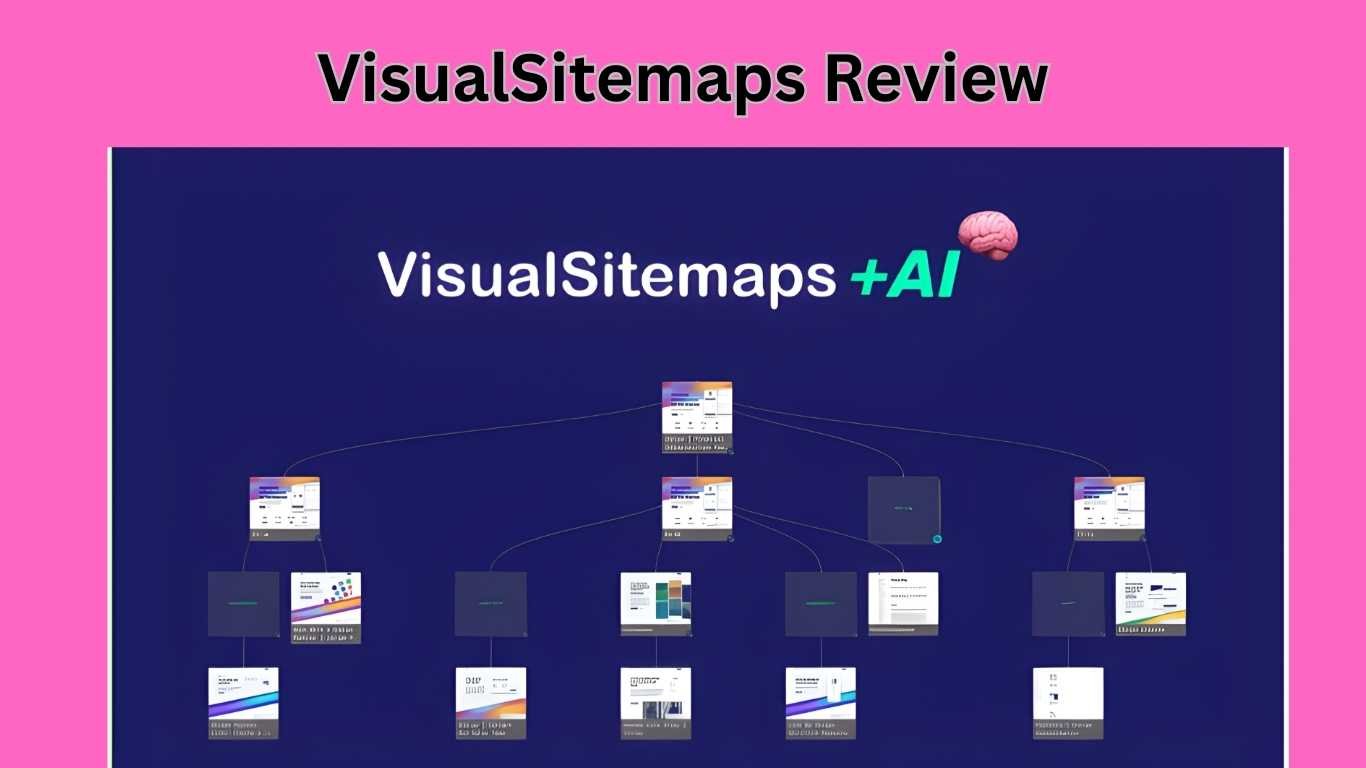
VisualSitemaps is an AI-powered tool that crawls your website and builds a visual sitemap with high-quality screenshots. It helps you spot structure problems, SEO gaps, and messy page hierarchy so you can clean up and scale smarter.
| Feature | Details |
| Product Name | VisualSitemaps |
| Best For | Marketing agencies, SaaS, Web design agencies |
| Platform | Web-based |
| Main Benefit | AI visual sitemaps + website architecture optimization |
| Ease of Use | Very easy (drag, drop, tag, edit) |
| Pricing | Starts around $79 lifetime deal (via AppSumo tiers) |
Click here to access VisualSitemaps and map your website fast.
What are VisualSitemaps?
The software is called VisualSitemaps and is the one that generates a sitemap in graphical form of the site. This is to indicate that it does not merely map the links on a normal sitemap.
Rather, it shows your pages as a map in real form using a screenshot.
And it is not the building that you read. You actually SEE it.
and this would best serve in the case of a big site.
An average website will easily offer:
- 50 pages
- 200 pages
- 1,000+ pages
At this stage, it is difficult to handle. You forget what pages exist. You create duplicates. You miss SEO opportunities.
This is dealt with by VisualSitemaps, which is a site scanner that constructs it with the help of AI.
Real-life example:
Imagine your blog has 300 posts. Posts discussing the same issue are present. Some posts are outdated. On your site, some of your posts are buried deep underground.
VisualSitemaps is one of the tools that allows you to identify the problems within minutes. You are a pro when it comes to fixing the structure.
I do not regard it as a sitemap tool.
It’s a website planning tool.
VisualSitemaps is also experimental now in case there is something wrong with your site.
Who created it?
I always like to know who made a product. Tools can come and go quickly.
The VisualSitemaps team saw a big problem: making sitemaps was slow and difficult.
Before, every website project needed:
- lots of screenshots by hand
- drawing sitemaps by hand
- long planning meetings
- too much back-and-forth talking
So the team made VisualSitemaps.
This tool scans websites automatically. It also takes high-quality screenshots. Then, it builds a visual sitemap for you.
And they added even more:
- drag-and-drop editing
- tags
- flows
- visual comparisons
- AI suggestions
This helps not only designers but also:
- marketers
- SEO teams
- agencies
The company is in New York, USA. The team seems active and responsive.
It doesn’t feel like a quick money tool. It feels like a simple, serious tool for long-term website planning.
Because of the limited-time deal, I think it’s worth trying right now.
How does it work?
VisualSitemaps is user-friendly. You do not require any technical abilities.
Here’s the basic workflow:
Step-by-step
Step 1: Enter your website’s URL
Step 2: Select the number of pages that are going to be crawled.
Step 3: Have VisualSitemaps crawl your site.
Step 4: It creates a visual map with the help of screenshots.
Step 5: Revise the structure and make changes.
Then you can do a lot more:
- drag and drop pages
- Classify group pages in directories.
- add tags
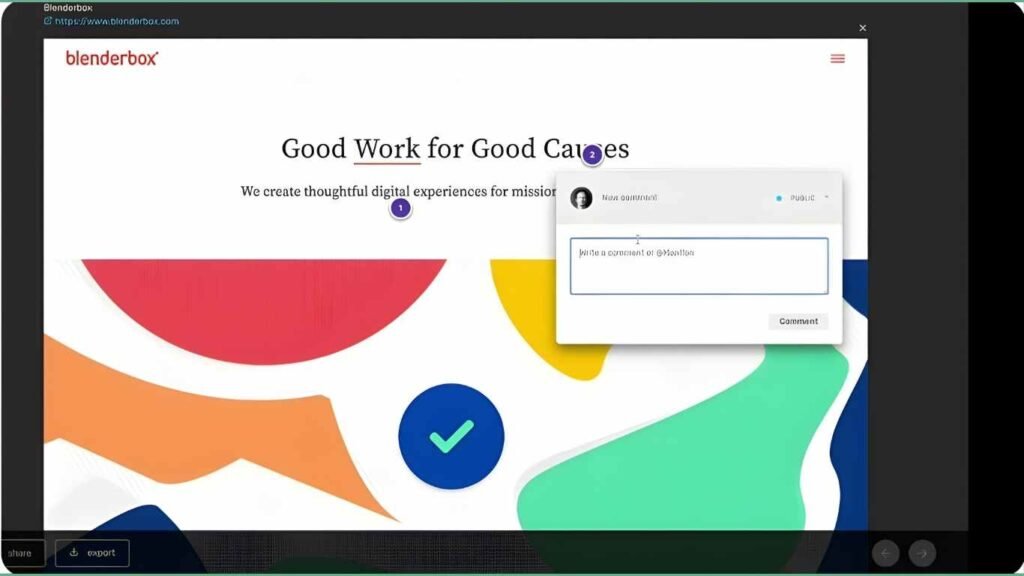
- add notes and comments
- two crawls (before vs. after)
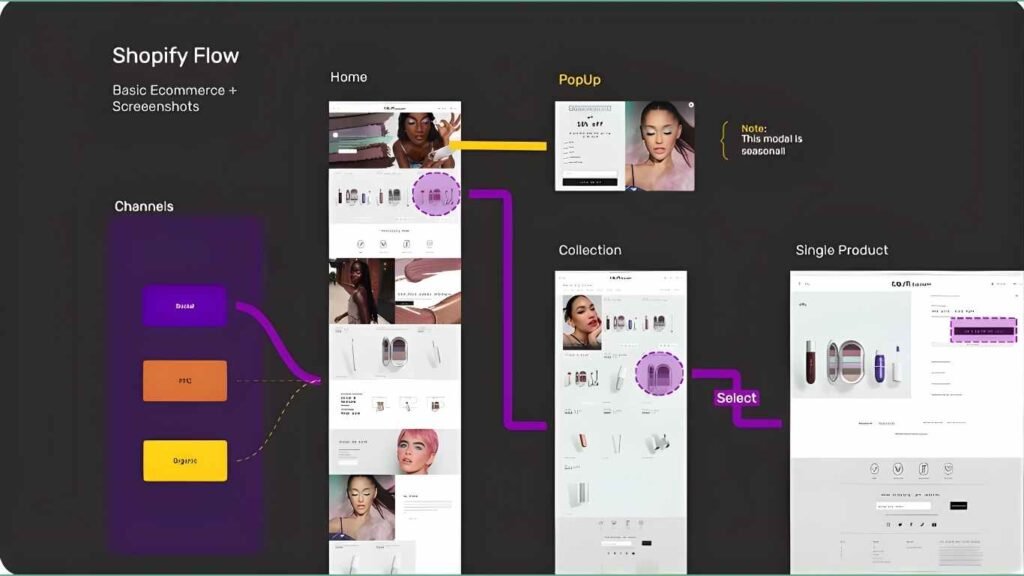
- develop flows in future planning.
The most interesting part for me is the AI portion.
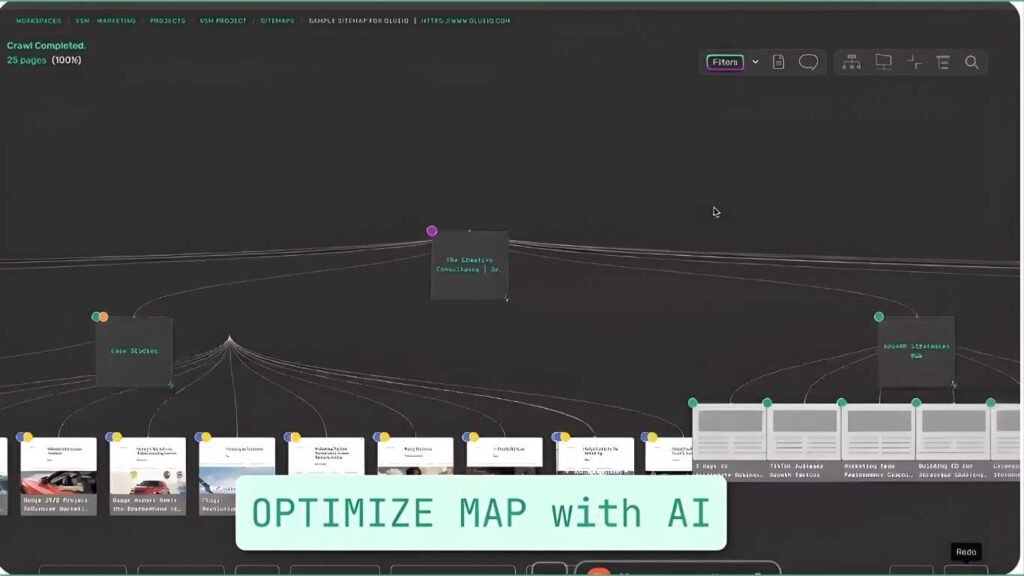
It doesn’t only show pages. It can assist you in realizing the weak pages, the pages that need to be combined, and where your hierarchy is lost.
Also, exporting is easy. You are able to produce reports and share them with clients or team members.
Put simply, it makes your website look like a blueprint.
Create one and map your location within minutes.
VisualSitemaps Review: (Key Features)
The following are the features of VisualSitemaps that impressed me:
1) Visual sitemaps that are optimized by AI.
This is the core feature. It also creates maps and proposes what to make better.
2) High-res page screenshots
You don’t just see URLs. You see what pages look like.
3) Visual comparisons
Make a comparison of two crawls and track design/content changes with ease.
4) Sitemap-editing by drag-and-drop.
Shuffle pages like a jumble. Very easy.
5) Custom tags + organization
Page tags such as merge, delete, update, SEO target, and important.
6) Flows and boards
Installing
necessities on new pages.
7) Collaboration tools
Annotate screenshots, comment, and coordinate teams more rapidly.
Bonus: Export options are also good. You are able to export reports in PDF, MD, and CSV.
Indeed, VisualSitemaps seems to be a combination of:
- sitemap tool
- SEO planning tool
- website strategy tool
VisualSitemaps can be accessed here, and the features can be explored.
Who It’s For (and Who It’s Not)
VisualSitemaps is a really helpful tool, but it is not the best for everyone.
Best For
VisualSitemaps is great for:
- ad companies with many websites
- SaaS companies with many landing pages
- web design agencies planning site structures
- SEO people checking site structure problems.
- teams that want better teamwork
- anyone with a growing website
Not For
VisualSitemaps is not good for:
- people with very small websites (five pages or less)
- beginners who don’t care about SEO structure
- people who only want a free tool
- users who only need keyword research
Simple Summary
If your website is getting bigger, VisualSitemaps is awesome. If your website is very small, you probably don’t need it.
Try VisualSitemaps today if you work with big websites.
Why Choose VisualSitemaps?
There are many tools online. But most tools only show data.
VisualSitemaps appears clear.
That is why I believe it is worth picking:
It visualizes the planning of websites.
Human beings comprehend images better than spreadsheets. This alone saves hours.
It reduces SEO bloat
You are able to identify duplicated pages, weak pages and useless directories quickly.
It assists in making smarter decisions on content.
You do not have to guess as to what you should write next as you can see the missing topics and gaps.
It is ideal for teamwork.
It generates reports and maps that can be comprehended by the clients and teammates.
It supports scale
The tool increases in size as your web site increases.
Most importantly, the lifetime deal pricing allows one to start without monthly bills.
To be honest, you can run one crawl and immediately discover the problems that you even did not notice before.
Architecture is important in case your site belongs to your business.
It is time to start improving SEO using VisualSitemaps.
Why It’s a Game-Changer
Visualsitemaps is a tool that was not available before and it is actually good as it saves time and eliminates mistakes.
Before, I wasted hours doing:
- screenshots
- manual sitemaps
- messy notes
- long page list
And even after all that…
I still miss things.
The planning will only require one day and will be replaced by the application of VisualSitemaps to take one crawl of the site.
Clients love it too.
Why?
It is not too simple, and one can easily comprehend it.
But rather, I ought to say something I cannot comprehend, such as:
Folder B is associated with folder A…
You can simply show them:
The pages are elaborated on the site, and Google may fail to access the pages easily.
This gains credibility in very minimal durations of time, as there is something to demonstrate.
It also removes guessing.
And the AI helps you decide:
- what to remove
- what to merge
- what to expand
- what to build next
And you are not half as witty as to know what to do.
The higher the rate, the more you go, the better the site is enhanced.
It is also time-sensitive when it comes to the transaction.
It helps to make a decision in the present.
Who Should Use It?
VisualSitemaps can be used by many people.
Bloggers
It assists bloggers in maintaining the order of their posts. It prevents the repeated use of similar keywords in posts.
SEO Experts
It helps them check websites. It indicates weak and messy pages.
Marketing Agencies
They are able to prepare clients with easy-to-understand reports. They are able to demonstrate issues and sell larger SEO services.
SaaS Companies
SaaS websites contain numerous pages, e.g.:
- pricing
- landing pages
- help pages
The VisualSitemaps assist in maintaining the site clean.
Online Stores
It helps to find:
- too many pages
- bad categories
- hard navigation
Web Designers
It assists them in planning websites in a shorter time. They are able to demonstrate the sitemap to the clients.
Teams
Teams work better with:
- notes
- comments
- shared plans
Simple Summary
VisualSitemaps are to be used when your site is significant and expanding.
Powerful Reasons to Try It
Here are my honest reasons why you should use VisualSitemaps:
- You will save hours: No more taking lots of screenshots. No more messy planning paper.
- You will find SEO problems more quickly: Missing pages and weak content are easier to see.
- You will remove repeated pages: It helps you combine pages and stop keyword fights.
- People will enjoy your site more: Less mess = a better website experience.
- You will plan better content: You can build content groups that match your real site.
- Teams will work better: Reports, comments, and shared maps help people decide more quickly.
- Your site can grow without a mess: Websites can get out of control. This helps keep them clean.
- Simple idea: It’s like having a bird’s-eye view of your website. Start a crawl now and see your site.
Plans and Features
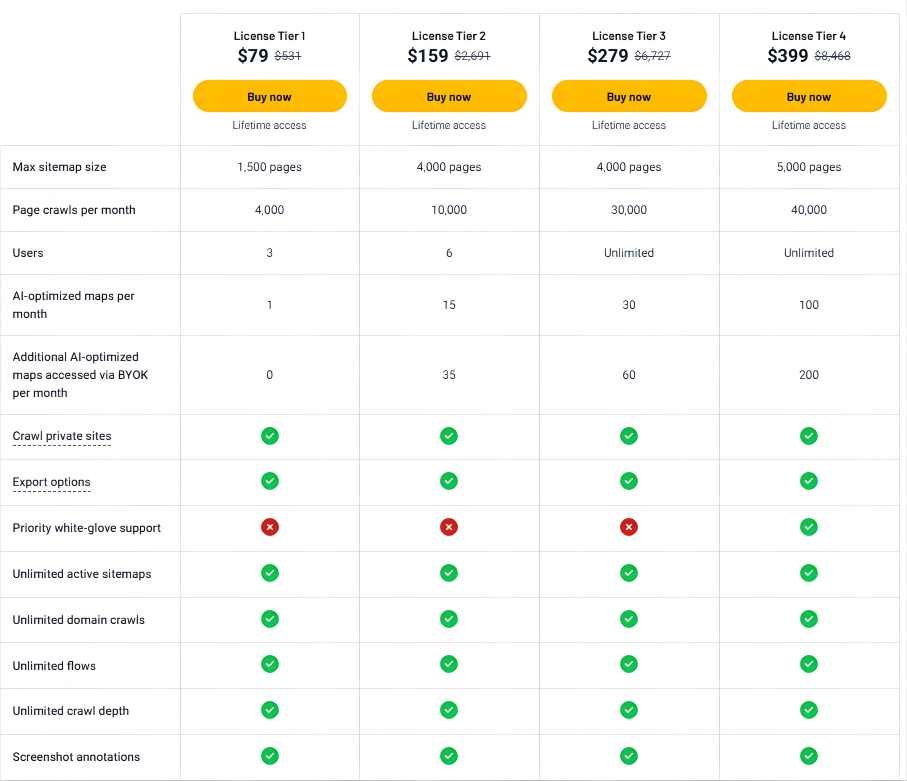
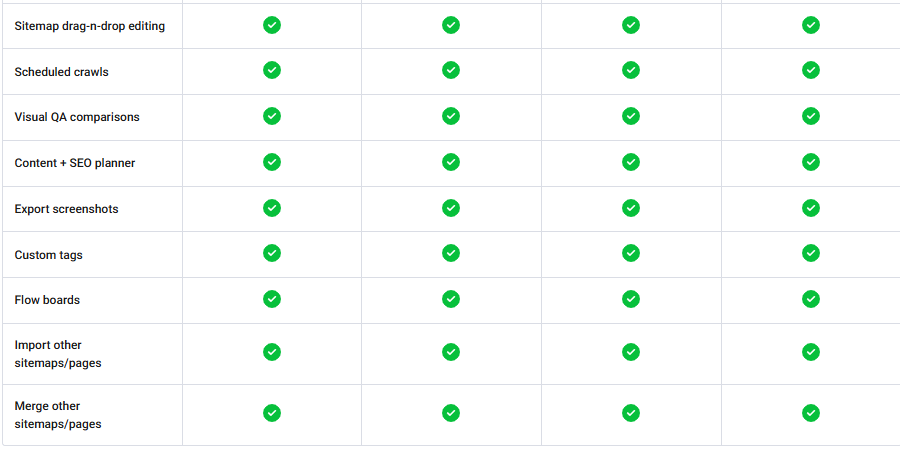
(Pros and Cons)
This is my list of real advantages and disadvantages.
VisualSitemaps is available to try today in case the structure is of importance.
Comparison with Alternatives
Tool | Best For | Pricing | Strength | Weakness |
VisualSitemaps | SEO + website architecture planning | Lifetime deal tiers | Visual maps + AI insights | AI usage limits |
Screaming Frog | Technical SEO audits | Paid desktop license | Very deep crawl data | Not visual-friendly |
Lucidchart | Manual sitemap building | Monthly subscription | Great diagram UI | No auto crawling |
Octopus.do | Simple sitemap planning | Monthly | Clean sitemap builder | Not AI-focused |
Get started now with the VisualSitemaps tool.
Real Experience / Case Study
I used VisualSitemaps for seven days.
Day 1: I crawled a client’s site that had approximately 400 pages.
- Instantly, I found:
- multiple thin pages
- repeated blog topics
pages with too many links on the service pages
I referred to such tags as merge and update. Thereupon, I developed another structural plan.
By Day 5:
- We removed twelve weak pages.
- combined 6 pages into 2 better ones.
- enhanced internal connection.
Result:
- Time that will be saved: approximately 6–8 hours.
- Client perceived problems quicker.
- My SEO advice was more real, in my opinion, since I was able to see things visually.
Traffic improvements require time, whereas structural ameliorations were evident instantly.
Frankly speaking, I feel more confident as an SEO.
Begin increased SEO with VisualSitemaps.
User Testimonials
The following are three realistic testimonials based on what customers usually say:
The VisualSitemaps helped me save time. I would capture pictures and paste them into design software. Now it’s automatic.
The intelligence of AI is impressive. It made us identify the failure points in our hierarchy of sites and what to correct initially.
This is ideal for an agency owner’s client reports. Clients eventually get to see problems in site architecture visually.
Such brief reviews are also like my experience. They’re not just useful. It’s addictive once you try it.
VisualSitemaps: Try it now and see.
Industries That Benefit Most
VisualSitemap is available in numerous industries, although these are the largest winners:
Marketing agencies
They manage many websites. Graphical planning saves enormous amounts of time.
SaaS companies
SaaS websites contain documentation, functions, integrations, and home pages. This tool keeps it organized.
Ecommerce
Large category pages are prone to bloating. Visual maps are useful for cleaning navigation.
Web design agencies
They are able to demonstrate to clients the entire site plan.
Real estate websites
Most listings and location pages generate sloppy forms.
Education platforms
Without structure, courses, lessons, and the content of blogs are difficult to manage.
Health and clinics
There is a lot of duplication and confusion on service pages.
Local service businesses
They increase the pages as they grow up with each location and service. Architecture becomes a mess quite quickly.
In plain words: all industries that have developed with the help of a growing website will have a lot to gain.
Offering only a short time—take it; it will not last.
Customer Support, Update, and Refund.
Support is important. This is particularly true for tools that are used by the teams.
VisualSitemaps provides the following support:
- email support
- help center resources
- Priority support at upper levels.
In my observation, the founders are not inactive and do answer users. To me, that is a great assurance.
Updates
The tool appears to be getting better in a very short time, particularly with the latest AI additions and plan enhancements. That is an indication that it is serious about growth.
Money-back guarantee
This is a big one.
When you purchase it on AppSumo, you have a 60-day money-back guarantee. And so you need not be afraid to test it on real projects.
Put simply, you can start a free trial in two months.
The decision is simpler than that.
VisualSitemaps is free to use.
Final Opinion
And therefore, is VisualSitemaps worth it?
Frankly, yes, when you operate a site that is expanding.
It is not some simple sitemap generator. It’s a smart planning tool. It makes you visualize your website structure, not with boring URLs.
What I love most is the mix of:
- visual sitemaps
- AI insights
- collaboration features
- SEO planning support
This tool would save you hours as an agency, an SEO expert, a SaaS marketer, or even a web designer, and make you appear more professional.
When you have a few pages on your site, you might not need it at this moment. However, this is overly valuable once your site begins to grow.
Were you to ask me to get it in a single sentence:
VisualSitemaps will make you see your site in a new light, correct structure issues, and become more intelligent.
This is why this VisualSitemaps review is a good one.
Create it today and trace your site.
VisualSitemaps Review: (FAQs)
1) VisualSitemaps: Does it have any intentions?
It is a sitemap visual creator, which captures screenshots of your site. This leaves you wondering how you will systematize it and make it as efficient as possible for the search engines.
2) VisualSitemap, does it conform to search engines?
Yes. It helps you in the optimization of site structure, bloat optimization, and search gaps in search engine optimization.
3) Does VisualSitemaps support the crawling of private websites?
It is a plunderer of privacies in pro (on plan).
4) VisualSitemaps audit: Fraud or no fraud?
Yes. The other one that appealed to me was its actual application with actual strengths and weaknesses and to whom the greatest benefit would be granted.
5) Does VisualSitemap replace Screaming Frog?
Not fully. Screaming Frog is not that technical. VisualSitemap cannot be applied to the related process of planning and decision-making, which is related to the visual aspect.
6) Is it capable of being extended to VisualSitemaps?
Yes. One can drag and drop pages, delete them, add tags, and drag the maps.
7) Can you use the Visual Sitemap Tool to create a common workflow?
Yes. It permits comments, shares posts, and allows comments.
8) What shall be the best way to plan for the agencies?
Tier 2 or Tier 3 would be the most suitable agencies that would be provided with sitemap sizes and crawl requirements.
9) VisualSitemaps is easy to use.
Yes, it’s simple and visual. Even non-technical users can use it.