
Affiliate Disclosure: This post contains affiliate links. If you buy NextCRM through a link on this page, I may earn a commission at no extra cost to you. The facts below come from the NextCRM deal page on AppSumo and from ThemeDev, the company that makes it.
This NextCRM review looks at a WordPress plugin you can buy once on AppSumo. NextCRM puts email marketing, a CRM, automation, forms and popups inside your WordPress dashboard. It also tracks who visits your site and what they do.
The deal starts at $59, paid one time. Most email tools charge you every month, and the bill grows with your list. NextCRM lets you send unlimited emails through your own SMTP. That sounds great. But there are a few catches. It only runs on WordPress. And you must set up your own sending service. This NextCRM review covers every plan, every limit, how it works, what it can and cannot do, and who should skip it.
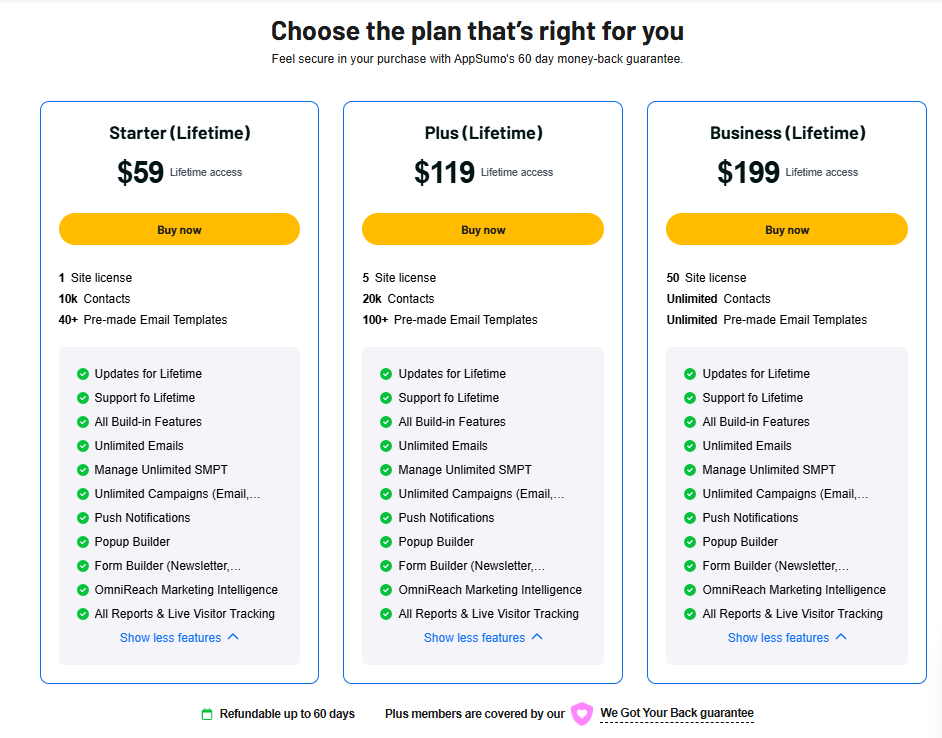
Quick Answer: NextCRM is a WordPress CRM and email marketing plugin made by ThemeDev, a company in Dhaka, Bangladesh. The AppSumo lifetime deal has 3 plans: Starter at $59 (1 site, 10,000 contacts), Plus at $119 (5 sites, 20,000 contacts) and Business at $199 (50 sites, unlimited contacts). Every plan gets unlimited emails, unlimited campaigns, automations, forms, popups, push notifications and OmniReach visitor tracking.
You send emails through your own mailbox or SMTP, so you may pay a small fee to a sending service. The deal is refundable for 60 days, and you must activate your license within 60 days. It is a strong fit for WordPress and WooCommerce owners who are tired of monthly email bills. It is a poor fit if your site is not on WordPress.
NextCRM Review: Deal at a Glance
| Item | Details |
|---|---|
| Product name | NextCRM (older listings call it Next Campaign) |
| Product type | WordPress CRM, email marketing and automation plugin |
| Maker | ThemeDev, Dhaka, Bangladesh |
| Founder | Md Golam Mostafa, Founder and CEO |
| Company founded | January 1, 2020 |
| Team size | 11 to 50 people, bootstrapped |
| Lifetime deal price | $59 (Starter), $119 (Plus), $199 (Business) |
| Listed regular price | $221 for Starter (73% off) |
| Site licenses | 1, 5 or 50 sites |
| Contacts | 10,000, 20,000 or unlimited |
| Emails | Unlimited on every plan, sent through your own SMTP |
| Works with | WordPress, WooCommerce, ChatGPT and Claude (through MCP) |
| Listed as an alternative to | ActiveCampaign, FluentCRM and Omnisend |
| Codes and stacking | No codes. No stacking. |
| Activation deadline | Within 60 days of purchase |
| Refund | Within 60 days |
What Is NextCRM?
NextCRM is a plugin. You install it on your WordPress site like any other plugin. After that, you manage your email list, your customers and your campaigns from the WordPress admin area.
Email marketing is the heart of the tool. Around it, NextCRM adds a CRM for contact records, an automation builder, segments, reports, forms and popups. A newer part called OmniReach tracks site visitors and lets you reach them by email, SMS, push notification or popup.
Because it lives inside WordPress, your contact data sits in your own site. You do not rent a list from an outside email company. That is the main reason people look at a WordPress CRM plugin like this one in the first place.
The product has been around for a while. Review sites such as Capterra still list it under its old name, Next Campaign. The AppSumo launch is a newer, bigger version with OmniReach, MCP access and a redesigned admin area.
Who Makes NextCRM?

NextCRM is built by ThemeDev. The company is based in Dhaka, Bangladesh. It was founded on January 1, 2020. It has 11 to 50 people and no outside investors.
The founder and CEO is Md Golam Mostafa. He is a WordPress plugin developer. ThemeDev also makes other WordPress plugins, such as Next3 Offload for moving media files to cloud storage. You can see the company site at themedev.net.
On the AppSumo page, the founder says the goal is simple. He wants you to stop juggling many marketing tools. The deal page says questions there usually get an answer within 24 hours.
How NextCRM Works (5 Steps)
Getting started takes five simple steps:
- Install: Install and activate the plugin on your WordPress site. A NextCRM menu appears with contacts, campaigns, automations and reports.
- Connect sending: Add your mailbox or SMTP and set up your sending domain. NextCRM checks the mailbox and lets you send test emails.
- Collect contacts: Add forms and popups, or bring in your existing list. Each person is saved as a contact with tags, lists and custom fields.
- Send and automate: Build a campaign or a workflow. NextCRM sends emails or SMS and runs welcome, follow-up and abandoned cart flows.
- Track: Open the reports to see opens, clicks, live visitors and conversion funnels.
NextCRM Key Features
1. 360-degree contact profiles
Each contact gets one profile page. It shows their details, tags, notes, email activity and past actions. You can add unlimited custom fields and unlimited lists. So you can store things like a birthday, a plan type or a city.
2. Smart segmentation
You can group contacts by behavior, engagement and tags. If you run a WooCommerce store, you can also group people by what they bought. For example, you can email only people who bought a certain product last month.
3. Visual automation builder
You build workflows on a visual screen. A workflow starts with a trigger, such as a new signup. Then you add time delays and if/then rules. NextCRM can run multi-step sequences like welcome emails, follow-ups and abandoned cart reminders. It can also tag contacts on its own and A/B test a workflow.
4. Drag-and-drop email builder
You design emails by dragging blocks into place. There are ready-made templates to start from. Starter gets 40+ templates, Plus gets 100+ and Business gets unlimited templates.
5. Conditional content in emails
This is a newer feature. Inside the Gutenberg editor, you add a Conditional Content block. Then one email can show different parts to different people. The rule can check lists, tags, status or past actions like opens, clicks, purchases, bounces and unsubscribes. You can match ALL rules or ANY rule. You can also hide or show parts by device.
6. Your own mailbox and SMTP
NextCRM does not charge you per email. You send through your own mailbox or SMTP service. Every plan includes unlimited SMTP management. The plugin can send test emails, validate your mailbox and help you set up a sending domain.
7. Email and SMS campaigns
You can run unlimited campaigns. The deal page lists both email and SMS campaigns. It also includes push notifications on every plan.
8. Forms and popups
The form builder makes newsletter and subscriber forms. It has field search and a preview for desktop, tablet and mobile. The popup builder lets you change the design, add a background image and choose which devices see the popup. New signups go straight into your lists and automations.
9. OmniReach visitor tracking
OmniReach watches what visitors do on your site. It shows live visitors, behavior and conversion funnels. You can then reach those people by email, SMS, push notification or popup. This is a feature many email-only plugins do not have.
10. Reports and analytics
Reports show opens, clicks and engagement trends. You can view them by contact, by campaign or by automation. Every plan gets all reports, including live visitor tracking.
11. AI assistant access through MCP
NextCRM has an MCP connection. MCP lets AI assistants like ChatGPT and Claude talk to other tools. With it, you can manage contacts, campaigns and reports by asking an AI assistant instead of clicking through menus.
12. Fresh admin design
Recent updates, posted on November 8 and November 16, 2026, added a redesigned admin menu and a command search. They also added more design controls for forms and popups. This shows the team is still shipping changes during the launch.
NextCRM Lifetime Deal Pricing (All 3 Plans)
There are 3 plans. You pay once. There are no codes to stack.
| Plan | Lifetime price | Site licenses | Contacts | Email templates |
|---|---|---|---|---|
| Starter | $59 (listed at $221) | 1 | 10,000 | 40+ |
| Plus | $119 | 5 | 20,000 | 100+ |
| Business | $199 | 50 | Unlimited | Unlimited |
Every plan includes: lifetime access, lifetime updates, lifetime support, all built-in features, unlimited emails, unlimited SMTP management, unlimited email and SMS campaigns, push notifications, the popup builder, the form builder, OmniReach and all reports with live visitor tracking.
Note: The deal page does not list user seats, pipelines or renewal prices. It also does not show a regular price for Plus and Business. If you need many team logins or a sales pipeline view, ask the founder on the deal page before you buy.
Which NextCRM Plan Should You Pick?
Pick Starter ($59) if
- You have one WordPress site
- Your list is under 10,000 contacts
- You want to test NextCRM at the lowest price
Pick Plus ($119) if
- You run 2 to 5 WordPress sites
- Your list is close to 10,000 or growing fast
- You want more templates (100+)
Pick Business ($199) if
- You are an agency or build sites for clients
- You need up to 50 site licenses
- You want unlimited contacts and templates
You can upgrade or downgrade between the 3 plans. So many buyers start small and move up later.
NextCRM Deal Terms and Refund Policy
- Lifetime access to NextCRM
- You must activate your license within 60 days of purchase
- All future plan updates are included
- No codes and no stacking
- You can move between the 3 license tiers
- Refundable within 60 days
- AppSumo Plus members are also covered by the “We Got Your Back” guarantee
You can read AppSumo’s full rules on its refund policy page.
NextCRM Bonus and Extras
NextCRM does not come with a separate bonus bundle. The extras are built into the deal itself:
- OmniReach visitor tracking on every plan
- Push notifications and SMS campaigns at no extra fee from NextCRM
- Lifetime updates, including the new features added during the launch
- Lifetime support from the ThemeDev team
- A live demo you can explore from the deal page before you buy
- 60 days to test it and ask for a refund
What NextCRM Can and Cannot Do
Here is a simple look at what NextCRM does well and where it stops.
What NextCRM can do
- Store and segment contacts inside WordPress
- Send unlimited emails through your own SMTP
- Run welcome, follow-up and abandoned cart automations
- Segment WooCommerce buyers by what they bought
- Build forms and popups that feed your lists
- Show different email content to different people
- Track live visitors and conversion funnels
- Let ChatGPT or Claude manage it through MCP
What NextCRM cannot do
- Run on a site that is not WordPress
- Send email without your own mailbox or SMTP service
- Give you a team seat count (the deal page does not list one)
- Show a sales pipeline view (the deal page does not list one)
- Promise how fast your emails send or how many reach the inbox
- Fix a bad sender reputation for you
- Accept codes or stacked deals
NextCRM Review: Pros and Cons
Pros
- One payment from $59 with unlimited emails
- Email, CRM, automation, forms and popups in one plugin
- Your contact data stays on your own WordPress site
- Deep WooCommerce segmentation and abandoned cart flows
- OmniReach adds visitor tracking, SMS and push
- Conditional email content is rare at this price
- MCP access for ChatGPT and Claude
- Business plan covers 50 sites, great for agencies
- Team keeps shipping updates during the launch
- 60-day refund window
Cons
- WordPress only
- You must set up and maybe pay for your own SMTP
- Newer, smaller company than the big email tools
- Starter caps you at 10,000 contacts
- User seats, pipelines and renewal prices are not listed
- Sending big campaigns from WordPress can load your server
- Some key FAQ answers (GDPR, self-hosting) are hidden on the page
NextCRM vs ActiveCampaign, FluentCRM and Omnisend
AppSumo lists NextCRM as an alternative to these three tools. Here is how they differ in setup and billing.
| Point | NextCRM (AppSumo) | ActiveCampaign | FluentCRM | Omnisend |
|---|---|---|---|---|
| Where it runs | Inside WordPress | Cloud (SaaS) | Inside WordPress | Cloud (SaaS) |
| How you pay | One-time deal | Monthly or yearly plan | Yearly license (free core plugin) | Monthly plan (free tier) |
| Who sends your email | Your own SMTP | ActiveCampaign servers | Your own SMTP | Omnisend servers |
| Where your data lives | Your WordPress site | Their cloud | Your WordPress site | Their cloud |
| WooCommerce focus | Yes | Through an integration | Yes | Yes |
| Visitor tracking | Yes (OmniReach) | Yes | Not a main feature | Yes |
| Track record | Small team, new AppSumo launch | Large, long-running company | Large WordPress user base | Large e-commerce user base |
In short, NextCRM is closest to FluentCRM because both live in WordPress and use your own SMTP. The big draw of NextCRM is the one-time price plus OmniReach. The big risk is that it comes from a smaller, newer team.
Who Should Buy NextCRM?
- WordPress site owners who pay too much for a monthly email tool
- WooCommerce store owners who want abandoned cart and buyer segments
- Bloggers and course sellers who want forms, popups and email in one place
- Agencies that build WordPress sites and want one license for up to 50 clients
- People who want their contact data on their own server
- Users who want to run email tasks from ChatGPT or Claude
Who Should Skip NextCRM?
- Anyone whose site runs on Shopify, Wix, Squarespace or another non-WordPress platform
- People who do not want to deal with SMTP or domain setup
- Teams that need a full sales CRM with deal pipelines and many user seats
- Senders with very large lists on cheap shared hosting
Tips Before You Buy the NextCRM Lifetime Deal
- Open the live demo on the deal page and click through the automation builder.
- Pick your SMTP service first. Check its monthly cost for your list size.
- Set up SPF, DKIM and DMARC on your sending domain so your emails land in the inbox.
- Ask the founder about GDPR, data import and team seats on the deal page.
- Count your contacts. If you are near 10,000, start with Plus.
- Activate your license within 60 days, or you may lose it.
- Send a real campaign during the 60-day refund window to test speed and delivery.
Want more one-time software deals? See our list of the best AppSumo deals, our guide on how AppSumo lifetime deals work and our lifetime subscription deals guide. You can also read our LeadOcean review for finding leads, our AdaptlyPost review for social posting, and our AppSumo Black Friday guide.
Final Verdict: Is the NextCRM Lifetime Deal Worth It?
This NextCRM review shows that NextCRM packs a lot into one WordPress plugin. You get email, a CRM, automations, forms, popups, SMS, push and visitor tracking for a single payment. The $59 Starter plan is cheaper than a few months of most email tools.
The weak spots are clear. It is WordPress only. And you need your own SMTP. So this is a smart buy if you already run WordPress and are fine with a little setup. Start with the plan that fits your list size, test it hard during the 60 days, and keep the refund option in mind.
Our take: NextCRM is worth a look for WordPress and WooCommerce owners who want to stop paying monthly for email. Skip it if your site is not on WordPress or you want zero technical setup.
Source: NextCRM deal page on AppSumo.
NextCRM Review: FAQs
What is NextCRM?
NextCRM is a WordPress plugin for email marketing, CRM and automation. It also has forms, popups, SMS, push notifications and visitor tracking.
How much is the NextCRM lifetime deal?
On AppSumo, Starter costs $59, Plus costs $119 and Business costs $199. Each is a one-time payment.
How many contacts do I get?
Starter allows 10,000 contacts. Plus allows 20,000. Business has unlimited contacts.
Are emails really unlimited?
Yes, NextCRM does not limit how many emails you send. But you send through your own mailbox or SMTP, and that service may have its own limits or fees.
Do I need an external SMTP or email service?
Yes. NextCRM sends through your own mailbox or SMTP. The deal page lists this question in its FAQ, so check the full answer there.
Does NextCRM work with WooCommerce?
Yes. You can segment WooCommerce customers by what they bought and send abandoned cart emails.
Does NextCRM work without WordPress?
No. It runs inside WordPress only.
Can I track opens and clicks?
Yes. Reports show opens, clicks and engagement trends for contacts, campaigns and automations.
Is NextCRM GDPR-friendly and self-hosted?
The plugin runs on your own WordPress site, so your contacts are stored there. The deal page has an FAQ on GDPR and self-hosting, but the answer is not shown in open text. Ask the founder to confirm it fits your country’s rules.
Can I move my contacts from another tool?
The deal page lists a question about moving existing contacts and email data, but the answer is hidden. Check the live demo or ask the founder before you buy.
Can I stack NextCRM codes?
No. The deal has no codes and no stacking. You can move between the 3 plans instead.
Is there a refund policy?
Yes. The deal is refundable within 60 days. You must also activate your license within 60 days of purchase.
Who makes NextCRM?
ThemeDev, a WordPress plugin company in Dhaka, Bangladesh. The founder and CEO is Md Golam Mostafa.
Is NextCRM worth it?
For WordPress owners who want to stop paying monthly for email, yes, it is worth testing. Use the 60-day window to check sending speed and delivery on a real list.