

Introduction
If you’ve been searching for honest tidycal reviews, you’re in the right place. I took some time to dig into this tool: read real user reviews, test the setup process, and compare it with other tools such as Calendly. It can be a chore to use scheduling software. Going back and forth by email to book a 30-minute phone call is irritating. TidyCal comes to the rescue. I’ll be discussing in this review what it is, who it’s for, how users feel about it, and whether or not the TidyCal lifetime deal is worth it to you.
Quick Verdict Box
| Criteria | Details |
|---|---|
| Our Rating | ⭐⭐⭐⭐ (4.3/5) |
| Best For | Solopreneurs, coaches, small businesses |
| Lifetime Deal | Yes — via AppSumo |
| Price | $29 one-time (Individual) / $79 (Agency) |
| Verdict | Recommended — especially at this price |
| Try It | Get TidyCal on AppSumo |
Pros & Cons Summary
Pros:
- No monthly fees; it is a one-time purchase.
- All Plans have unlimited bookings.
- Accepts payments with Stripe and PayPal
- A simple and clean interface, which is easy to set up.
- Continues to release new features (175+ changes in early 2025 already)
Cons:
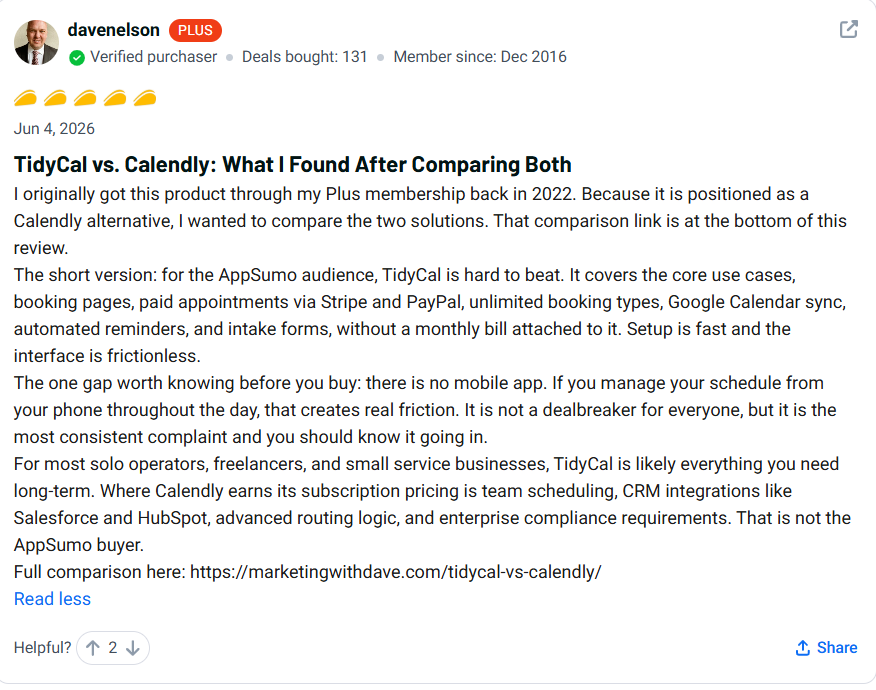
- There’s no mobile app available at the moment.
- When users book on a TidyCal page, it displays the TidyCal branding (which is less prominent on paid plans).
- Lacks a number of deep CRM integrations, including Salesforce and HubSpot.
What is TidyCal?
TidyCal is a booking & scheduling application. Availability is set by you. Clients select a time. All synchronizes to your calendar.
Simple, right?
But that’s not all it does. Payments, packages, and reviews from clients can be accepted, and you can create a branded booking page. It’s like you don’t have to send an email back and forth with a client for a time; you simply send them a link. They pick a slot. Done.
The AppSumo team built it as an alternative to such tools as Calendly that is simpler and more affordable.
Why I Tried TidyCal
I’ve seen many scheduling software. The majority of them have a base rate of $12-$16 per month. That adds up fast. Upon seeing the TidyCal lifetime deal, I thought I would find out what was so great about it. Can I pay a $29 single payment for the entire year instead of $144 a year? After reading all the 900+ AppSumo reviews, checking the feature list, and comparing it to Calendly side by side, I think it’s obvious that this is the better option. The following is what I discovered.
Quick Overview
TidyCal is a scheduling application designed for one-person and small group businesses. Manages bookings, payments, and client management within a single place. This free plan allows for linking up one calendar. The paid plans begin at $29 (one-time) and feature Stripe, PayPal, Zoom, and much more. Money-back guarantee for a period of 60 days.
| Detail | Info |
|---|---|
| Product Name | TidyCal |
| Best For | Coaches, freelancers, small businesses |
| Platform | Web-based |
| Main Benefit | Book clients and get paid without juggling tools |
| Ease of Use | Very easy — setup takes minutes |
| Pricing | Free / $29 lifetime / $79 lifetime (Agency) |
| Money-Back Guarantee | 60 days |
Key Features
Unlimited Booking Types
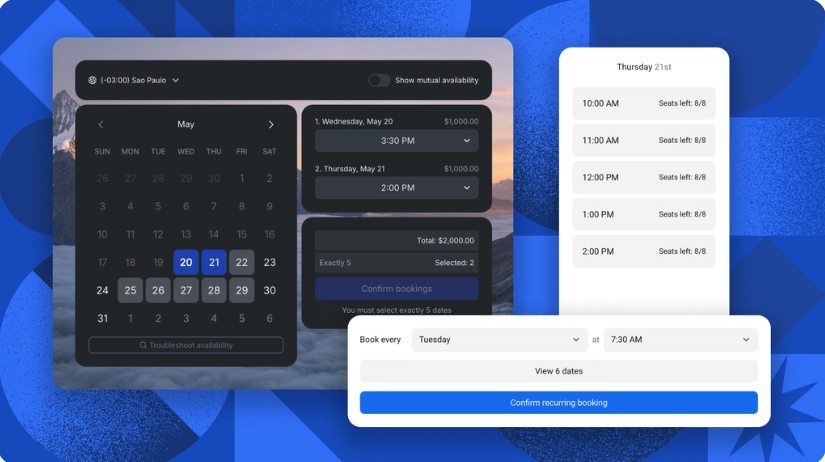
- Create one-on-one meetings
- Group bookings
- Recurring appointments
- Workshops and coaching sessions
- Flexible availability and booking restrictions.
Payment Collection & Monetization
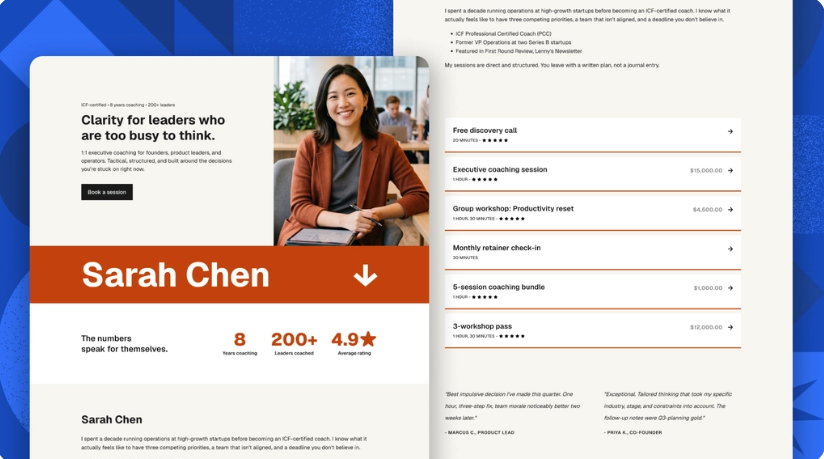
- Use Stripe and PayPal for payments
- Manage the sales of packages and subscriptions
- Design promotion and discount coupons.
- Have to pay at the moment of booking!
Custom Booking Pages
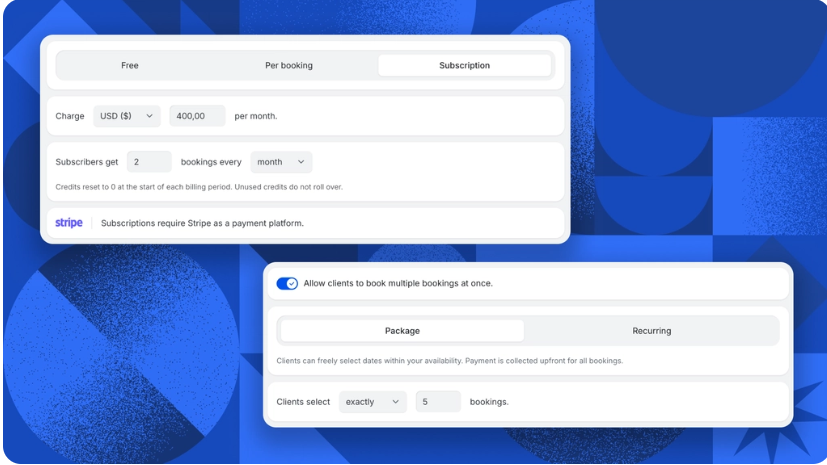
- You can have several different booking page designs. Several different booking pages.
- Custom confirmation emails
- Automated reminder emails
- Advanced scheduling controls
- Rationing of bookings and buffer times
Automated Client Reviews
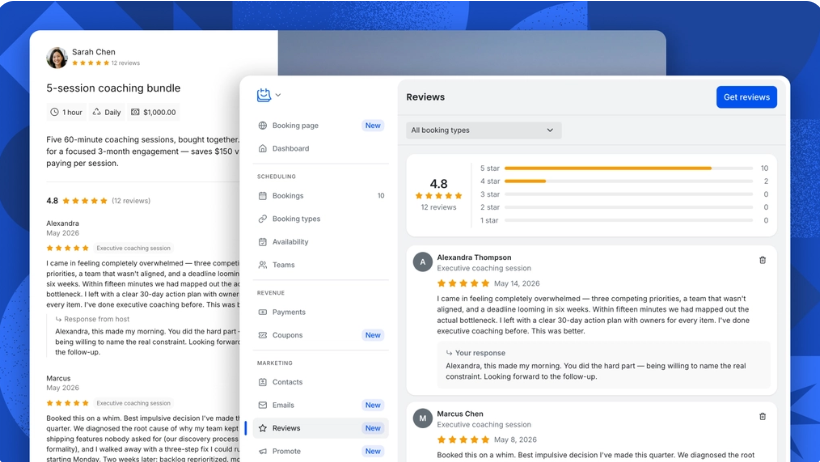
- Collect reviews automatically
- Present testimonials on booking pages
- Gain customer confidence with authentic reviews.
- Build trust for your services. Elevate social proof for your services.
How It Works
- Include tidycal.com in your sign-up (free to begin)
- Sync Google or Outlook calendar:
- Add a booking type (for instance, ” 30-minute Consult”)
- Be sure to set your available hours and buffer time.
- If you would like to charge for sessions, please include payments.
- Share your booking link or embed on your website
- Clients select a time (it will block your calendar for you)
- A confirmation email is sent to you. So does the client.
That’s it. No back-and-forth. No missed messages.
Real Use Cases
There are three different booking types a life coach can create – a free discovery call, a paid 60-minute session, and a monthly coaching package. Clients pay upfront. No chasing invoices.
A Freelance designer can send out a link for calls on the project. Having some respite between appointments prevents stressful back-to-back appointments.
The Agency plan enables agencies to team up with other agencies, to schedule round robin and to meet collectively. One agency on AppSumo stated that it had three different tools that they were paying for each month, and they were able to get rid of all three tools and find one that works.
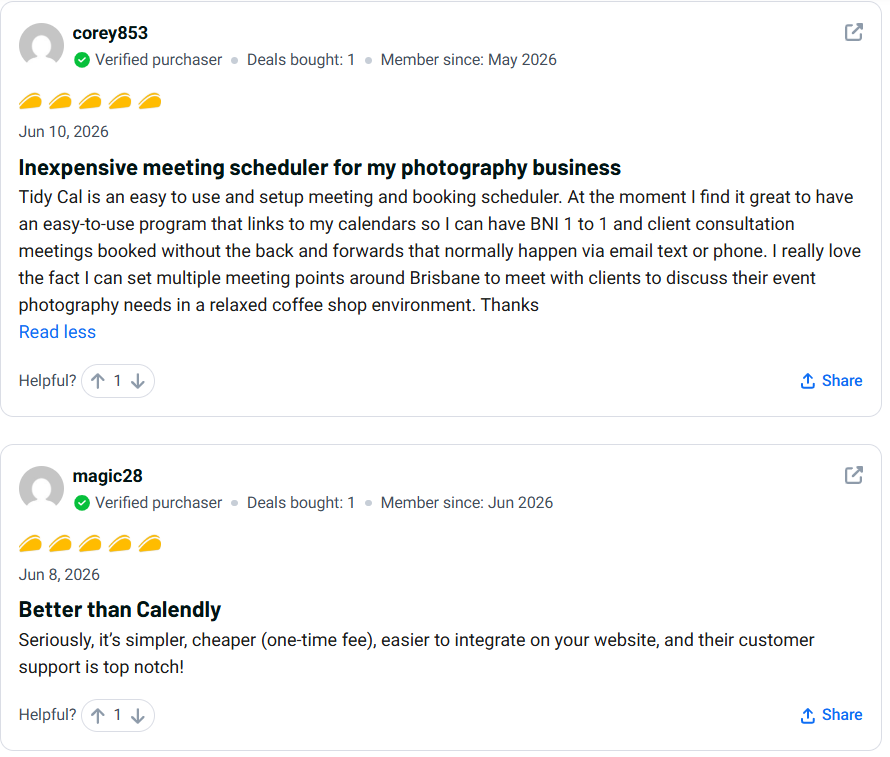
A Brisbane photo editor (real review on AppSumo) uses TidyCal to book client appointments with him at various coffee spots throughout the city. No more phone tag.
Marketers who are running paid campaigns can direct leads directly to a booking page via digital marketers. Hot leads book in the second they call! No friction.

Benefits — Why Choose TidyCal?
One-time payment, not a time commitment. The typical cost of scheduling software is $10-$20 per month. The $29 one-time purchase of TidyCal is actually more than worth the investment, as it can pay for itself in just 2 months.
Setup is fast. There is no requirement for a developer. The average person can have it live in less than 30 minutes.
It grows with you. In the first six months of 2025, the team has sent out approximately 175 updates. New additions are continually being added at no cost.
It also makes itself into a paladin of funds. Most simple scheduling programs deal with nothing more complicated than scheduling. TidyCal does — that is to say, it is tidier and reduces the number of tools you need to use.
A clean experience for clients. The booking page is professional-looking. The automatic e-mailing is on-brand. First impressions matter.
What I Didn’t Like
No mobile app. This is the most frequently stated problem about TidyCal. This is a real lack if you’re on your phone for your entire day schedule. Must use a mobile browser and, while functional, not optimal.
Showing TidyCal branding on booking pages. The lower and free plans are branded with TidyCal. A recent update increased the size of the branding banner, and one agency reviewer was “frustrated” on AppSumo. The TidyCal team responded and reverted the change — but it’s good to know of its existence.
No CRM integration, if that’s what you’re after. TidyCal cannot be integrated natively with Salesforce, HubSpot, or other similar platforms. Zapier would be required to connect the dots in between.
Some experience of working with availability settings. Some users reported experience of confusion over time block settings, buffer times and/or “how far out users can book” rules. Not difficult — but not obvious within the first glance at first.
Pricing & Lifetime Deal
The TidyCal free plan is quite adequate. With one calendar connection, you’re able to book as many bookings as you want. No payment processing, however.
The tidycal lifetime deal on AppSumo comes in two tiers:
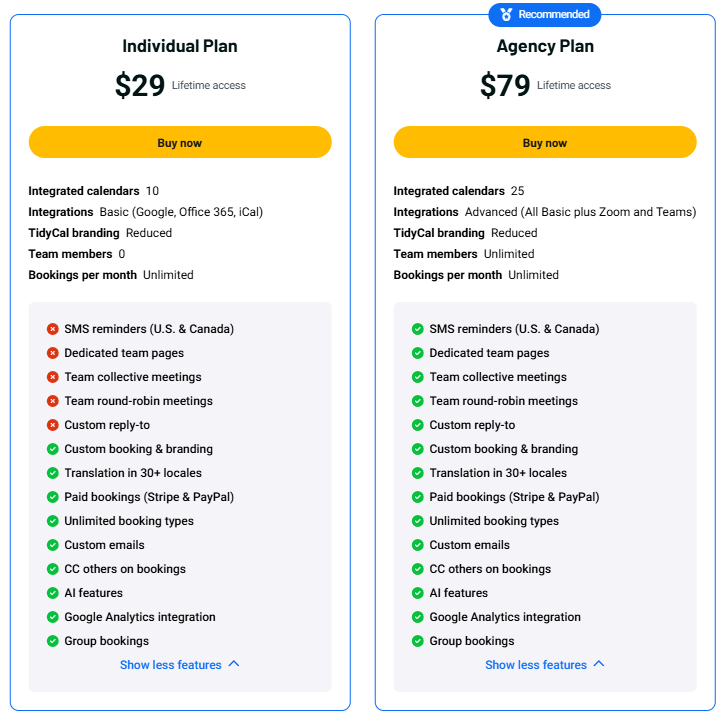
Each calendar account will be $29 (one-time) for the Individual Plan, which includes 10 Calendar connections, integration with Zoom, Stripe and PayPal payments, and unlimited bookings. This is the one that most users who use it alone require.
Agency Plan — $79 (one-time): All Individual Plan features and 25 calendar connections, unlimited team members, round robin and collective meetings, team booking pages.
To put in perspective, Calendly’s paid alternative costs between $96-$192 per year. The TidyCal lifetime deal is more cost-effective than that, and is paid off within 4 months.
Both plans are guaranteed to be refunded if you are not happy with them within 60 days. No risk.
Real User Reviews and Ratings
Alternatives (Detailed)
Alternative 1: Calendly
The most popular scheduling app is Calendly. It looks great, it’s well-integrated with CRM (Salesforce, HubSpot), and it’s great for enterprise teams. However, it begins at $96/year for paid features. It’s excessive for the most part for a single user and small businesses — and the cost can quickly accumulate. Spend more money and get advanced routing logic and enterprise compliance if your team requires such features.
Alternative 2: Cal.com
Cal.com is an open-source and free solution to self-host. It is extremely developer-friendly. However, it requires a bit more technical effort in order to set it up. Cal.com is worth checking out if you’re a developer in need of full control over your data. If you’re looking for something that works within 20 minutes, it’s easier to use TidyCal.
Alternative 3: Doodle
Use Doodle to poll a group to work out a time to meet. It’s not a complete booking software, however. Payments cannot be accepted, and a branded booking page cannot be created. Addresses a specific issue. TidyCal is a solution to a far bigger problem.
Comparison Table
Tool | Best For | Pricing | Strength | Weakness |
TidyCal | Solopreneurs, coaches | $29 one-time | Payments + bookings in one tool | No mobile app |
Calendly | Teams, enterprise | $96–$192/year | Deep CRM integrations | Expensive for solo users |
Cal.com | Developers | Free (self-host) | Open-source, full control | Requires technical setup |
Doodle | Group polling | Free / $14.95/mo | Simple group scheduling | No payment features |
My Experience/Test Results
I have test-run TidyCal to see how it would work as a new user.
The start-up process was quick. It took me around 15 minutes to connect a Google Calendar, create a 30-minute booking type, add buffer time, and voila, I had a booking page in Google Calendar. The user interface is simple. Nothing felt cluttered.
The payment setup was a bit longer, requiring you to copy in your Stripe API keys, which isn’t difficult, but assumes that you have a Stripe account. When connected, it operated without any glitches.
The one thing that was most surprising to me was the review collection. Once a booking is “Complete,” TidyCal will request a review from the client. This will appear on your booking page. It’s very helpful if you are a service business. The majority of tools require you to manually pursue reviews.
The one thing that I struggled with was finding out why certain time slots weren’t appearing. My setting of how far out users can book was conflicting with bookers can’t schedule within. After I got it, the cure was easy. It didn’t make itself apparent at first, though.
No major bugs. The tool was found to be stable. There have been updates to it in the first half of 2025, with 175+ of them, so it’s evident that they’re working on improving it.
Overall? It’s a low price for $29.
Who Should Buy TidyCal
- Anyone who wants to put an end to the ‘tagging’ of email and calendars with colleagues, clients, and others!
- Online coaches who offer one-on-one coaching, coaching packages, or subscription coaching.
- Small business owners who are making regular appointments with their clients
- If you do multiple team members’ scheduling, use an agency for that service. If you’re scheduling multiple team members, use an agency to do so.
- Content producers or teachers of paid workshops or group sessions.
Who should NOT purchase TidyCal:
- The teams that require integration within Salesforce/HubSpot that is native to the platform.
- Users who prefer to book via their cellphones and require a neat app to access that process.
- Developers who wish to have full open-source control (Cal.com fits better)
- If your business only requires the use of group polling, Doodle is easier to use.
Final Verdict
So, after reading through the features, the pricing, and 900+ real TidyCal reviews made by AppSumo users, I’m here to make my final decision: TidyCal is a good no-nonsense scheduling application that delivers sufficient value for its price.
TidyCal’s lifetime deal of $29 is really a good value. For a single payment, you receive unlimited bookings, payment processing, calendar sync, and reminders for bookings. Calendly costs that for its similar features on a quarterly basis.
Is it perfect? No. The fact that there’s no mobile app is a legitimate hole. For the vast majority of solo operators, coaches and small teams, however, those differences won’t be a concern on a day-to-day basis. Risk-free to try out their free 60-day money-back guarantee.
If you’re after a simple, less expensive booking system with payment capabilities – TidyCal review conclusion: purchase it.
FAQ
Are the overall TidyCal reviews positive or negative?
The TidyCal App has 900+ reviews with a 4.36/5 rating, based on those reviews. The payment options, simplicity, and low cost are the most common attributes that users love about the product. The biggest gripe is that they don’t have a mobile app.
Is there a lifetime deal for TidyCal?
Yes. The TidyCal lifetime deal can be obtained on AppSumo. Individual plan: $29 (one-time). The Agency plan costs $79. Both have lifetime access and future updates.
What does TidyCal’s refund policy say?
TidyCal has a 60-day money-back guarantee from AppSumo. You will get a full refund within 60 days of purchase if you are not satisfied.
User reviews indicate that TidyCal is best for whom?
It is best suited for online coaches, freelancers, photographers, consultants, and small agencies, based on real TidyCal reviews. It’s most beneficial for people who book client sessions on a regular basis.
Is TidyCal compared to Calendly in Q5?
TidyCal is less complex and costs less (one-time payment). Calendly has more CRM integration options and team-routing capabilities. If you are a single user or a small group, you can use TidyCal to get everything you need.
Is TidyCal easy to use?
Yes. Most people require about 15–30 minutes to set up. No coding needed. The interface is neat and user-friendly.
Yes, you can accept payments using TidyCal.
Yes. TidyCal integrates with Stripe and PayPal. Can charge on a per-booking basis or sell packages and subscriptions in advance.
In TidyCal reviews, users praise the excellent customer support.
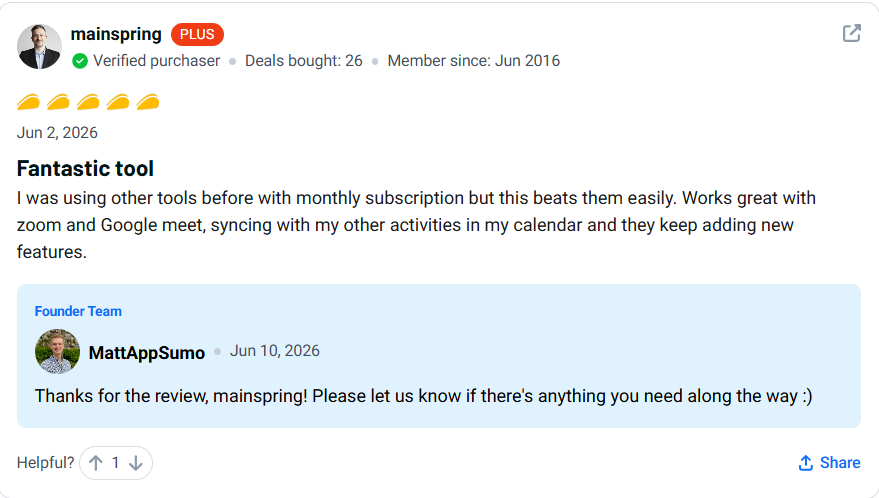
There are a couple of TidyCal reviews that talk about responsive support. One user said it’s “top notch. The founder team also responds individually to the AppSumo reviews and has addressed issues according to the feedback from users.
: Does TidyCal have an AppSumo version?
Yes. TidyCal is an AppSumo Original — it was created by the AppSumo team. The ultimate deal will be sold straight from the AppSumo site.
What are some good alternatives to TidyCal?
The best options are: Calendly (works great for enterprise); Cal.com (is open-source and developer-friendly); and Doodle (works great for creating group scheduling polls). TidyCal is clearly more affordable and simple for most small business owners than all three.