
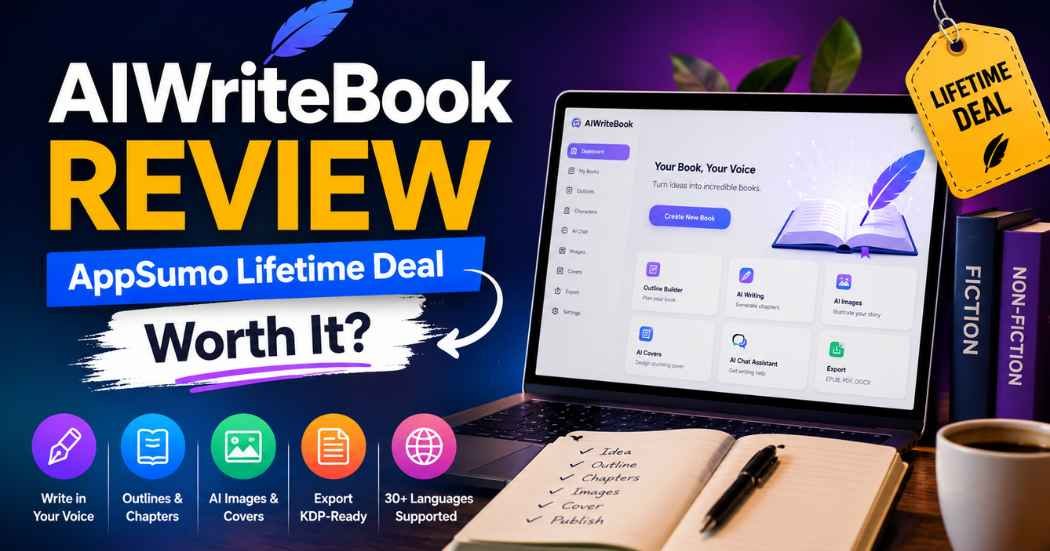
You’ve got a book idea. You can’t learn EPUB formatting at midnight; you don’t have the outline, the chapters, or the cover. AIWriteBook is designed to fill that gap. Is AIWriteBook just another book to add to your browser tabs? Let’s see if this AIWriteBook review 2026 can provide you with the answer. By the end of this AIWriteBook review, you’ll have a clear understanding of who this is written for and who should avoid this book.
AIWriteBook Quick Verdict (TL;DR)
Short on time? Let’s dive into this AIWriteBook review 2026 in a condensed format.
- Best for: Solo authors, freelance writers, coaches, and content creators who are looking for a step-by-step process to get from concept to a finished KDP-ready file.
- Biggest strength: They are all contained in one workspace, including outlining, writing, illustration, and export. You do not have to switch between five different tools.
- Biggest weakness: It’s still AI-generated writing. You will need to edit and personalize it before it’s ready to publish.
- Lifetime deal: If you write books regularly and are paying monthly for a writing application and a separate cover design application, this could be a good one to consider.
- Overall take: A good choice of speed and structure. Does not replace a real sense of editing or writing judgment.
What Is AIWriteBook?
AIWriteBook is an AI book writing tool that is browser-based. It is designed for book writers and not bloggers or social media caption writers.
You don’t have to enter prompts into a generic chatbot; you work within a dedicated book workspace. You enter a notion. The tool can be used to construct characters, create an outline, write the chapters in your style of voice, add artwork, and export your file for Amazon KDP, Apple Books, and Kobo.
This differentiates it from any generic AI book builder that’s created from disjointed ChatGPT conversations. The structure is built in by itself. There’s no chat window on which you have to start fresh each time you sit down to write chapter twelve. Outline, last chapter, and character notes are all in one location.
AppSumo doesn’t say that AIWriteBook is an alternative to Chatbots, but instead, it’s an alternative to Scrivener. That’s a good comparison. With Scrivener, you organize your book. AIWriteBook makes an attempt to organize it and write it.
AIWriteBook Product Overview
On paper, the workflow is very simple. You have an idea, enter some details, create an outline, type out chapters, go over them, and then export. Unlike a document editor that uses an AI plug-in, it’s a complete AI book writing tool. Typically, people looking for an AI book writing tool are looking for two things: one that writes well and one that is capable of organizing a long project. AIWriteBook is focused on the latter part of the problem.
Category | Details |
Product type | AI-assisted book writing and publishing workspace |
Platform | Browser-based, no install needed |
Best for | Authors, freelancers, solopreneurs |
Integrations | Amazon, Google, Google Gemini, Stripe |
Export formats | EPUB, PDF, DOCX |
Deal availability | AppSumo lifetime deal, split into license tiers |
The company is based in London. It was founded at the end of 2025. The team currently has 1-10 people and is bootstrapped. That matters here. This is a young product, not an established publishing platform with years of history behind it. Keep that in mind as you read the rest of this AIWriteBook review.
Key Features
Write in Your Own Voice
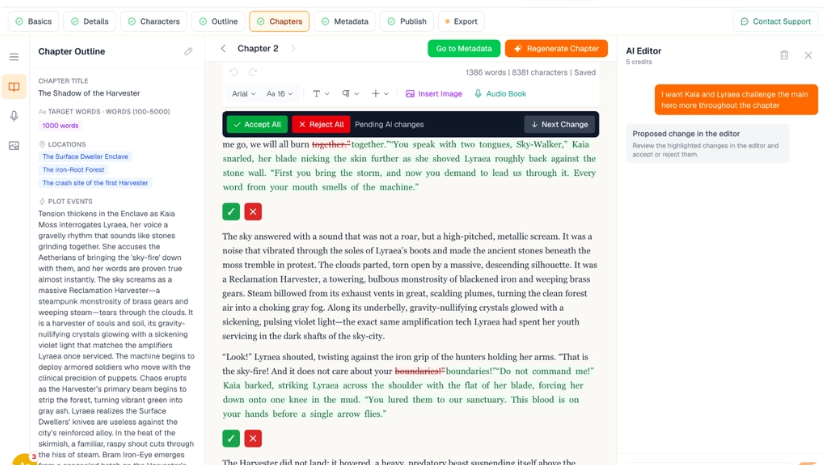
- Upload previous writing to train AIWriteBook on your writing style
- Generate voice-matched chapters
- Edit or regenerate single paragraphs
- Verify grammar, style, and consistency
- Refer to the AI Chatbot for chapter-wise guidance.
Create a printable copy of your book
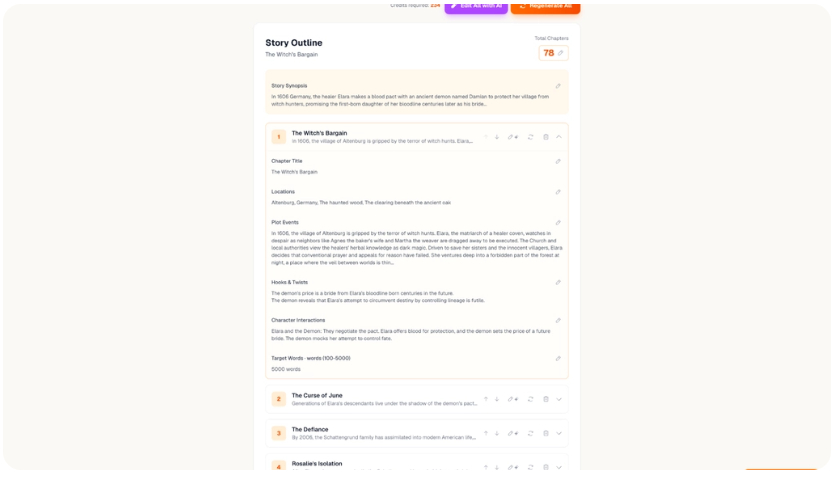
- Create sophisticated characters using arcs, backstory, and character traits.
- Create and customize fiction or nonfiction outlines
- Make edits and regenerate chapters and outlines
- Include citations and references in nonfiction textbooks
- Maintain control of the structure of your book.
AI Book Illustrations & Covers
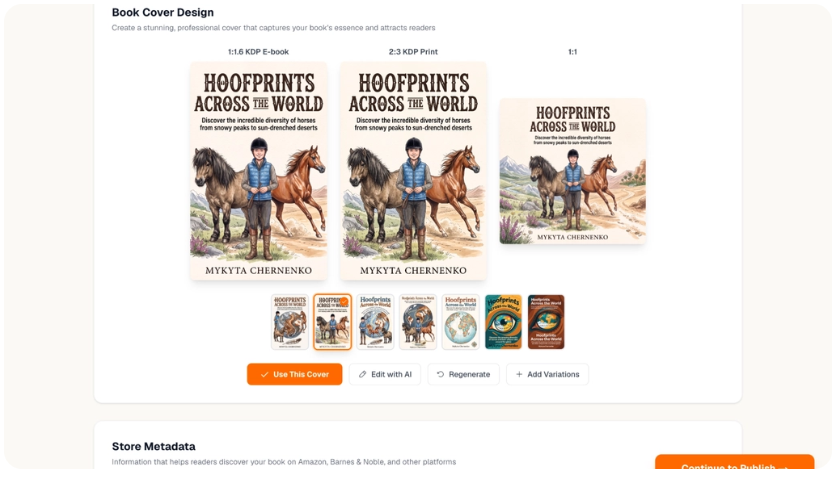
- Generate chapter illustrations
- Use a uniform visual style throughout the book
- Design business book covers. Design Book Covers for Business.
- Create several cover types. Make several cover variations.
- Place text and illustrations in a single workspace
KDP-Ready Book Export
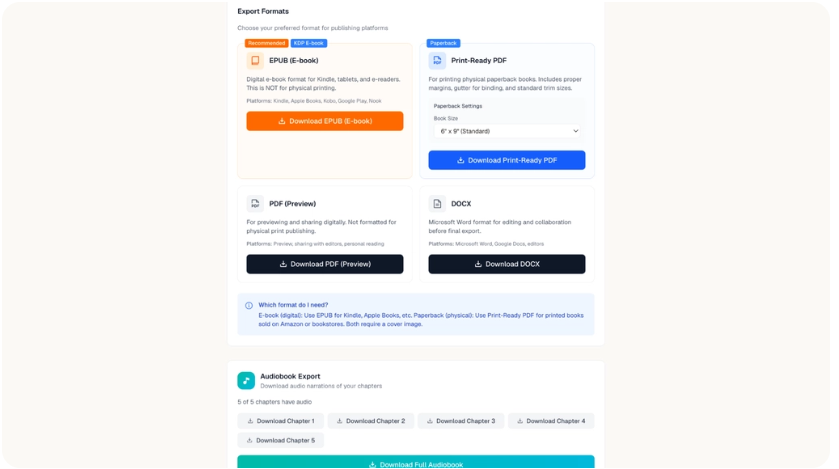
- Export books in EPUB, PDF, DOCX
- Create KDP-ready files
- Publish to Amazon, Apple Books, Kobo, etc.
- Do final editing and formatting changes to your manuscript in one workspace before publishing.
KDP Listing Optimization
- Research relevant keywords
- Generate book blurbs
- Choose appropriate book classes
- Make key elements of your KDP listing top-notch.
Multilingual Book Creation
- Write in 30+ languages
- Produce content in native languages supported by the system.
- Compose books without an additional translation process.
Ease of Use & User Interface
AIWriteBook is based on the screenshots and workflow, which is logical and linear: idea, outline, chapters, illustrations, export. It is very helpful to beginners to have that set-up. It takes out the element of “what should I write next?”
The dashboard organizes tools into a writing stage rather than having all of the tools cluttered on a single screen. This ensures that first-timers do not get lost. A single paragraph can be edited while the chapter is not constantly being regenerated. That’s a good move that many of the rival tools aren’t so smart about.
This should be relatively easy for a beginner who is not technically oriented. It’s primarily the learning curve in terms of comprehension of books, such as how to construct an outline, not a learning curve in understanding complicated software. This is an important point to emphasize when discussing AIWriteBook reviews: The software isn’t the difficult part! Making a successful book plan is still difficult.

How AIWriteBook Works
- Begin by having a concept for a book. Put your concept: fiction, non-fiction, or something like a lead magnet.
- Define book details. Initiate and plan. Attach a sample of your writing, if available.
- Create or import an outline. Utilize the outline builder or incorporate an outline you have already made.
- Generate chapters. Content will be automatically drafted for each chapter.
- Review and edit. Regenerate weak sections. Perform a grammar check and style check.
- Draw and create a cover. Create chapter art and select a cover, if the book requires pictures.
- Export. Get a downloadable KDP ePub, PDF, or DOCX file including keyword and category suggestions.
All steps are “optional” to a certain extent. If you are writing a business book with no illustrations, then skip this step altogether. This customizable, progressive progression is one reason for the overall positive AIWriteBook review for those new to the game.
Real Use Cases
Ebook creation. For coaches and consultants creating a lead-generation or paid guide, the first draft is possible without any outside assistance. With this approach, AIWriteBook can be thought of as an AI ebook generator for short, focused non-fiction guides, just as it can be used for full-length books.
Fiction writing. With the character builder and outline tool, even novice novelists have a scaffold to help them build a novel they could not easily construct in a plain chat window.
Non-fiction books. The use of references and citations is important. The research-based books require more structure than a novel.
Self-publishing prep. The KDP export tool isn’t designed for the person who is a little bit lost in the formatting process and needs to complete the formatting steps later.
Personal-brand content. A consultant’s or marketer’s book can be written quicker and at a lower cost than using a ghostwriter.
Key Benefits
- Faster first drafts. Say goodbye to a blank page.
- A well-thought-out order in which to write.
- Much less formatting work at the end, with the inbuilt KDP export.
- One workspace instead of a ChatBot, formatting tool, and other design tools.
- Costs less than hiring a ghostwriter, editor, and illustrator separately.
All of this does not ensure a bestseller – or even a book. The tool eliminates friction. It doesn’t actually complete and edit a manuscript for you.
Pros and Cons
Pros
- Outlines, writes, and illustrates, then exports all in a single workspace
- The writing style builder’s goal is to minimize generic phrases.
- Special export and metadata utilities eliminate real formatting time in KDP.
- Character builder helps maintain consistency of a fiction writer’s characters.
- Supports more than 30 languages to write in the language of native speakers
Cons
- Copy and Content Generated by AI that Requires Editing by Humans for Publication
- A small team, a young company, and a late year of founding (late 2025).
- Heavy users will have to pay attention to their plans, as they will be credit-based plans.
- Style matching with uploaded samples will not be accurate.
- Not a replacement for professional editing of books to be widely published
AIWriteBook Pricing
AIWriteBook is sold through AppSumo as a one-time purchase, not a monthly subscription, at least for the current deal. Pricing is split by tier and monthly credits.
Tier | Price | Credits/month |
License Tier 1 | $79 (listed from $144) | 500 |
License Tier 2 | $159 (listed from $360) | 1000 |
License Tier 3 | $319 (listed from $1,440) | 2500 |
License Tier 4 | $519 (listed from $2,000) | 5000 |
The higher levels come with additional options such as audiobook creation, author pages, book series support, visual books, translation, and more monthly credits. The price and features of the AppSumo deals may be subject to change. Please consult the official listing for the latest information before purchasing, as it is not solely based on the numbers listed above.
A notable feature for those looking to save money: the majority of AI book writers charge monthly fees. This one doesn’t. This is one payment based on your selected tier. This alters the numbers. While one month is $79, it seems high. It’s like a small fee, once and done.
AIWriteBook AppSumo Lifetime Deal
The AIWriteBook AppSumo listing will be available as a one-off and will provide access to it for a lifetime with whatever license you choose. However, it’s the typical AppSumo format: Once you pay, you’ll have access for the entire duration of the deal and until it ceases to exist. This is the structure that deal-hunters looking for writing products on AppSumo will be familiar with. It is in the same format as most of the other productivity AIWriteBook AppSumo launch deals.
The money-back guarantee policy of AppSumo guarantees the AIWriteBook lifetime deal. That provides you with a real opportunity to see how it works on a book before declaring it yours.
Before considering a few, some questions to consider first:
- Even with a lifetime plan, credits will reset every month. Don’t always think “limanite” when you think “limited”.
- Higher tiers cost a lot more upfront. That extra cost only makes sense if you’ll use the added credits and features.
- Features, pricing, or support may change as the product expands, as it is a new company.
It is a one-time purchase for your lifetime that beats the subscription model of a similar tool if you write multiple books every year. Whereas if you are testing the waters using 1 ebook, then a lower level is more sensible initially.
Don’t forget, the key to the AIWriteBook lifetime deal is its usage of credits. One of the most common pitfalls when purchasing any software lifetime is purchasing the highest level “just in case”. Match the tier to this year’s actual production of books. Avoid going for the lowest possible price.
AIWriteBook vs ChatGPT
Feature | AIWriteBook | ChatGPT |
Book-focused workflow | Yes, purpose-built | No, general-purpose |
Book outlining | Dedicated outline builder | Manual prompting required |
Chapter generation | Structured, voice-matched | Possible, but less structured |
General AI tasks | More focused on book creation | Broad, handles many tasks |
Editing | Inline paragraph editing, style checks | Mainly chat-based |
Ease of finishing a full book | Higher, guided process | Lower, requires your own workflow |
Best for | Authors focused on finishing a book | Anyone needing flexible AI assistance |
Pricing model | One-time AppSumo lifetime deal | Free tier plus paid plans |
This AIWriteBook vs ChatGPT comparison isn’t really about which AI writes better sentences. ChatGPT is more flexible. It can brainstorm, code, or draft a chapter if you build your own prompt system around it. AIWriteBook trades that flexibility for structure. And structure is exactly what most first-time authors are missing.
If you already have a solid outlining and formatting process, and just want raw drafting help, ChatGPT works fine and costs less to start. If you want the whole pipeline handled for you, AIWriteBook is the more purpose-built pick.
Plenty of readers land on this AIWriteBook vs ChatGPT question for one reason. They tried writing a book with ChatGPT alone and hit a wall around chapter three. That wall is usually about structure, not sentence quality. Structure is exactly what AIWriteBook is built to fix.
AIWriteBook Alternatives
Scrivener. An established writing and organizing device. According to the AIWriteBook review by AppSumo, it has an alternative—AIWriteBook. For writers seeking manual control over the writing process and who don’t want AI-generated content, Scrivener is a better choice. The only limit: It does not write for you.
With ChatGPT or Claude and a manual process. If you’ve created an outline and prompt system, then you can use the general AI assistant to write chapters. Ideal for writers who wish to have the greatest flexibility. No built-in book structure, character tracking, or KDP export.
Sudowrite. AI writing assistant for description, brainstorming, and story development, with a focus on fiction. Best for novelists looking for robust creative abilities. Does not have the non-fiction and KDP export focus that AIWriteBook has.
Jasper. Created originally to be used for marketing copy, and now extended into longer content. Perfect for teams that are already using it for other writing projects who are looking to participate in books. It’s not specifically designed for book structure as AIWriteBook is.
The use of a ghostwriter or editor who is human. The traditional route. If you’re an author who wants a 100% human-written manuscript and can afford it, then Best is for you. The obvious constraint: time and cost.
As you read through some of the other AIWriteBook alternatives, you’ll notice a trend. If you’re looking for one single path from idea to KDP file, AIWriteBook is the more straightforward choice. If you desire to have maximum creative control or a fully human manuscript, choose from the options above instead.
None of these AIWriteBook alternatives is “the best. They simply address various problems. Scrivener solves organization. ChatGPT solves flexibility. AIWriteBook addresses just one issue: the need to connect five tools to get from idea to a formatted and publishable file.
What Users Are Saying
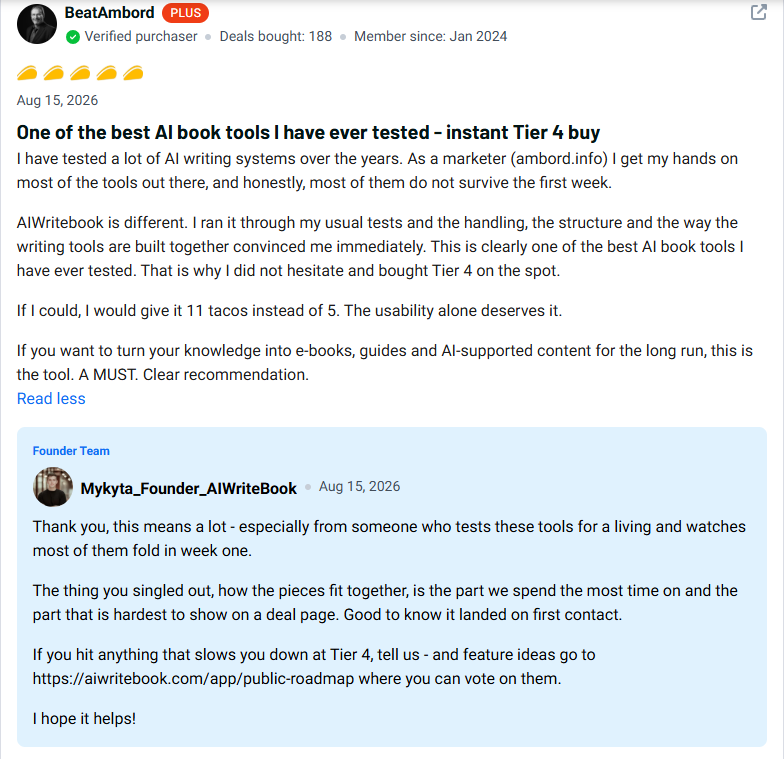
The public has mixed, but mostly positive, feedback on the AppSumo listing. Overall, it has received a rating of 4.76 stars from 37 reviews (as of writing).
Reiterating positive themes: people enjoy the guided tour from outline to export, and the ease of having illustration and cover design in the same tool as the writing. Indeed, this feature — the outline builder — is mentioned in several AIWriteBook reviews on the AppSumo page as the reason for keeping using the tool past the first chapter.
Shared issues: credit limits at lower levels, and setting expectations for how much of the editing that AI still requires on chapters. From public AIWriteBook reviews, that’s what you’d expect from a first draft generated by any AI, right?
This is a fairly new product and only has a handful of reviews, so it’s best to read some of the real AppSumo reviews before purchasing one. Avoid using just the star rating. This AIWriteBook review is not the sole source of information, but if you read a couple of independent sources, you will get a clearer picture than this article.
Who Should Use AIWriteBook?
- New authors who require structure rather than creativity.
- Ebook creators with lead magnets or paid guides for their business.
- Coaches and consultants looking for a book that can serve as a tool of credibility without having to hire a ghostwriter to write it for them.
- Existing content owners transforming their content into a longer book.
- Self-publishing beginners who don’t yet know how to format a KDP file.
The more of these groups you belong to, the more reason you have to give the platform a try. This part of the AIWriteBook review is designed to enable you to make an informed choice before (literally) spending a penny.
Who Should Avoid AIWriteBook?
- Authors looking for a 100% human-assisted book without the involvement of AI in writing.
- Publishers that have no AI submission system.Traditional publishers for authors who don’t use AI for submission.
- Anyone who does not want to take the time to edit and customize AI-generated chapters before publishing.
- Individuals whose requirements are more fulfilled with a general AI that they are familiar with, but not necessarily one that is rigid.
Is AIWriteBook Worth It?
Yes, but if you’re the right buyer.
It is not as cheap as ghostwriting; $79 is a pretty hefty price tag. The lifetime model means you’re not paying monthly to use a tool that you may only use in spurts. AppSumo’s 30-day money-back guarantee reduces the risk of trying it on an actual project.
The value depends on how many books you plan to write, and how much you’ll use the credit allowance. The single-book hobbyist might get by on Tier 1. If you are thinking of doing a series, or multiple non-fiction books per year, then consider higher-priced tiers, which offer better price per credit.
This AIWriteBook review has it be worth it primarily because of the structure and tools to export, rather than the quality of the writing itself being drastically improved. The case for changing becomes less compelling if you already outline and format your work. The fundamental trade-off that this AIWriteBook review circles around is structure vs flexibility.
The choice between this purchase and other AI book generators on the market is generally between preferring a single space to deal with the most effective tools you can imagine for every step.
Final Verdict
AIWriteBook is best suited for a particular type of buyer. A user who wishes to follow a step-by-step process from a book concept to a file ready to submit to KDP, rather than assembling the pipeline himself. The chapter outline builder and KDP export stand out as the best features. The writing style builder is actually an effort to resolve the issue of the “sounds like AI” effect seen in numerous AI-written books.
The downside is that it’s a problem with all AI writing tools, not just this one. There’s still work to be done in the way of editing, fact-checking, and personalizing the output before it’s your book. Bring no expectations of a polished manuscript, just an expectation that you will get a strong first draft and a solid publishing pipeline.
If you write books regularly, or you’ve put off a book because formatting and cover design felt like too much, the lifetime deal is worth a look. Check the current AIWriteBook deal and see if it fits your project and your budget before you commit. That’s the honest bottom line of this AIWriteBook review.
FAQ
What is AIWriteBook?
AIWriteBook is a browser-based AI book writing platform. It helps you outline, draft, illustrate, and export a book, including KDP-ready files for self-publishing.
Is AIWriteBook worth it?
It’s worth it for authors who want a structured, guided writing process and are willing to edit AI-generated drafts. It’s less worth it if you already have your own outlining and formatting workflow.
Is AIWriteBook legit?
Yes. It’s a real product sold through AppSumo, with founder identity verification and a 60-day refund policy. It’s still an early-stage company, founded in late 2025.
Does AIWriteBook have a lifetime deal?
Yes. The current AppSumo listing offers one-time payment for lifetime access, split across four license tiers based on monthly credits and features.
How much does AIWriteBook cost?
Pricing currently starts at $79 for the entry tier and goes up to $519 for the top tier. Prices and features on AppSumo deals can change, so check the current listing.
Can AIWriteBook create a complete book?
It can generate a full draft from outline to export. Expect to edit and revise the output before it’s ready to publish.
Is AIWriteBook better than ChatGPT?
For book-specific structure and KDP export, yes. For general flexibility and broader tasks, ChatGPT stays the more versatile tool. See the comparison table above for details.
Who should use AIWriteBook?
New authors, ebook creators, coaches, consultants, and self-publishing beginners who want a guided process instead of building their own system.
Can I use AIWriteBook for ebooks?
Yes. The platform supports non-fiction structuring, reference and citation tools, and export formats built for ebook publishing on Amazon KDP and other platforms.
What are the main AIWriteBook limitations?
The output still needs human editing, the company is young, and heavy users need to track credit usage against their license tier.