
Disclosure: This article may contain affiliate links. If you buy through one of these links, I may earn a commission at no extra cost to you. This does not change the facts or the opinions in this review.
Introduction: An Honest Look at Pin2Profit AI
Pinterest can send steady traffic to affiliate offers. But the work behind each pin adds up fast.
You pick a product. You find keywords. You design an image. You write a title and a description. Then you plan when to post it. Do that for one product and it feels fine. Do it for twenty and it starts to eat your week.
That is the gap Pin2Profit AI says it fills. It is sold as a tool that turns an Amazon product link into a Pinterest campaign. The sales page lists pins, copy, keywords, video pins, affiliate pages, scheduling, and analytics.
This Pin2Profit AI review looks at the features, the Pin2Profit AI pricing, the limits, the policy risks, and who the tool suits. It does not repeat the sales pitch. It asks what you should check before you pay.
One point is worth holding onto. Making affiliate content is one job. Earning affiliate income is another. A tool can help with the first. It cannot promise the second.

What Is Pin2Profit AI?
Pin2Profit AI is an AI tool for building Pinterest campaigns around Amazon products. The sales page says it puts several jobs in one place: product research, pin design, copywriting, keyword ideas, and campaign planning.
You start with an Amazon product link. The software then helps make materials for Pinterest. The sales page lists:
- Pin images
- Headlines and descriptions
- Product benefits and angles
- Keyword suggestions
- Video pins
- Affiliate landing pages
- Campaign schedules
- Analytics reports
Here is a simple example. Say you want to promote a coffee maker. You might make pins about small kitchens, gift ideas, or a home coffee corner. The tool aims to speed up the prep work.
Keep one thing clear for this Pin2Profit AI review. All of this is what the vendor says the tool does. I have not confirmed it by testing. Treat the software as an assistant. It still needs a human to check the facts, the images, and the links.
How Does Pin2Profit AI Work?
The sales page describes a six-step flow. Some steps are automated. Some are on you.
Step 1: Choose an Amazon product (you). Pick something that fits your niche and your readers. An air fryer or a coffee grinder is a fair example. Do not pick a product only because the commission looks big.
Step 2: Add the product link (you, then the tool). The sales page says you can paste a link or use a Chrome extension. The tool then pulls out benefits and audience ideas. Check them against the real listing. AI can misread a product.
Step 3: Generate the campaign (tool). The tool is advertised to produce images, titles, descriptions, keywords, and angles. Video pins and affiliate pages may depend on your plan.
Step 4: Review and edit (you). Keep the best images. Fix the text. Each pin should make one clear point.
Step 5: Publish or schedule (tool and you). The sales page mentions scheduling and CSV export. Check which options your plan includes and whether you must connect a Pinterest account.
Step 6: Track results (you). Use Pinterest analytics and your Amazon Associates reports. Look at outbound clicks, orders, and commissions. Views alone tell you little.
Nothing here should be read as fully hands-off. The advertised steps still need your judgment.
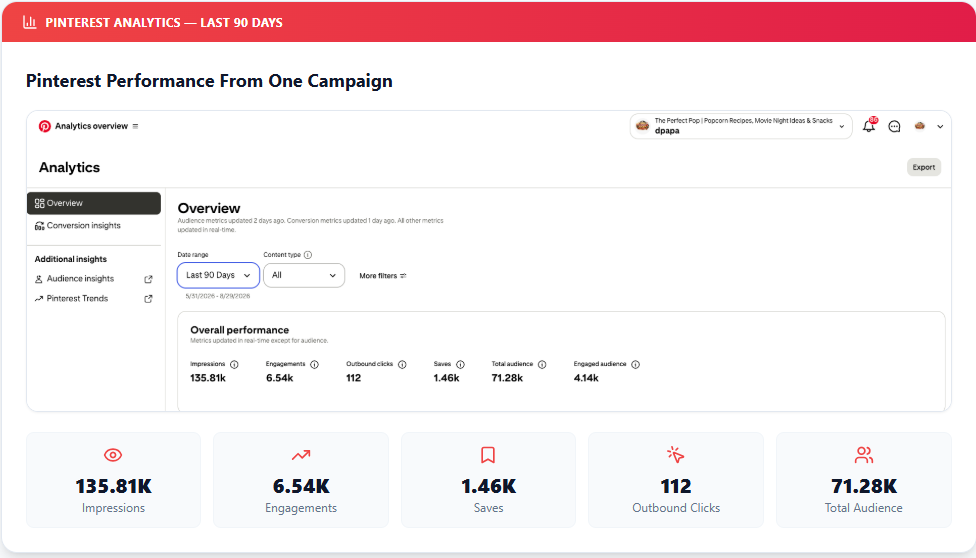
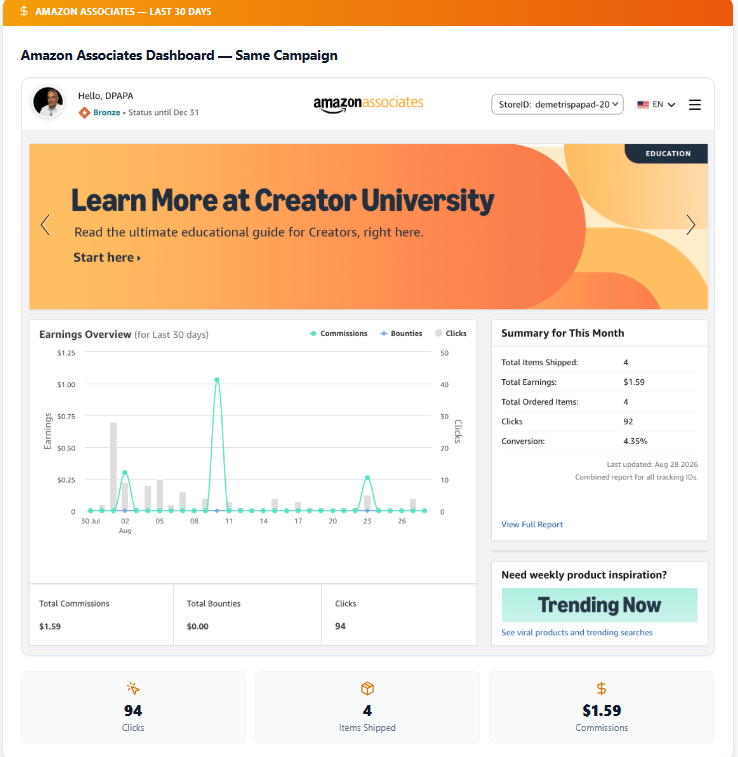
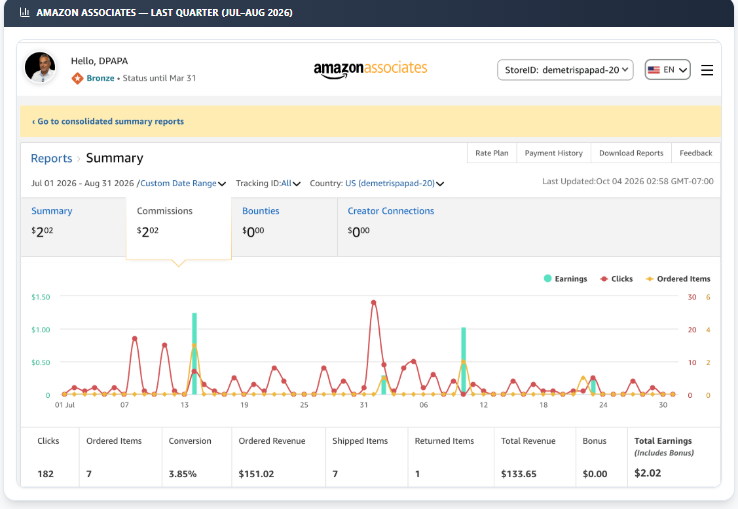
Real-World Results and Performance Evidence
Who Should Use Pin2Profit AI?
This Pin2Profit AI review sees the tool suiting a few kinds of people, under the right conditions.
Beginner affiliate marketers. Starting is hard when you do not know what to post. The tool may give you first ideas. You still need to learn the basics of keywords, content quality, and disclosure.
Pinterest content creators. If you already post often, having images, copy, and planning in one place could keep you organized.
Amazon Associates publishers. The tool is built around Amazon products. Check that your links and pages follow the current program rules first.
Bloggers and niche site owners. A kitchen blog could publish a buying guide, then make pins that point to it.
Freelance marketers. If you run several campaigns, one workspace may help. The real value depends on how much editing the output needs.
Key Features of Pin2Profit AI
The sales page lists many features. Below, each one gets the same four checks: what it does, how it may help, what to check, and where it may fall short. All details are vendor claims unless stated.
Amazon Product Analyzer
What it does: It turns product information into marketing ideas, such as who might want the item and what problem it solves.
How it may help: A coffee maker could be pitched as a gift, a small-apartment item, or a home office extra.
What to check: Compare every claim with the Amazon listing and the maker’s page.
Possible limit: The ideas are only as good as the data the tool reads.
AI Campaign Strategist
What it does: It suggests campaign angles such as gift guides, product showcases, lifestyle posts, seasonal ideas, and problem-and-solution posts.
How it may help: You can avoid posting the same type of pin again and again.
What to check: Each pin needs its own reason to click. A new headline on the same weak content will not help.
Possible limit: Ideas are not results.
AI Pinterest Pin Generator
What it does: It makes pin images in different styles.
How it may help: It may save design time if you make many graphics.
What to check: Look closely at each image. AI can change how a product looks, add features that do not exist, or garble text. Also confirm you may use any product images under the rights holder’s terms.
Possible limit: An image that misleads buyers can cause trouble.
AI Video Pin Generator
What it does: The sales page advertises vertical video pins with hooks, text overlays, calls to action, and auto-made titles and descriptions.
How it may help: Short videos can show a product’s benefits quickly.
What to check: The vendor says the front-end offer includes one AI video pin per campaign, and the Pro Suite upgrade adds unlimited video pins. Confirm this at checkout. Also ask whether video needs an outside API key or paid credits.
Possible limit: The base video allowance is small.
AI Pin Copywriter
What it does: It writes headlines, titles, descriptions, hooks, calls to action, and benefit lines.
How it may help: It can help when you know the product but not the words.
What to check: Read the copy out loud. Cut anything that sounds pushy or cannot be backed up.
Possible limit: AI copy can sound alike from one pin to the next.
Pinterest Keyword Engine
What it does: It suggests keywords and content themes for your campaigns.
How it may help: It gives you a starting list.
What to check: A suggested keyword is not proof of search volume or low competition. Match each keyword to the actual pin and the page it leads to.
Possible limit: You still need to judge search intent yourself.
Affiliate Page Builder
What it does: It helps build supporting pages around a campaign.
How it may help: A useful guide gives readers more context than a bare product link.
What to check: Make sure the page is accurate, helpful, and carries a clear affiliate disclosure.
Possible limit: Do not assume a generated page is ready to publish as is.
1-Click Campaign Builder
What it does: It joins product analysis, ideas, images, and copy into one flow.
How it may help: It saves clicks and switching between apps.
What to check: What does one click actually produce, and how much do you need to fix?
Possible limit: One click does not mean one-click success. Product choice and review still matter.
Pinterest Account Setup Assistant
What it does: The sales page says it can suggest profile names, handles, bios, board structures, and content plans.
How it may help: It is handy if you are starting a new account.
What to check: Pick a clear niche and make sure the profile matches what you post.
Possible limit: A tidy profile does not guarantee reach.
Smart Campaign Scheduling
What it does: It spreads pins over several days. The front-end offer lists a seven-day option, and the Pro Suite adds more.
How it may help: It keeps your posting plan organized.
What to check: Read Pinterest’s current rules before you connect an account.
Possible limit: No schedule guarantees reach. Posting low-value pins just to hit a daily number is a bad plan.
Pinterest CSV Export and Integration
What it does: It exports Pinterest-ready CSV files with descriptions, keywords, board assignments, and dates. It also describes an account link through Pinterest OAuth.
How it may help: It may cut manual uploading.
What to check: Look at the permissions the app asks for. Never share your password or API keys with a service you have not verified.
Possible limit: I could not confirm how well the integration works.
Pinterest Analytics Import
What it does: It reads Pinterest Analytics CSV data and links the numbers to your campaign pins. The sales page names impressions, engagements, saves, and outbound clicks.
How it may help: You can see which pins get attention.
What to check: Compare Pinterest data with your Amazon report. A pin with many views and few clicks may need a clearer message.
Possible limit: Numbers guide decisions. They do not make them.
Pin2Profit AI Dashboard Overview
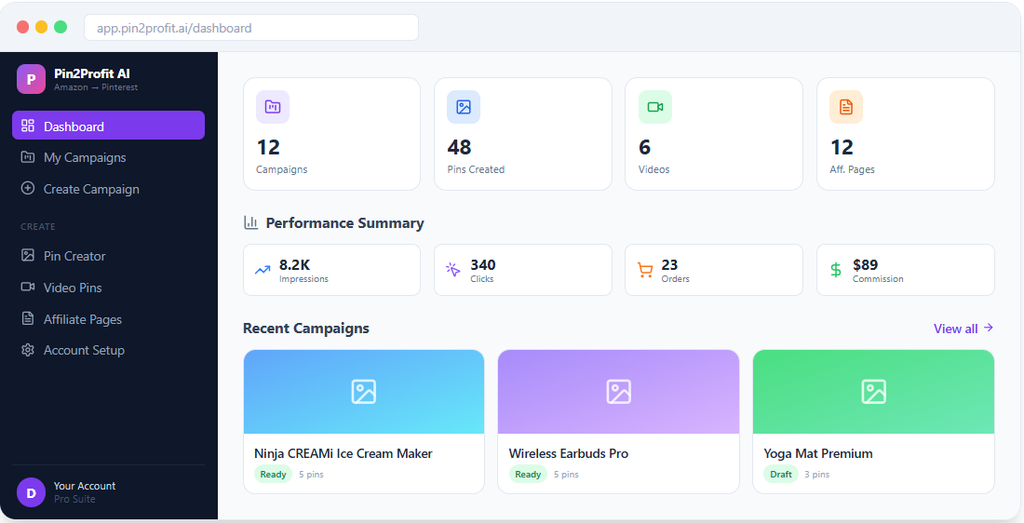
This section is based on the dashboard images on the sales page. It is not a hands-on test.
The images show areas for campaigns, pin creation, video pins, affiliate pages, and performance summaries. The idea is one workspace for the whole job.
That could be handy if you now juggle several tools. But screenshots cannot tell you how fast the software runs, how stable it is, or how easy it feels.
If you can, watch a live demo before you buy. Look at how campaigns are edited, how files are downloaded, and how the integrations work.
How to Create a Pinterest Affiliate Campaign With Pin2Profit AI
Here is a simple workflow you can follow. The example product is a coffee maker. No test results are shown, because none were supplied.
- Pick a relevant product. Choose one that fits your niche. Read the listing and think about who would buy it.
- Check affiliate eligibility. Confirm that you can earn commissions on it under your Amazon Associates account.
- Know your reader. A person who wants a compact coffee maker may care about counter space, cleanup, and size.
- Generate pin ideas. Ask for several angles. For example: how to choose a coffee maker for a small kitchen, features to compare, and gift ideas.
- Review images and text. Fix errors. Make sure the pin does not promise features the product lacks.
- Add the right destination. Use your correct affiliate link, or send people to a helpful guide that has one.
- Prepare the landing page if needed. Include real information and a clear disclosure.
- Publish or schedule. Check the image, text, link, and board before you post.
- Track clicks and results. Watch outbound clicks, orders, and commissions. Then improve the next round.
Pin2Profit AI Pricing: Is $27 Worth It?
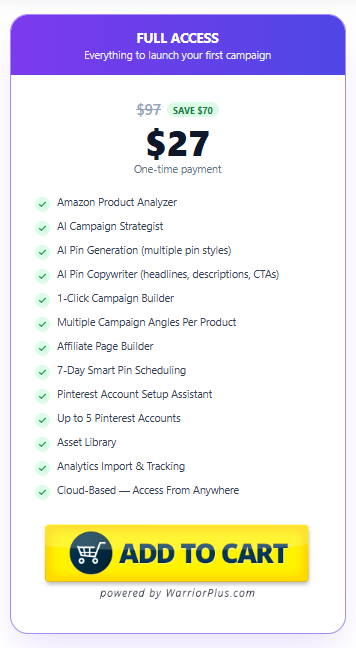
The sales page advertises a launch price of $27 and a regular price of $97. It describes the front-end purchase as a one-time payment. Treat both numbers as sales-page claims. Check the checkout page for the current price.
The advertised front-end offer includes:
- Amazon Product Analyzer
- AI Campaign Strategist
- AI pin generation
- AI Pin Copywriter
- Campaign Builder
- Affiliate Page Builder
- Seven-day scheduling
- Pinterest Account Setup Assistant
- Support for up to five Pinterest accounts
- Asset Library
- Analytics import and tracking
- Cloud-based access
The sales page also says free image generation and one AI video pin per campaign are part of this offer.
So is it a fair price? That depends on you. If you build Pinterest campaigns often, a one-time fee may make sense. If you post a few pins a month, free design and writing tools may be enough.
Before you pay, work out the full cost. Ask whether video, advanced text, API access, storage, or extra campaigns cost more. A low Pin2Profit AI pricing headline does not mean every feature is covered.
Buy only if the features fix a problem you really have. A discount alone is not a reason.
Pin2Profit AI OTOs and Upsells Explained
OTO means “one-time offer.” It is an optional upgrade shown during checkout.
The sales page mentions a Pro Suite upgrade with more video generation and wider scheduling. But the full list of Pin2Profit AI OTOs, and their exact prices, could not be verified from the supplied material.
Before you accept any upgrade, check:
- The exact price
- Whether it is one-time or recurring
- Which features it adds
- Whether you need it for something you want
- Whether outside API or usage costs remain
- Whether the refund terms differ from the base offer
You do not need every upgrade. Start with the base product. Add an upgrade only when you know why.
Pin2Profit AI Pros and Cons
Here is a balanced look at the Pin2Profit AI pros and cons, based on the information supplied. Points I could not test are marked as potential.
Potential Pros
- Many tasks in one workflow. Research, copy, images, and planning sit together. That may cut app switching.
- Help with design and writing. It may ease the load if you dislike both.
- More campaign angles. The strategist is built to give different ideas for one product.
- Scheduling and analytics. These may keep you more organized.
- Narrow focus. It is aimed at Amazon products and Pinterest, which suits marketers in that lane.
Potential Cons
- AI output needs review. Text and images can contain mistakes.
- Sales are not guaranteed. The tool cannot promise traffic or commissions.
- Some features may cost extra. The sales page mentions a Pro Suite upgrade and outside AI services.
- You still have to learn. Product choice, disclosure, and tracking are on you.
- Limited outside proof. The sales page claims and screenshots are not independently verified.
- Policy rules stay with you. Following Pinterest and Amazon rules is your job.
Pin2Profit AI Limitations
Every tool has limits. Go in with realistic hopes.
- Input quality matters. Weak product data leads to weak ideas.
- AI can be wrong. A made-up spec or an unsupported benefit can slip in. Check final content against reliable sources.
- Human review is needed. Posting more pins does not mean better results.
- Traffic takes time. Results vary by niche, competition, content quality, and audience.
- Extra costs may appear. Some advanced AI features may need API keys or separate usage.
- Making a campaign is not the same as profiting from one. Automation cannot pick the right product, understand your readers, or learn from the data for you.
Pinterest Growth and Earnings Claims: What You Should Know
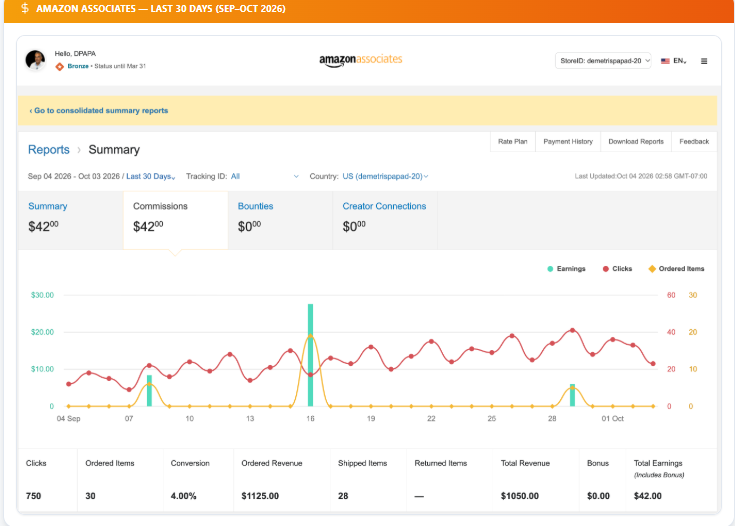
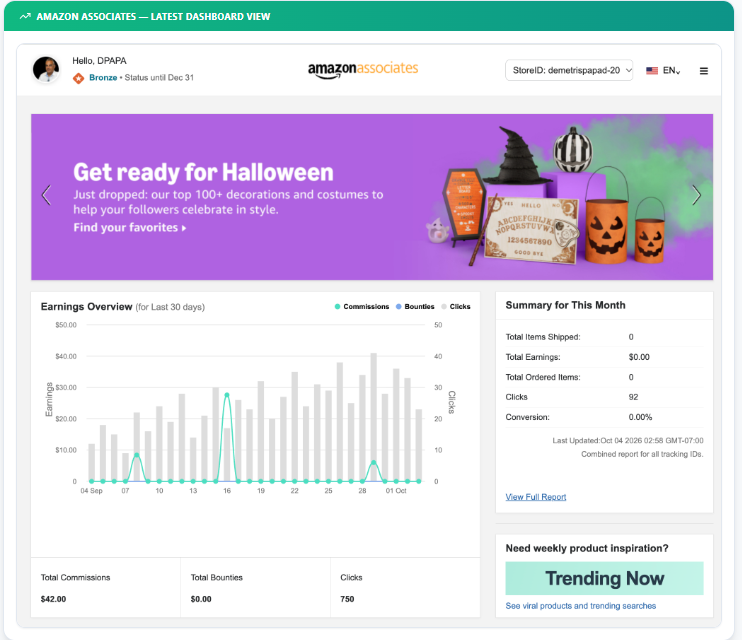
The sales page shows examples of impressions, engagements, saves, outbound clicks, and Amazon commissions. It also shows accounts that reportedly grew after launching campaigns.
I cannot confirm that these screenshots are real, complete, or typical. They show what the vendor wants to show. A new buyer should not expect the same.
It helps to know what each number means:
- Impressions: how often a pin was shown. Not purchases.
- Engagements: actions people took on a pin. Interest, not income.
- Saves: people saving a pin to a board. A good sign, but not a sale.
- Outbound clicks: people who clicked through to a link. Traffic, not orders.
- Amazon orders: items ordered after a click.
- Qualifying purchases: orders that count under program rules.
- Earned commissions: what you are actually paid. Rates depend on category and program rules.
So in this Pin2Profit AI review, I do not judge any tool by impressions. Look at traffic quality, content value, and real affiliate results. And do not assume a sales-page campaign will repeat on your account.
Is Pin2Profit AI Pinterest-Approved and Safe?
The sales page claims Pin2Profit AI has Pinterest API approval and an official account link. This is a vendor claim. I could not verify it from the supplied material, so check it against Pinterest’s own documentation before you connect anything.
Even if the claim is true, it has limits. Developer access does not mean every pin, link, schedule, or landing page follows every Pinterest rule. What you publish and how you publish it still counts. Nobody can honestly say bans or policy problems are impossible.
Before you connect your account:
- Confirm who the app and vendor are.
- Read the permissions it asks for.
- Make sure you log in through a proper authorization screen.
- Read Pinterest’s current developer and platform policies.
- Avoid repeated or misleading content.
- Disconnect the app if you stop trusting it.
The same care applies to Amazon. Software approval does not mean Amazon approves every campaign or linking method.
Pinterest and Amazon Associates Compliance Tips
Policy checks belong in your workflow. This is not legal advice, and rules change. Use the official documents.
- Follow Pinterest’s current rules on spam, content, and links. A scheduling feature or an anti-spam claim does not guarantee you comply.
- Follow the Amazon Associates agreement and program policies. They cover links, disclosures, and promotion methods.
- Disclose clearly. Say you may earn from qualifying purchases, using the wording and placement Amazon requires.
- Keep product facts accurate. Do not let AI invent features, prices, or customer experiences.
- Check every image. AI product pictures may not match the real item. Use third-party images only if allowed.
- Avoid misleading earnings claims. Do not promise income.
- Skip low-value or repeated content. Make each pin useful.
- Review your landing pages. Working links, useful text, and the right disclosures.
Pin2Profit AI vs. Manual Pinterest Affiliate Marketing
Neither path is always better. The table gives a quick view. It reflects general trade-offs, not test results.
Area | Pin2Profit AI (as advertised) | Manual workflow |
Setup | Learn one tool | Set up several tools |
Content creation | Generated images and copy to edit | You design and write it all |
Research | Built-in product and keyword ideas | You research on your own |
Control | Less, since you edit AI output | More, since you do each step |
Cost | One-time fee advertised, extras possible | Can be low if you have tools already |
Learning | Tool plus affiliate basics | Several tools plus affiliate basics |
Customization | Depends on what the tool allows | Wide open |
If your problem is juggling many tasks, the tool may be worth a look. If you are new, one small manual campaign can teach you what works before you spend. You do not have to automate every step.
Pin2Profit AI vs. Other Pinterest Tools
I am not naming competitor prices or features, because none were supplied and I will not guess. Instead, compare by job.
- Graphic design tools are the usual choice if images are your main problem. Canva is a common one.
- AI writing tools can brainstorm angles and draft descriptions. Always check facts.
- Keyword research tools help you test whether a phrase fits what people search.
- Scheduling tools handle posting plans. Pinterest also has its own publishing options. Check which features your account has.
- Analytics tools show what works. Pinterest Analytics and your Amazon reports already cover a lot.
- A manual affiliate page on a WordPress site, like a buying guide, is another route.
Choose by total cost, time, and the features you will really use. Do not pay twice for tools that overlap.
Can Beginners Make Money With Pin2Profit AI?
Buying software and learning affiliate marketing are different things.
To earn commissions, you generally need a niche, trusted content, products that fit, traffic, and qualifying purchases. Pin2Profit AI may help with some prep work if it works as advertised. It cannot control whether people click, trust your pin, or buy.
Buying it does not guarantee traffic, orders, or earnings, and no Pin2Profit AI review should say it does.
A sensible start looks like this: choose one niche, research a few products, make helpful content, and watch the results. A buying guide for a small-kitchen coffee maker may help readers more than a pin that only says “buy this.”
Decide on automation after you see what your own results look like.
Common Mistakes to Avoid
- Picking products without research. Check demand, competition, and fit. Look at the listing and your audience first.
- Posting AI output unchecked. Read every title, description, and image before you publish.
- Ignoring keyword relevance. Match each keyword to the pin and its page.
- Using misleading images. Compare each image with the real product.
- Forgetting disclosures. Add the required wording wherever you use affiliate links.
- Repeating the same pin. Make each pin answer a different question.
- Watching only impressions. Track outbound clicks and qualifying purchases.
- Expecting quick income. New accounts need time. Plan for testing.
- Buying every upsell. Start with the base plan and upgrade only for a clear reason.
Customer Support and Refund Policy
The sales page advertises a 30-day money-back guarantee. That lowers the risk, but only the real terms count. Read the refund period, who qualifies, how to file, and who to contact. No one should promise that every refund request will be approved, and no Pin2Profit AI review can replace the real terms.
The sales page also says WarriorPlus helps handle sales, while product questions and refund requests go to the vendor. Confirm the current checkout terms so you know the right process.
I cannot judge support quality or response time from the supplied material. Look for working contact details before you buy, and keep your receipt and order information.
Pin2Profit AI User Reviews: What We Can Verify
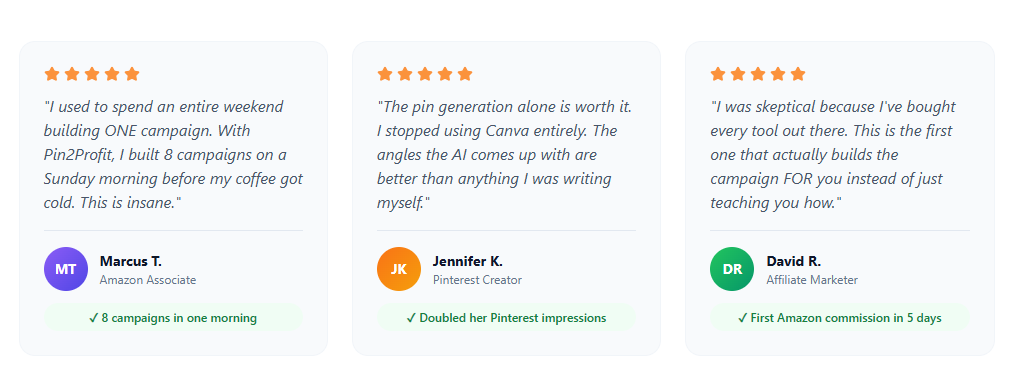
The sales page includes testimonials from people described as an Amazon Associate, a Pinterest creator, and an affiliate marketer. It also shows campaign examples.
None of this is independently verified. I cannot confirm who these people are or whether the results are accurate. Treat them as vendor promotional material, not outside customer proof.
Look for reviews that describe real experiences: what worked, what did not, and whether extra purchases were needed. Be wary of any review that promises guaranteed commissions or says no effort is needed.
For now, this Pin2Profit AI review has too little verified customer feedback to give a satisfaction rating.
Is Pin2Profit AI a Scam or Legit?
It would be unfair to call Pin2Profit AI a scam from a sales page alone. It would also be too early to call every claim trustworthy. The honest answer is that Pin2Profit AI legit or not is something this material cannot settle by itself.
What we have is a product with advertised features, a stated launch price, and a money-back guarantee. That is a start. It does not prove any feature, result, or customer story.
Run these checks before you buy:
- Does checkout name the product and price clearly?
- Are the included features explained in plain terms?
- Are upgrades and possible extra costs shown?
- Are the refund terms easy to find?
- Can you see the main features working in a demo?
- Is vendor support information available?
- Is there reliable proof for the Pinterest integration claim?
If key questions stay unanswered, wait. Until then, the fair label is unproven, not Pin2Profit AI legit and not a scam. Judge the tool by what you can verify.
Who Should Buy Pin2Profit AI?
It may be worth a look if you:
- Make Pinterest affiliate content on a regular basis
- Want help with campaign ideas and copy
- Need help preparing pin images
- Prefer several tasks in one workflow
- Already understand affiliate basics
- Are fine with reviewing and editing AI output
- Have a clear reason to use the advertised features
It fits best for someone with a niche site or a plan who wants faster prep. That holds only if the software works as described and the full cost fits your budget.
Who Should Avoid Pin2Profit AI?
You may want to skip it for now, per this Pin2Profit AI review, if you:
- Expect guaranteed affiliate income
- Have not picked a niche
- Rarely make Pinterest content
- Already get by with free tools
- Dislike editing AI work
- Cannot pay for upgrades or extra usage costs
- Cannot verify the vendor’s terms or main claims
If you are new, learning product research, useful content, affiliate links, and traffic may be a better first step. You can come back to specialized software later.
Frequently Asked Questions
Does Pin2Profit AI guarantee affiliate sales?
No. Nothing in the supplied information supports a guarantee. Sales depend on audience, traffic, product choice, and conversion rates.
Can beginners use Pin2Profit AI?
The sales page calls it beginner-friendly. Still, beginners need to learn Pinterest and affiliate basics.
Do I need an Amazon Associates account?
To earn Amazon commissions, you generally need to join the program and follow its rules. Check how the software handles affiliate links and whether you must add your own account details.
Does Pin2Profit AI require an API key?
The sales page describes free image and text generation through outside AI services. It also mentions bringing your own AI keys for more features. Confirm which functions need keys and whether limits or charges apply.
Are AI video pins included in the basic plan?
The sales page says one AI video pin per campaign comes with the front-end offer. It says unlimited video pins come with the Pro Suite upgrade. Confirm this before buying.
Does Pin2Profit AI offer a money-back guarantee?
The sales page advertises a 30-day guarantee. Read the current terms and the refund process before you order.
Is Pin2Profit AI worth $27?
It may be, if the features solve a regular problem for you. The answer depends on the current price, the features you will use, any extra costs, and your needs.
Can I use Pin2Profit AI without paid ads?
The sales page promotes organic Pinterest traffic. Organic reach is not guaranteed, and you still need useful content.
Final Verdict: Is Pin2Profit AI Worth Buying?
Pin2Profit AI aims to make Pinterest affiliate work easier by joining product analysis, campaign ideas, pins, copy, video, affiliate pages, scheduling, and analytics in one tool.
This Pin2Profit AI review finds a useful idea with open questions.
For someone who makes Pinterest content often, that bundle could save time. The advertised Pin2Profit AI pricing ($27 launch, one-time payment) and the 30-day guarantee also lower the first-step risk, if they check out.
The big caution is that a long feature list does not prove the features work well or that campaigns will pay. AI output needs review. The Pin2Profit AI OTOs and outside costs need checking. The Pinterest approval claim and the earnings screenshots lack independent proof.
The best fit is a marketer who already knows the basics, posts often, and will edit what the tool makes. Newcomers and occasional posters may do fine with free tools. Weigh the Pin2Profit AI pros and cons against your own workflow.
My overall rating is on hold until the features, the current price, and the main claims can be checked.
My Honest Recommendation
My Pin2Profit AI review ends with a plain view: treat the tool as a possible time-saver, not a shortcut to income. I have not tested it, so this advice rests on the supplied product information and the gaps in it.
Before you buy, confirm what the front-end offer includes and which features need an upgrade or an outside service. Watch a demo if one is available. Read the refund terms.
If you go ahead, start with one small campaign. Review everything the tool makes. Publish with care. Track outbound clicks and orders before you do more.
That gives you real data to decide if the tool belongs in your workflow. Success still comes from useful content, relevant products, reader trust, and steady improvement. Software can help with parts of that. It cannot replace it.