
Quick verdict: is 3D Ninja worth considering?
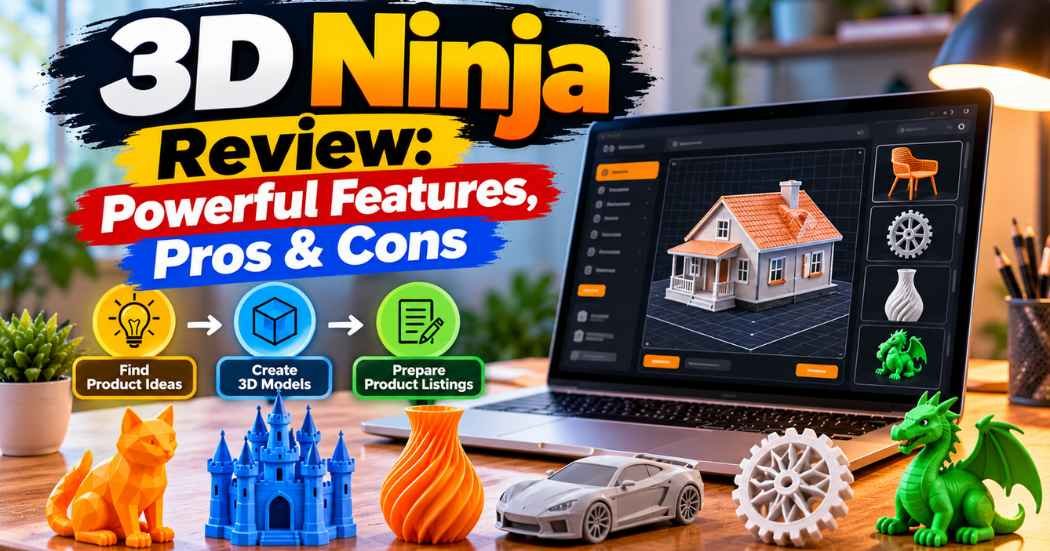
3D Ninja is software for making files that people can 3D print. The sales page says it puts three jobs in one place: finding product ideas, generating 3D models, and preparing marketplace listings. The main offer is one year of Basic access for a one-time $27.
The price is easy to like. The harder part is everything the price doesn’t tell you. A generated file still has to print well. You still need permission to sell it. And a listing on a marketplace doesn’t mean anyone will buy it.
My take: 3D Ninja may be worth a look if you’re a beginner who wants a guided start. Check the export formats, the commercial license, and the monthly limit before you pay. Nothing in the material I worked from shows that users actually make money with it.
How this review was researched
This 3D Ninja review is based on the 3D Ninja sales page and the product details supplied for it. Features, pricing, the creation allowance, the marketplace names, and the refund promise all come from the seller. I treat them as claims, not as facts I’ve confirmed.
I haven’t used the software. I can’t tell you how good the models look, whether the export works smoothly, or what any real customer earned. If I could only guess at something, I say so and tell you what to check.
That’s the honest limit of this review. Sales pages tend to show the best side of a product, so the gaps matter as much as the promises.

What is 3D Ninja, and who is it for?
3D Ninja is presented as a tool for people who want to make and sell digital files for 3D printers. The seller focuses on the file, not the finished object.
Here’s a simple example. Say you design a cable holder for a desk. You list the file on a marketplace. A customer downloads it and prints the holder on their own printer. You never make, pack, or ship anything.
You still have work to do, though. You need a design that’s actually useful, a download that opens properly, a listing that follows the marketplace rules, and some way to answer customer questions.
According to the sales page, 3D Ninja has three main tools:
- Trend Hunter, for finding product ideas.
- Model Studio, for generating 3D models.
- Listing Kit, for preparing listings.
It looks aimed at beginners, digital product sellers, and creators who want a guided workflow. If you need exact engineering controls or full manual control over every measurement, it probably isn’t the right fit. If you’re still learning how to sell online, our guide to digital product marketplaces is a good place to start.
How does 3D Ninja work?
The advertised process has three steps.
Step 1: find an idea. Trend Hunter is meant to show niches and product ideas in the 3D printing market. You might look at desk accessories, kitchen tools, or storage helpers. A busy category isn’t proof that your product will sell, so you’d still need to look at competition and buyer needs.
Step 2: generate a model. In Model Studio, you type a plain-English description, such as a phone stand or a cable clip, and the software builds a 3D model. This is the step I’d test first. A model can look great on screen and still fail on a real printer.
Step 3: prepare the listing. Listing Kit is meant to draft titles, descriptions, tags, and suggested prices. That saves typing, but you’d need to read and fix everything before it goes live.
So the software claims to handle the research, the model, and the first draft of the listing. The checking is still on you.
3D Ninja features explained
Trend Hunter: finding product ideas
Picking what to make is hard. Plenty of designs are interesting to the person who made them and useless to everyone else.
The sales page says Trend Hunter shows a top ten list of niches and lets you explore narrower ideas inside them. For a beginner, that beats staring at a blank page. If you’re curious about home organization, you might dig into cable management, drawer dividers, or desk organizers.
What the sales page doesn’t tell us is where the trend data comes from, how often it updates, or how closely it matches real buyer demand. Before you trust it, look for proof such as current marketplace listings, search trends, or sales signals. I’d treat any suggestion as a place to start researching, not a green light.
Model Studio: generating 3D files
Model Studio is the part that sounds most exciting. You describe an object, and the tool makes a 3D model of it. If you’ve never touched modeling software, that could save you weeks of learning.
But making a model is not the same as making a good product. A printable object needs the right dimensions, walls that aren’t too thin, and enough strength for its job. Some designs also need support structures or tweaks in slicing software (the program that turns a model into printer instructions).
The sales information doesn’t say which file formats Model Studio exports, or whether every model prints without editing. Look for a full demo that shows the whole path: typing a prompt, generating the model, exporting it, opening it in other software, and getting it ready to print. A screenshot of a finished model proves very little. For background on file types, see our explainer on 3D file formats.
Listing Kit: preparing your product listings
A good listing tells a buyer exactly what they’re getting. Listing Kit is advertised as a way to draft titles, descriptions, buyer tags, and suggested prices.
That could help if writing product copy slows you down. Just don’t publish it blindly. A generated description shouldn’t say a model fits a certain device unless you’ve checked. It shouldn’t promise print results you haven’t tested. Tags should describe your product honestly, not chase popular searches that have nothing to do with it.
Good copy can help a decent design stand out. It can’t rescue a bad design. If you plan to sell on Etsy, read up on selling digital products on Etsy and the platform’s current rules first.
What does the $27 Basic plan include?
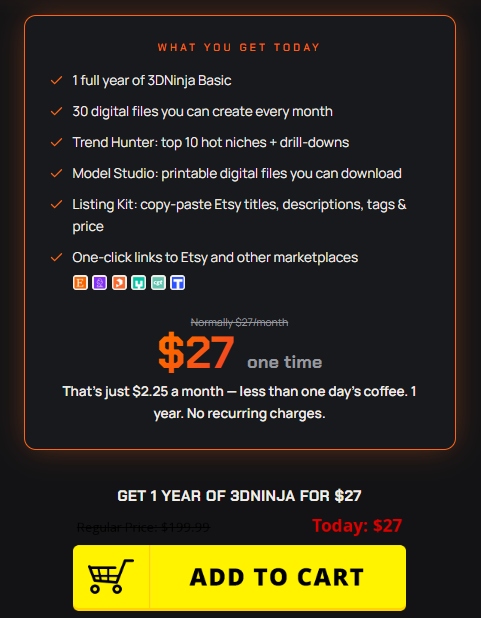
The sales page advertises one year of Basic access for a one-time $27 payment. It also claims you can create 30 digital files each month.
Here’s what the offer lists:
- One year of Basic access.
- 30 digital file creations per month.
- Trend Hunter.
- Model Studio.
- Listing Kit.
- Links to marketplaces and selling platforms.
All of this is the seller’s description of its own offer. I haven’t confirmed that each feature works as promised.
The “30 digital files” line needs a closer look. Does it mean 30 generation credits, 30 successful downloads, or 30 finished models? The material doesn’t say what happens with failed generations, redo attempts, or unused credits. Ask before you buy.
Also notice that this is one year of access, not a lifetime plan. The sales information doesn’t spell out renewal terms or whether your files stay available afterward.
Can 3D Ninja generate print-ready files?
This is the question I’d answer before anything else.
A 3D model and a print-ready file are different things. A model can look fine in a preview and still have problems. The walls might be too thin, a part might hang in the air with nothing under it, or the size might be wrong. Many files also need to go through a slicer before a printer can use them.
Before you buy, try to find out:
- Which file formats you can export.
- Whether other 3D design or slicing programs can open the files.
- Whether you can change dimensions.
- Whether you can edit a model after it’s generated.
- Whether models come out with geometry or mesh errors.
- Whether files need extra prep before printing.
- How you can test the output.
If the models are editable and work well with common printing tools, that’s a real plus. If you have to fix a lot by hand, a beginner may need more time and technical skill than the sales page suggests. Until someone shows the output working, I’d call print readiness an open question, not a feature.
Can you sell the generated files commercially?
Having a file isn’t the same as having permission to sell it.
Your rights depend on the software license, where the design came from, and the rules of the marketplace you use. Check these before listing anything:
- Does the license allow you to sell generated files, or only use them yourself?
- Are you allowed to redistribute or resell the original model?
- Could a design look too much like a protected character, a brand, or another creator’s work?
- Does your chosen marketplace accept this kind of file?
- Could the printed object cause a safety problem?
The sales page points to Etsy, Cults3D, Printables, MyMiniFactory, CGTrader, and Thingiverse. Seeing those names doesn’t mean each site accepts every generated file, or that the license lets you resell on all of them. Read the current terms for 3D Ninja and for each marketplace. If the license is vague, ask the seller for a written answer before you pay.
I’m not a lawyer, and this isn’t legal advice. If you’re building a real business, a quick professional opinion on licensing and copyright is cheap compared to a takedown or a dispute.
3D Ninja pricing and upsells explained
Many software offers add extra purchases at checkout. Here’s what the supplied material lists. Only the front end price is described on the sales page itself. The other offers come from the supplied outline, and I haven’t verified their current contents.
Offer | Price | Type | What to verify |
One year of Basic | $27 | One-time payment, one year | Final checkout price, creation limits, renewal terms |
Niche Pack | $27 | Upsell | Exact contents and whether it adds anything you need |
Agency Reseller License | $97 | Upsell | Which rights it grants and any limits |
Founder Lifetime Deal | $298 | Upsell | What "lifetime" covers, and whether updates are included |
Front end: one year of Basic for $27
This is a one-time payment for a year, not a monthly subscription. It’s also not lifetime access. Confirm the checkout price, access period, and creation limits before paying.
OTO 1: Niche Pack for $27
The outline lists a Niche Pack at $27. I can’t tell you what’s inside. Check the checkout page, and don’t assume you need it to use the Basic plan. Ask yourself whether it gives you something you couldn’t get from the main software or from free research.
OTO 2: Agency Reseller License for $97
A “reseller license” can mean very different things from one product to the next. The name alone doesn’t tell you whether you can do client work, resell, or redistribute. Read the actual terms and look for limits. Don’t pay for rights you can’t describe in your own words.
OTO 3: Founder Lifetime Deal for $298
The terms need confirming here too. Find out what “lifetime” covers, which features it includes, and whether future updates and services are part of it. A lifetime deal doesn’t always mean everything the company ever builds.
Are the upsells necessary?
The sales page presents the $27 plan as a standalone offer, and nothing I was given says the upsells are required. My advice is to judge the core product first. Buy an upgrade only when you can say exactly what it adds and why you need it. Seeing an offer at checkout is not a reason to take it.
Sales claims vs. available evidence
The sales page uses examples of other sellers to show that a market exists for 3D printing files. It mentions shops with big sales counts, products with lots of reviews, and creators with paying members.
The page also says these are independent examples, that those sellers aren’t necessarily 3D Ninja customers, and that the revenue numbers may be estimates. I’m glad that’s there. It’s also the most important part.
A successful independent seller shows that people buy these files. It doesn’t show that the seller used 3D Ninja, or that you’ll get the same results. Lots of reviews on a product doesn’t tell you how much money it made, either.
The page also talks about skipping inventory, printing, and shipping. That’s fair for digital downloads, since the customer gets a file, not a package. But you’ll still face other costs: marketplace fees, software, taxes, customer support, and marketing.
And “built-in traffic” on a marketplace isn’t free, guaranteed attention. Your listing competes with thousands of others, and what gets seen can change over time.
Where I land: digital 3D files are a business model worth looking into. The material I have doesn’t show that 3D Ninja itself will bring you sales or profit.
Potential advantages and unresolved concerns
Potential advantages
- The workflow is guided. Research, model generation, and listing prep in one place may make things clearer for a beginner.
- It could cut down on design work if Model Studio performs well.
- Listing Kit might save you time on descriptions and tags.
- The $27 starting price is clear, subject to the current checkout terms.
- Selling downloads means you don’t have to make and ship a physical product for each order.
Unresolved concerns
- Model quality is unconfirmed. Nobody has shown me that the files are accurate, editable, or ready to print.
- Commercial rights are unclear, and they decide whether the product can support a business at all.
- Sales aren’t guaranteed. A good design can still go unnoticed in a crowded market.
- Marketplaces charge fees, so “digital” doesn’t mean “free to run.”
- Upsells, other software, and promotion can push the real cost above $27.
- It still takes time. You’d research, test, write listings, answer buyers, and improve your designs.
Whether the benefits outweigh the concerns comes down to one thing: is the actual output good enough to justify your time and money?
Who should consider 3D Ninja, and who should skip it?
It might suit you if you:
- Want a guided introduction to making 3D printable files.
- Like having research, models, and listings in one workflow.
- Are willing to check every design before you sell it.
- Know that sales are uncertain.
- Have confirmed the license fits your plan.
- Can afford the purchase without needing the money back fast.
You may want to pass for now if you:
- Need guaranteed income from a software purchase.
- Need precise engineering or specialized CAD features.
- Can’t confirm commercial rights for your use.
- Need a specific export format nobody has verified.
- Expect every generated model to print perfectly.
- Can’t afford to lose the price if it doesn’t work for you.
If you want fine control over geometry and measurements, a more established design tool is probably the better path. If you’re still deciding whether 3D printing is for you, 3D printing for beginners covers the basics.
What to check before buying
Use this list before you pay. From the supplied material, the only things I can point to are the seller’s claims: the $27 price, the one-year access, the 30 files per month, and the 30-day guarantee. Everything else below is unconfirmed.
- [ ] Confirm the current Basic plan price.
- [ ] Confirm the one-year access period.
- [ ] Find out how the 30 files per month are counted.
- [ ] Confirm the export formats.
- [ ] Watch a demo of the full file-generation process.
- [ ] Check whether models can be edited.
- [ ] Find out whether generated files are suitable for printing.
- [ ] Read the commercial license.
- [ ] Read the rules of your intended marketplace.
- [ ] Review every upsell and its exact terms.
- [ ] Confirm the refund policy and who qualifies.
- [ ] Find out what happens when access expires.
- [ ] Check the support channels.
- [ ] Add up marketplace fees and other costs.
This matters most if you plan to sell, not just experiment.
3D Ninja alternatives: what to compare
I haven’t tested competing tools for this review, so I won’t name prices or features for specific products. What I can do is show you what to compare.
Traditional 3D modeling software gives you more control over shape, size, and geometry. The trade-off is a steeper learning curve. It suits people who want to build real design skills.
Free design tools are fine for learning and simple projects. Features vary, so check which formats they export and what the terms say about selling your work. Our roundup of free 3D modeling software can help you narrow it down.
Existing marketplaces are useful for research. You can see what categories exist and how other sellers present their files. Looking is fine. Copying another creator’s design is not, so read each platform’s intellectual property rules.
You can also write your own titles, descriptions, and tags. It’s slower, but you control the accuracy and the tone.
The real question is whether 3D Ninja saves you enough time or effort to justify the cost. To answer it fairly, compare current prices, real demos, license terms, and your own testing, not marketing claims.
Refund policy and support: what is confirmed?
The sales page advertises a 30-day money-back guarantee. That’s a seller claim. I couldn’t confirm the exact rules, exclusions, or how to request a refund.
Before checkout, find out:
- When the 30 days start.
- What conditions affect eligibility.
- How to submit a request.
- Whether any products or upgrades are excluded.
- What support channels exist.
- How long refunds take.
Save the checkout terms and your purchase confirmation. If anything is unclear, ask the seller before you pay. A guarantee on a sales page doesn’t mean every request gets approved.
Is 3D Ninja worth it in 2026?
It depends on how good the output is, how well the tools fit your plan, and what kind of business you want to build.
The idea is sensible. Finding ideas, generating models, and writing listings are three real tasks, and one place to do them could help a beginner. The $27 starting price is also low enough to feel like a small risk.
But the open questions are big ones. I don’t know the file quality, the export formats, the license terms, or whether it leads to sales. Those aren’t side details. They decide whether this is a useful tool or a nice-looking demo.
If you just want to experiment, it could be worth trying once you’ve read the current terms and seen a full demo. If you’re planning a serious commercial operation, I’d want more proof first.
Judge the Basic plan on its own. Skip upgrades you can’t explain. And don’t let income examples from unrelated sellers make the decision for you. Your results will depend on your designs, your niche, the competition, and the marketplace rules.
Frequently asked questions
Is the $27 offer lifetime access?
No. The sales page describes the $27 Basic offer as one year of access. A separately advertised lifetime deal may have different terms, so confirm them before buying.
Are the upsells required?
The sales page presents the $27 plan as a standalone offer, and nothing I was given says the upsells are required. Check the checkout page to see what the core plan includes and what’s optional.
Do you need a 3D printer?
According to the sales page, you don’t need a printer to create or sell digital model files. Your customers would need a compatible printer and software to turn the file into a physical object.
Which file formats can you export?
The supplied information doesn’t say. Check the product documentation or ask the seller, especially if you need a specific format for your printing setup.
What happens after the first year?
The Basic offer is advertised as one year of access. The material doesn’t explain renewal conditions or what happens to your access afterward. Check the terms for renewal costs, continued access, and whether files you’ve already made stay available.
Are the earnings examples from actual 3D Ninja users?
No. The sales page says its marketplace examples are independent creators, not verified 3D Ninja customers. They show activity in the wider market. They don’t show that 3D Ninja users got the same results.
Final verdict: should you buy 3D Ninja?
3D Ninja bundles product research, 3D model generation, and listing prep into one workflow. For a beginner, that’s a tidy starting point, and $27 for a year is a clear price.
Convenience isn’t the same as value, though. You still need to know whether the models are good, whether you can sell the files, and whether the software works with your marketplace. Nothing I’ve seen proves that a new seller will match the results of the independent shops shown on the sales page.
My advice is to go slowly. Look at the Basic plan only after you’ve checked the file formats, commercial rights, creation limits, refund terms, and a full demo. Treat every upgrade as its own decision. If those checks come back good, it may be a fine way to experiment with 3D printable products. If key answers are still missing, waiting is a reasonable choice.
Buy software because it will help you make something people want, not because it promises an easy business.
If you’d like to look at the current offer yourself, you can visit the official 3D Ninja page and read the terms before deciding.