
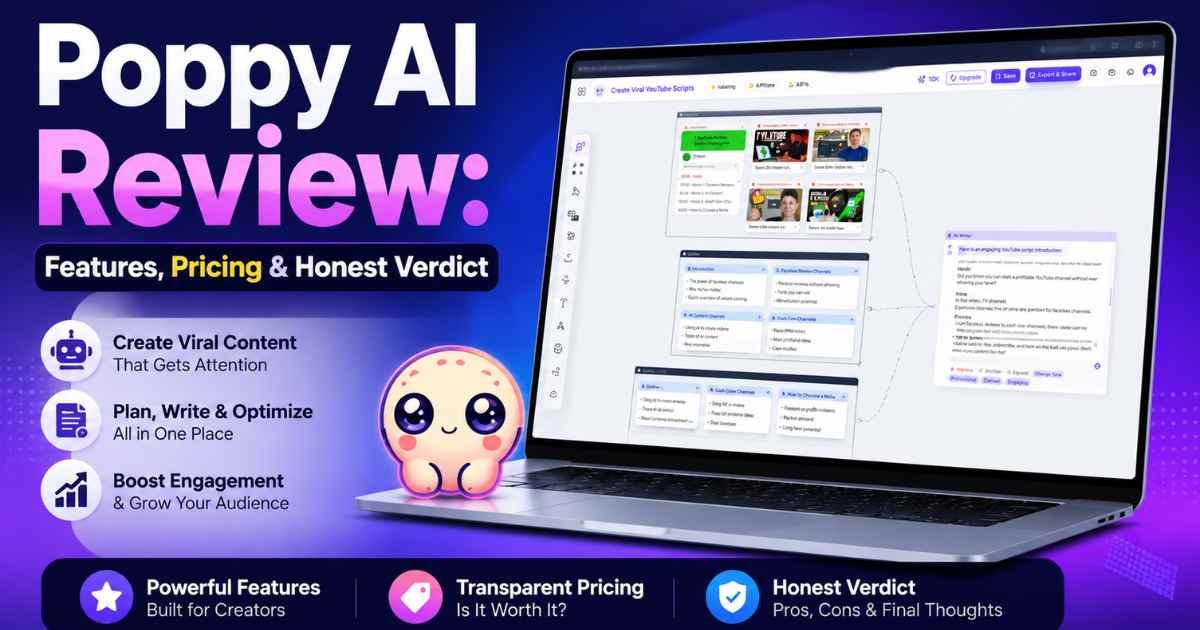
Content creators waste hours on a weekly basis organizing research rather than starting to write the content. This Poppy AI review explores whether or not this visual AI workspace solves that issue. We explain its features, its price, and the user feedback, so you can determine if it’s right for you. Here you won’t find only a sales pitch; you’ll find the strengths and weaknesses as well.
Quick Verdict
Item | Details |
Rating | (4.5/5) |
Best For | Content creators, agencies, and marketers who juggle many sources |
Starting Price | $279 (one-time, Tier 1) |
Free Trial | Not listed publicly; check the official page |
Lifetime Deal | Yes, through AppSumo |
Money Back Guarantee | 60 days |
Verdict | A solid pick for creators who want fewer tabs and faster drafts |
Poppy AI earns a strong rating because it solves a real problem. Instead of a blank chat box, you drop in videos, PDFs, and voice notes, and the AI builds content from what’s actually there.
That said, it’s not perfect. A few users have reported speed issues and some limits around visual asset generation. Beginners may also need the onboarding call to get the most out of it.
Creators who publish often, work from many sources, or manage content for clients will likely get the most value. If you only need basic text generation, this might be more than you need.
Pros and Cons
What I Like
- Save a YouTube video, PDF, link, or voice note directly onto a canvas without copying and pasting text.
- Simply maintains ChatGPT and Claude within the same workspace, not losing track of your thoughts when switching tabs.
- Knows your writing style and makes your writing sound more like you and less like a computer bot
- Together, teams can collaborate on a single board live!
- Creates short, usable videos or podcasts from longer content
- Incorporates tools such as Slack, Notion, and Google Calendar via MCP integrations
- Has a 60-day money-back guarantee, reducing the risk of a trial
What Could Be Better
- There are some complaints of occasional slow performance with heavy usage reported by some reviewers.
- Although visual asset generation is good, it is not quite as far as dedicated design tools.
- Model access (such as certain AI features) may vary from time to time, causing some consumers to get confused.
- The learning curve might seem steep for those who don’t have experience with canvas-based tools.
- The lower pricing levels only allow you one seat, not always the best option for small teams.
What Is Poppy AI?
Poppy AI is a visual workspace designed for content makers. It was created by Rafeh Qazi and Naz Dumansky, who were both tired of switching tabs, using sticky notes, and working on scattered documents when doing content-related work.
Drags sources onto a canvas, rather than typing into a blank chat box. It’s a digital corkboard for video, PDF, or voice notes, and has a feature that lets you get a script or blog post from the AI. YouTuber, for instance, might drop 3 competitor videos in and be provided with a brand new script idea, which was not a random thought, but a genuine pattern.
Why People Look for This Tool
These are the common pitfalls of most content creators. Having too many tabs open in the browser. Research on various applications. An empty page that never seems to fill.
All these issues slow down the entire content process. The writer is stalling out the writing process by searching for notes. The writer is losing time looking for notes rather than writing. But if teams switch tools, they are losing context every time.
The problem Poppy AI addresses is that everything is in the same visual space. No loss of information between steps, with sources, notes, and AI chat all being kept together.
Quick Overview
Designed for content creators who produce content consistently and wish to streamline their content creation process from research to draft. Does not require any installation; it is browser-based. The interface features a canvas for dragging and dropping, making it a more visual approach than a typical AI chat tool.
Detail | Information |
Product Name | Poppy AI |
Category | AI content creation and visual workspace |
Best For | Content creators, marketing agencies, social media marketers |
Platform | Web-based |
Ease of Use | Moderate learning curve, guided onboarding available |
Free Trial | Not publicly listed; check official site |
Money Back | 60-day guarantee |
Pricing | Starts at $279 (lifetime, Tier 1) |
Key Features
1. Centralize All Your Sources
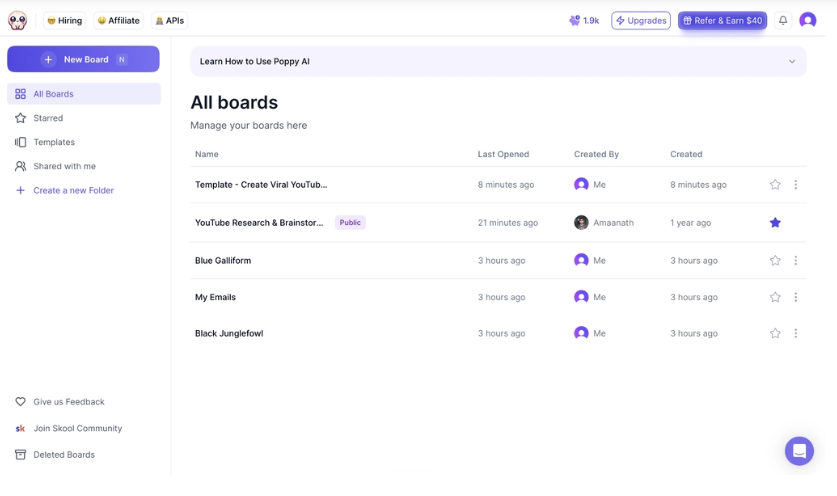
- Embed YouTube videos, PDFs, websites, images, and voice notes into a single workspace.
- Browse the Internet without having to copy and paste between apps.
- Maintain research, notes and AI-generated content in the same visual canvas.
- Reduce time by managing all the sources from a single dashboard.
2. Write Faster Without Losing Your Voice
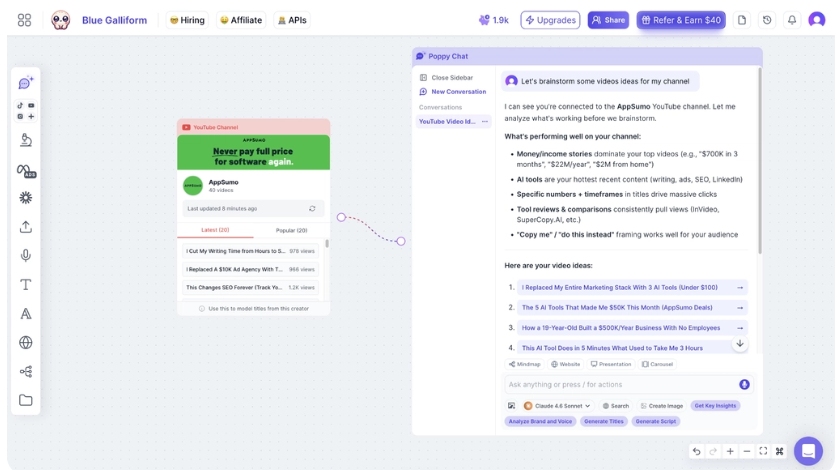
- Write blog posts, emails and scripts from your own content.
- Collaborate with ChatGPT and Claude within a single workspace.
- Get your preferred writing style to come out of Poppy AI.
- Produce more uniform content, with minimal editing.
3. Analyze Competitor Content and Find New Ideas
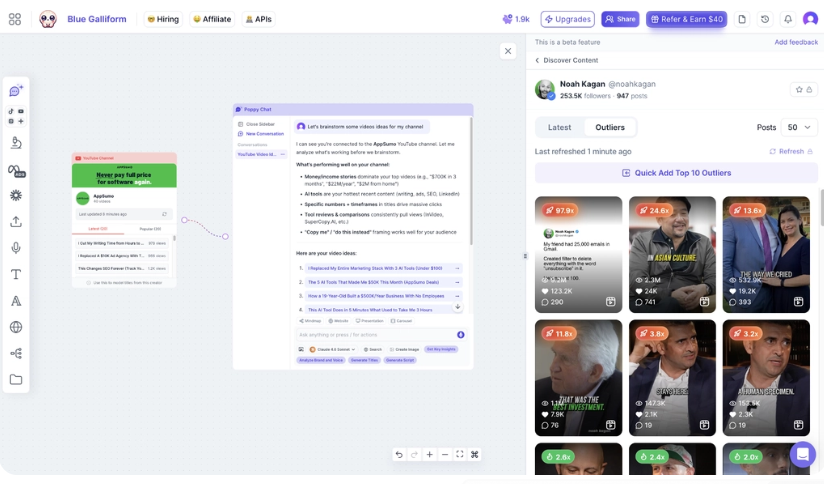
- Create long videos, podcasts, and documents in minutes.
- Find new marketing opportunities and gaps in the content.
- Get the main points without watching/reading everything.
- Use competitor research as a source for new ideas for content.
4. To plan and structure your content.
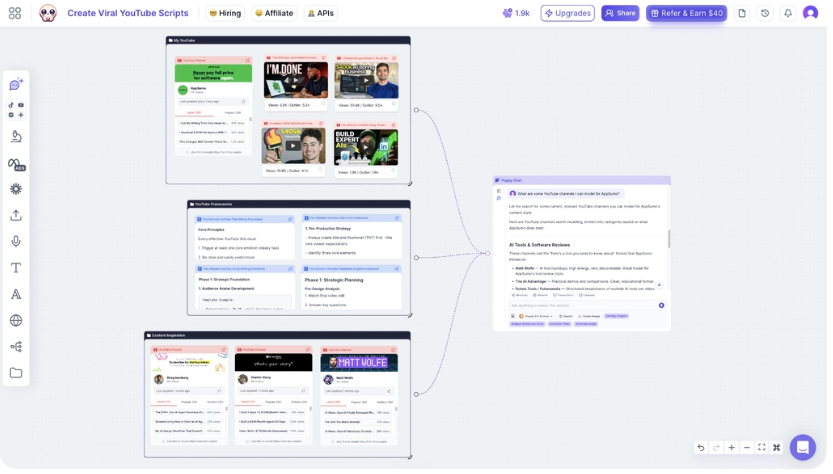
- Create a visual mind map prior to writing.
- Develop concepts into outlines, scripts and action plans.
- Easily drag-and-drop related content.
- Ensure all assets and ideas are tidied and arranged during the project.
5. Content Summarization
If you want to listen to a two-hour podcast but don’t have time for it, you can ask Poppy AI to summarize the main points. This means real time is saved for anyone conducting competitor research and/or trend analysis. Marketing agencies in various sectors are the best.
6. Mind Mapping
Visual mind mapping can be used to plan out a campaign or story structure prior to composing anything. This can aid writers in structuring their ideas prior to drafting. Good for anyone who feels like planning in advance, such as YouTubers who are planning a series.
7. Competitor Analysis
The ability of Poppy AI to analyze competitor content, websites, and documents for angles and hooks. This provides marketers with something to start with rather than just taking a stab in the dark. This can be particularly useful for affiliate marketers who are creating a review.
8. MCP Integrations
Poppy AI integrates with applications such as Slack, Notion, Gmail, and Google Calendar. So your content workflow can be integrated with the other apps in your work environment. Agencies that are in charge of client communication as well as creating the content are the biggest beneficiaries.
How It Works
- Sign up for the Poppy AI website.
- Import sources, such as video files, documents (PDFs), or voice notes.
- Arrange them on your visual canvas.
- Talk to the AI about what you wish to make.
- Create a script, post, or email using sources.
- Read and proofread to adjust to voice.
- Create and store your board for future projects.
- Save and export or share the completed work.
Overall Impressions
It seems like Poppy AI is a groundbreaking way to create content, given its features, documentation, and customer reviews. The majority of tools offer a ‘new prompt’ option. In contrast, Poppy AI is based on your existing sources.
The user interface is visual; some users might be pleasantly surprised, and others might take a little getting used to. There are a couple of reviewers who say the onboarding call has been very useful for them in understanding the process quicker than learning it on their own.
Overall, the performance appears good, but some users have experienced performance issues during heavy usage. Price-wise, the lifetime pricing always receives good reviews, particularly when they make a price comparison with monthly subscriptions elsewhere.
Real Use Cases
Bloggers: Bloggers can visit research articles and competitor blogs to get outlines more quickly. This eliminates the initial research phase, which can consume a lot of time.
Content Creators: Content creators can transform raw footage or voice notes into well-crafted scripts. This is helpful to those who have an out-of-the-box mentality but do not know how to structure their ideas into text.
Marketing Agencies: If you have multiple clients, you can have separate sources and notes per brand on boards. This ensures that you have your work with the client organized but not confused with other projects.
Freelancers: Freelance writers can utilize documents and voice memos that have been provided by the client to quickly start writing. This will help to ensure accuracy while keeping to the deadline.
Small Businesses: Small business owners can use product notes and/or customer calls to create marketing materials. This reduces the need for additional support with content tasks.
YouTubers: YouTubers can upload previously made videos and content from their competitors to create new ideas for their videos. This allows a channel to have a uniform tone.
Affiliate Marketers: Affiliate marketers can incorporate unique points to their content pieces from competitor assessments. This will make it easier for reviews to stand out from the crowd as opposed to repeating the same ideas as others.

Biggest Advantages
With fewer tabs, less time will be wasted switching between apps, saving more time throughout a busy work week. A visual canvas is useful for those who prefer to visualize instead of list in plain text. When content is generated using AI, style matching cuts down on the amount of editing required to render it human. Live collaboration is when teams can review and edit content together as opposed to passing files back and forth.
Since the AI is based on source material, it reduces the amount of hallucinated facts that it produces. Built-in competitor analysis saves your research time instead of having to scan them manually. With a lifetime deal, the total amount of money you pay may be less than that of a monthly subscription.
Benefits
Saves Time
Poppy AI can save planning time by directly taking notes from the source rather than from scratch. If you don’t spend extra time organizing research, you’ll have more time to spend writing!
Keeps Projects Organized
One board for every source, note, and draft is eliminated by removing them from apps. This allows it to be more accessible after a few days’ break.
Reduces Repetitive Work
The AI can be trained to become a brand voice over time, which saves the hassle of retyping your brand voice each time. This reduces the amount of duplicate writing of prompts.
Makes Collaboration Easier
No more back-and-forth emailing of drafts to teams working on the same canvas. This can help to lessen communication problems on joint projects.
Improves Content Planning
Mind maps and connected nodes assist writers in planning out an entire marketing campaign before they start writing. This can help to create a uniform message throughout a project.
Limitations
While it may be a great tool, it does have its drawbacks, so it is important to understand before purchasing where Poppy AI is lacking. Please be aware that the layout is a bit different than a normal chat room and may take some getting used to for beginners. The limits on visual asset generation, such as images, are greater than those on text/script generation.
Some users have experienced slow speeds under heavy usage; this may be a concern if working on large projects frequently. Higher-level pricing can also be a bit of a sticker shock for the one-person creator, who may not require multiple brand seats.
Finally, the access to certain models in the tool may evolve, leading to some confusion among the buyers who had hoped for a comprehensive and permanent AI models library.
Pricing Plans
Plan | Price* | Best For | Highlights |
License Tier 1 | $279 | Individual creators | 500 monthly credits, 1 seat, 3 brands |
License Tier 2 | $539 | Growing creators | 1,000 monthly credits, more bonus credits |
License Tier 3 | $989 | Agencies & advanced users | 2,000 monthly credits, recommended tier |
License Tier 4 | $1,379 | Small teams | 3,000 monthly credits, 2 seats, 5 brands |
License Tier 5 | $2,259 | Larger teams | 5,000 monthly credits, 3 seats, 10 brands |
License Tier 6 | $4,459 | Businesses & enterprise users | 10,000 monthly credits, 5 seats, unlimited brands, white-labeled chatbots |
The Poppy AI is being offered on AppSumo as a lifetime purchase, divided into several levels. Tier 1 is priced at $279 per month and comes with 500 monthly credits, three brand profiles, and one seat. Tier 4 costs $1,379, provides additional credits, seats, and limits.
The higher tiers up to Tier 6 on the deal page bring in more brands, more seats, and features such as white-labeled chatbots. Each level features a money-back guarantee, allowing you to try it out before you invest in it.
The price and tier options may vary, so please visit the official pricing page for the latest information before purchasing.
Alternatives
Alternative 1: Jasper
Jasper is a popular AI writing tool primarily used for marketing content and blogs. The best thing about it is that it has an extensive library of templates for ads, emails, and web copy. For teams that prefer structured templates over a visual workspace, Jasper is a better option. If you’re looking to create content from existing content, such as videos or PDFs, then Poppy AI will do a better job. If you are looking for quick, template-based marketing copy, then go with Jasper.
Alternative 2: Miro
Miro is a visual collaboration tool designed for brainstorming, diagrams, and project planning. Its flexibility with teamwork and visual projects on a whiteboard makes it its greatest asset. Miro’s strengths are in pure brainstorming and workflow mapping. The best results with Poppy AI are when the objective is to create complete pieces of written material from research. If you’re looking for a whiteboard that is more about content than anything else, select Miro.
Alternative 3: Copy.ai
Copy.ai specializes in creating short-form marketing content in a rapid fashion, such as product descriptions and ads. The strongest aspect of it is its rapidity when it comes to easy, repetitive copywriting. Copy.ai is a better option for short text snippets. Poppy AI is best suited to longer content that is developed from several research sources. If you are looking to write shorter copy and don’t need to do much research, opt for Copy.ai.
Comparison Table
Tool | Best For | Starting Price | Main Strength | Biggest Weakness |
Poppy AI | Source-based content creation | $279 (lifetime) | Visual canvas with source importing | Learning curve for beginners |
Jasper | Marketing copy and templates | Subscription-based | Large template library | Less visual organization |
Miro | Visual brainstorming | Subscription-based | Flexible whiteboard tools | Not built for AI content generation |
Copy.ai | Short-form copywriting | Subscription-based | Fast simple text generation | Limited for long-form, research-based content |
Poppy AI fits creators who want to build content from real sources on a visual board. Jasper suits marketers who want templates. Miro suits teams focused on planning rather than writing. Copy.ai suits people who need short copy fast.
What Users Are Saying
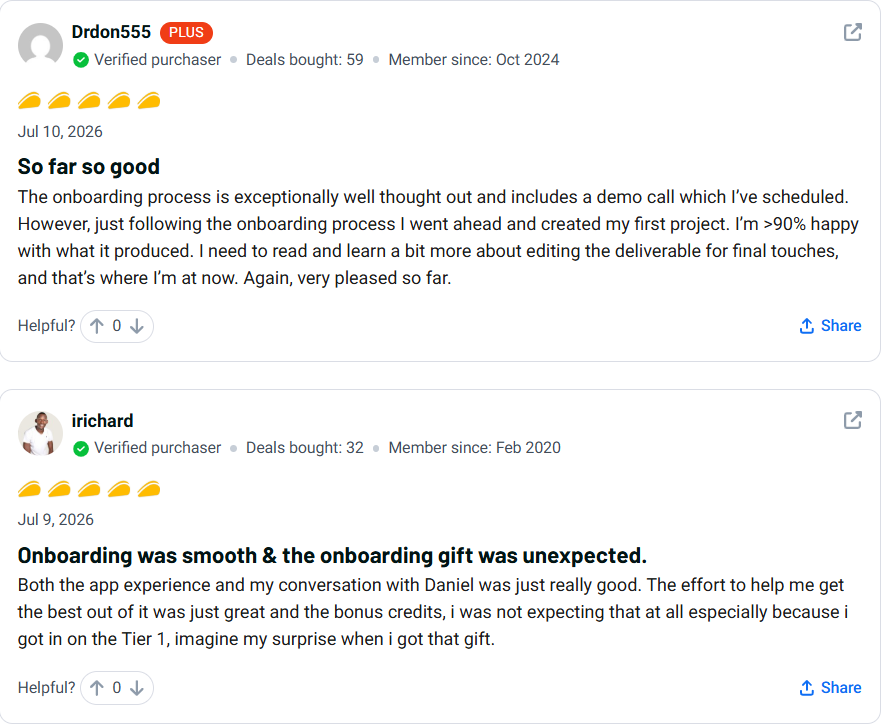
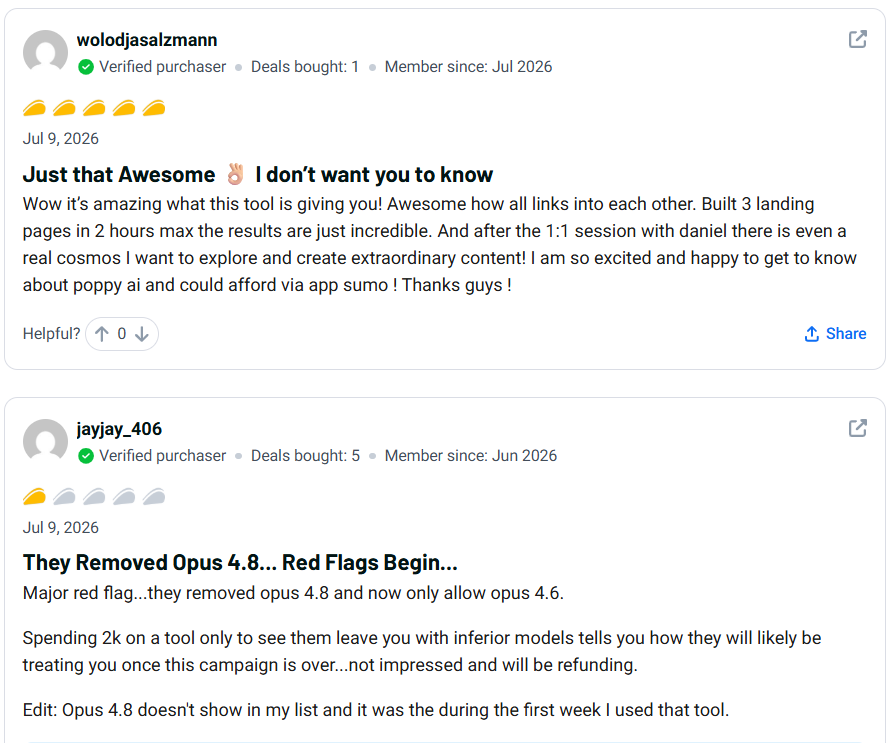
Users like the tailored onboarding procedure that incorporates a recommended call for setup of workflows. Several reviewers note that this “hands-on” assistance helped to make it easier to manage the learning curve.
One popular feature praised in positive reviews is its ability to provide users with ideas for new content while allowing them to import content they’ve created in the past on YouTube. Reviewers also say that they appreciated the extra credit they earned when they first onboarded.
There are a few reviews that mention issues with the availability of AI models changing over time, which resulted in some frustration. In at least one, the team that started up replied directly in order to answer the concern and provided support.
A handful of customers would like to see performance improvements when used intensively, while others would like to see more advanced visual asset generation. In general, the satisfaction scores are positive and are within the four- to five-star range.

Is Poppy AI Legit?
Poppy AI is a legit business, established in 2024 by Poppy in San Francisco, located in the United States, and verified to be a public founder on the AppSumo listing using PandaDoc’s public founder identity verification. The company is active; customer reviews and questions are responded to directly by the company’s founder.
There are some positive reviews for support, with references to onboarding calls and email support. The money-back guarantee also gives protection to newly acquired users, as they can get their money back within 60 days of purchase.
The fact that the company is regularly updating the product, such as adding MCP integrations and brand profiles, implies that it is continuously working to keep the tool fresh and relevant. The company’s commitment to regular product updates, like the addition of MCP integrations and brand profiles, shows that it is actively working to keep the tool fresh and relevant, instead of leaving it stagnant.
Easy to use Poppy AI?
Instead of a traditional chat box, you’ll be using a visual, drag-and-drop canvas with Poppy AI. If you’re unfamiliar with canvas-based tools, like this one, this layout may require some adjustment.
However, there are also onboarding calls to help you get started, with a few reviewers noting that this was a huge help in understanding the workflow. Users with a basic computer skills level appear to have a more comfortable experience if they invest the time required to set up the software.
Generally, the learning curve appears to be in the middle range. It may not be instantaneous, but it doesn’t seem that it is very technical after the first project.
Who Should Buy Poppy AI
- Regular content creators, having scripts, posts, or videos published regularly.
- These are great for affiliate marketers who are looking to quickly and easily get a competitive overview of competitor content.
- Marketing agencies including multiple brands under a single banner.Multi-brand marketing agencies.
- Business owners of small businesses who need to convert raw notes to marketing material
- Bloggers looking to accelerate their research and outlining needs to be more efficient.
- Content creators who are writing from clients’ sources.
- YouTubers who want to brainstorm and write new video concepts in an effective manner.
Who Should NOT Buy Poppy AI
- Individuals who require a simple writing aspect, such as short ad copy
- Users who are searching for a completely free tool that doesn’t require any cost.
- Businesses that require specific infrastructure or account support for their large enterprises
- Groups that need advanced enterprise-level security certifications
- Anybody not wanting to invest the time to learn a new visual workspace
Final Verdict
Poppy AI is unique due to its ability to create content based on actual sources, rather than starting from a blank prompt. The essence of the whole Poppy AI Review. Many creators will find it quicker to use the visual canvas, style matching, and source importing to go through the workflow.
The weak spots are also authentic. Users have reported slow performance, a limited number of visual assets generated, and a learning curve. However, the 60-day refund period decreases the risk of giving it a shot.
It might be a perfect solution for creators, agencies, and marketers having multiple sources and clients. If you’re only looking to create basic text, a simpler tool may be more appropriate. Check the latest pricing and available plans on the official website before making your decision.
FAQ
Does Poppy AI deserve to be reviewed? Or is it indeed worth it?
When users are active, and the features are largely satisfactory, it seems like Poppy AI is a worthwhile option for creators with a consistent workflow from multiple sources. May not be appropriate for those who just require some writing assistance.
Is there a free trial of Poppy AI?
As of this writing, there isn’t a clear mention of a free trial on their official page. It’s best to check the current site for the latest trial options.
What is the money-back guarantee?
You can get a money-back guarantee on Poppy AI for 60 days via AppSumo. This provides the buyer with time to trial the tool before making a decision on whether or not the organization will keep it.
Who is Poppy AI best for?
Ideal for video, document, or voice note content creators, marketing agencies, freelancers, and affiliate marketers.
How is it different than Jasper?
Jasper is all about creating marketing copy based on templates, whereas Poppy AI is about using real source content to generate content directly on a visual canvas. They solve some problems that differ slightly.
Easy to use for beginners?
Moderate learning curve as it is canvas-driven, though perhaps users can get the hang of it by following the guided onboarding calls.
Is it okay to use it when creating a YouTube script?
Yes. A number of authentic reviews have been found that include using Poppy AI, particularly for creating YouTube scripts, such as using past videos to match a channel’s tone.
What is the overall sentiment of the users in their Poppy AI reviews?
The majority of Poppy AI reviews are positive, highlighting the value of their onboarding assistance and the quality of their content. Some say that there are speed problems and more powerful visual asset tools.
Does it have a lifetime deal?
Yes, currently Poppy AI is available as a lifetime deal at AppSumo; there are multiple pricing options available depending on credits and features.
What are the most suitable options?
The contenders to Jasper are also popular options like Miro and Copy.ai, which have a bit different kind of content requirements.