

There are 10 browser tabs that are open. A video on YouTube here! A PDF there. A voice memo you recorded in the car.
To top it off, you have to convert all of it to a single script or a single post.
The Poppy AI lifetime deal aims to solve just that very issue. Poppy AI is a visual workspace. Drop it on a board. Afterwards, you can write with the help of AI.
This review will delve into the capabilities of Poppy AI. I will discuss the capabilities, the fees, the actual user experience, and the real disadvantages. No sales pitch. Just the facts only – based on research into this product and the public reviews.
Quick Verdict
Field | Value |
Our Rating | (4/5) |
Best For | Content creators, marketers, and small agencies |
Starting Price | $279 one-time (Lifetime, Tier 1) |
Free Trial | No free trial, but a live onboarding call is included |
Money-Back | 60-day guarantee through AppSumo |
Verdict | Recommended, with a few conditions |
Try It Here |
That 4-star rating means Poppy AI does what it says. It’s genuinely useful for people who create a lot of content. But it isn’t perfect, and the credit limits on lower tiers can feel tight. More on that below.
Pros and Cons
What I Liked:
- Drag in YouTube video, PDF, Images, and Voice Notes to one board.
- It leverages over one AI model, such as Claude and ChatGPT, within the same workspace.
- The visual canvas contains all sources, notes, and outputs without the need to open multiple tabs.
- It is offered together with a 1-on-1 onboarding call for free to help you get it set up.
- The monthly subscription fee is eliminated with the Poppy AI lifetime deal.
What I Didn’t Like:
- The lower levels are an allotment of available credits per month, which can be used up quickly by heavy users.
- But there is still some feeling of the “homebrew” quality of some of the visual asset generation compared to dedicated design tools.
- Some customers reported a slowdown at peak times.
What Is Poppy AI?
Poppy AI is a visual workspace for content creators. It’s like a giant whiteboard, but more intelligent.
You drag your sources onto the board. A YouTube video. A client brief. A voice note. All of it is read by Poppy AI.
You then tell it to write. A script, a social post, and an email. It accesses your board, not a blank prompt.
Suppose that you have just seen a competitor’s video and wish to create a copy of it. Attach the video link to the board. Get the key points from Poppy AI. Then get it to write a script for you.
Why I Looked Into the Poppy AI Lifetime Deal
This is a problem which anyone who makes content knows. You research something. You do note-taking on something. You then go into your word processor and have to remember everything.
The time spent between research and writing is a waste of time. It also mutes your tone as you’re reproducing what you’ve heard in your own voice rather than from the sources.
ChatGPT is a tool that can aid in writing, but it won’t remember to cite the sources for you. That’s the gap Poppy AI is built to close, which is why the poppy ai lifetime deal caught attention among bloggers and marketers looking for a one-time payment option instead of another monthly bill.
Quick Overview
Poppy AI works on the web. You build boards, drop in content, and chat with AI models right next to your sources. It’s built for people who create scripts, posts, and emails often, not for occasional use.
Detail | Info |
Product Name | Poppy AI |
Best For | Content creators, marketers, agencies |
Platform | Web |
Main Benefit | Turns any source into on-brand written content |
Ease of Use | Medium |
Starting Price | $279 one-time (Lifetime, Tier 1) |
Free Trial | No, but free onboarding call included |
Money-Back Guarantee | 60 days (via AppSumo) |
Key Features
1. Bring All Your Content Into One Workspace
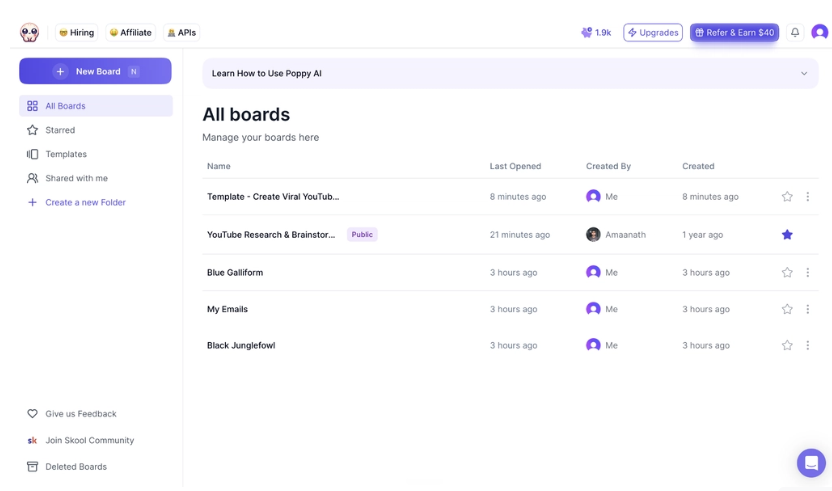
In the days of information overload, the research process can be significantly complicated, but not with Poppy AI, which has everything consolidated. You can import YouTube videos, TikTok clips, Instagram Reels, pdf, image files, voice notes, web pages, and documents onto a visual canvas. You don’t have to flip back and forth between dozens of tabs; all of your sources are grouped together.
2. Create Content That Sounds Like You
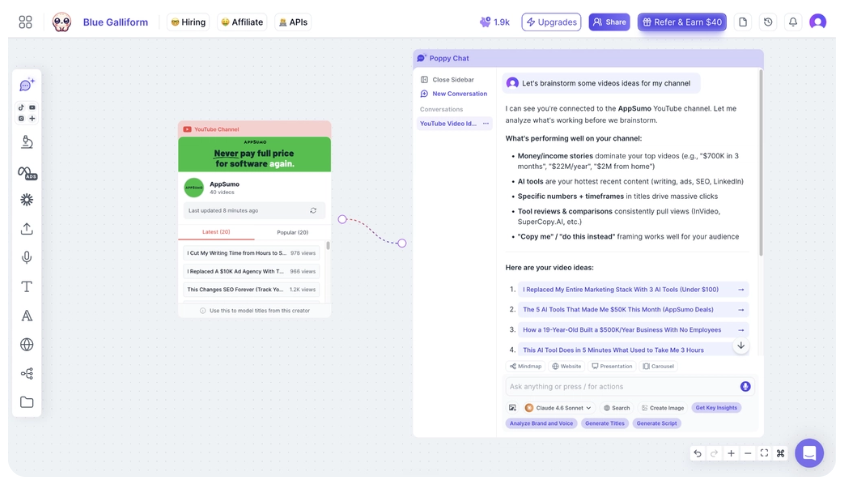
Don’t begin with a blank line! Create blog posts, video scripts, emails, or social media content directly from the materials collected with Poppy AI. It also picks up on your writing patterns, enabling your written content to remain consistent and on-brand.
3. Research Competitors Faster
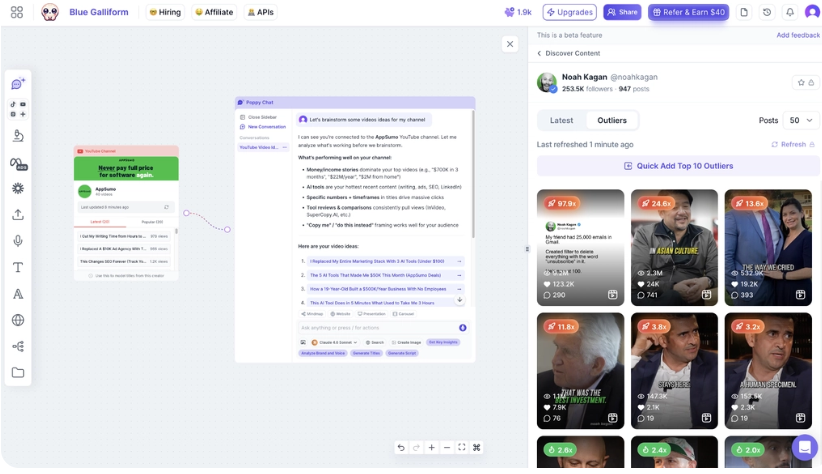
In minutes, you can get a summary of long videos, podcasts, websites, and documents with Poppy AI. It makes it easy to see what’s significant and vital in their content, marketing angles, hooks, and key takeaways so that you do not have to watch or read everything they publish.
4. Plan and Organize Ideas Visually
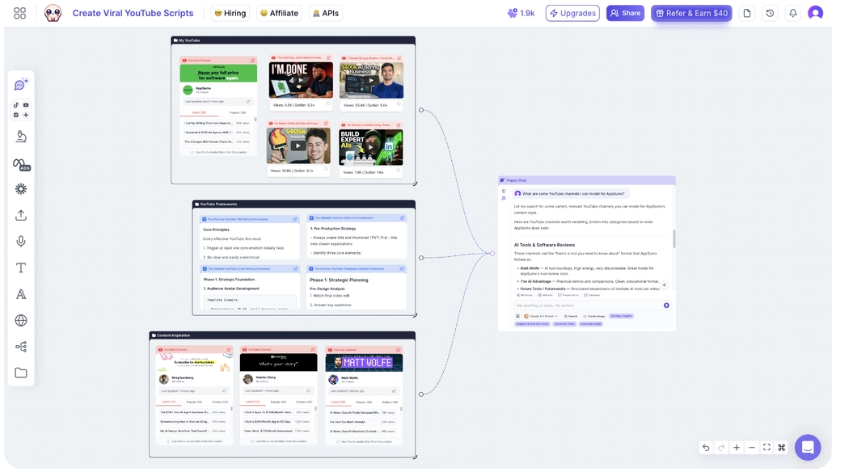
Use the built-in visual canvas to brainstorm ideas, create mind maps, and organize ideas prior to writing. Link related topics, develop outlines, and project manage anywhere—keeping all assets, notes, and AI-generated content more organized.
How It Works
- In order to use the service, you must register and establish an account with us.
- Finish the guided onboarding, creating your first board.
- Schedule a free 1-on-1 onboarding meeting with the Poppy AI team.
- Drag in your sources: videos, PDFs, voice notes, or links.
- Have the AI extract or summarize the information from those sources.
- Have a conversation with the AI model you have selected to create a script, post, or email.
- Make changes to the draft on the canvas, so it sounds like you.
- Save and/or export your completed work.
My Research and Overall Thoughts
I have not used Poppy AI myself, so I have taken the information from the product documentation, the information in the AppSumo listing, and some of the reviews posted by users.
From the research, the principal idea is supported. One problem people who create lots of content face is the need to create content from a blank chat window. A problem people who create lots of content face is that they have to create content from a blank chat window.
According to the founders, they have used it internally and reduced their production time by 70% when developing Poppy AI. It’s a company claim and not an independently verified number, so use it as a data point, not a guarantee of your results.
The reviews from the public, which are readily available, are mostly good and have an average rating of 4.88 out of 5 stars, based on 142 reviews at the time of writing. The most frequent compliments are around the onboarding process and the organization of the sundry research in the canvas. Less frequently, there are some complaints of rough edges in the visual generation and lag once in a while.
Real Use Cases
1. Bloggers can place 3 competitor blog articles and a YouTube video on the same keyword. Poppy AI helps to extract the best angles into one outline even before the initial draft has begun.
2. A marketer who is conducting a product launch can create a board using feedback from the customers, previous ad copy, and a demo video. Then they can create a few variations of the ad without having to rewrite the ad repeatedly.
3. For multiple client agencies, it can be useful to have a separate board for each client with notes about the brand’s voice and/or source material. This helps writers avoid getting the tone of other clients and clients’ messages confused.
4. eCommerce Sellers: A seller can upload product images and customer feedback, and request that Poppy AI generates product descriptions or social captions that capture buyers’ true sentiments.
5. If a small business owner doesn’t have a lot of time, they can write a quick voice note about a promotion that they can then edit and convert into a proper email or social post without hiring a copywriter.
Benefits — Why People Choose It
Less time spent switching tabs
When you work with sources and AI chat in one board, it reduces the number of browser tabs and documents that you have to switch between.
Content that sounds more like you
Outputs are created with your own voice and trained with your voice, resulting in more personal writing than a blank-prompt AI answer.
One-time cost instead of a monthly bill
With the Poppy AI lifetime deal, you can purchase Poppy once, rather than on a recurring basis from AppSumo.
Faster competitor research
Hooks and angles that are pulled from competitor content directly on the canvas save the time of viewing and/or reading the entire competitor content.
Team working in the one location.
The board can be used by many people, reducing the number of emails going back and forth.
What I Didn’t Like
There is a limited number of credits on the lower tiers. For heavy users and those who are posting daily, Tier 1’s 500 credits might not last long.
Creating visual assets such as photos with social posts still isn’t as polished as proper design apps. It does the job, but it’s not the best component of the product.
It may take some time for first-time users to get used to the visual canvas if they’re more accustomed to a basic chat window. It’s not “type a prompt, wait for a response.It’s not “prompt, wait”.
You might still need a tool such as Canva or a video editor to achieve a more refined look. The power of Poppy AI is in writing, not actual design work.
Pricing Plans
Poppy AI Lifetime Deal comes in 6 different licenses on AppSumo. All of the plans offer lifetime access, all future updates of the matching plan from AppSumo, and a 60-day money-back guarantee. Upgrades to the tiers are possible if need be and available during the deal period. This can also be downgraded within the first 60 days of purchase.
License Tier 1 – $279 (Regular Price: $649)
This is the basic plan, and it’s made for one person who’s making something alone and/or freelancing.
It includes:
- Lifetime access
- 500 monthly AI credits
- 500 one-time bonus credits
- 3 brands
- 1 user seat
- Unlimited boards
- Import from YouTube, PDFs, websites, social media, and more
- The ability to access the AI model that is supported.
- Collaborative workspace
This plan works well for those who are producing content on a regular basis but don’t require extensive AI usage.
License Tier 2 – $539 (Regular Price: $1,289)
Tier 2 is suitable for users who have greater content loads.
You get:
- Lifetime access
- 1,000 monthly AI credits
- 1,000 one-time bonus credits
- 3 brands
- 1 user seat
- All Tier 1 features
It’s a plan that’s great for bloggers, YouTubers, and marketers who post content several times a week.
License Tier 3 – $989 (Regular Price: $2,199)
Tier 3 is recommended for growing businesses and professional creators.
It includes:
- Lifetime access
- 2,000 monthly AI credits
- 1,500 one-time bonus credits
- 3 brands
- 1 user seat
- All basic Poppy AI capabilities
For those who use AI daily, this tier will provide a good mix of cost and monthly credits.
License Tier 4 – $1,379 (Regular Price: $3,867)
Tier 4 is designed for small teams and agencies.
It offers:
- Lifetime access
- 3,000 monthly AI credits
- 1,500 one-time bonus credits
- 5 brands
- 2 user seats
- All collaboration features
- API access (on a white-glove basis)
- White-label chatbot support
- MCP support
This plan is a good choice for teams that have multiple projects with clients.
License Tier 5 – $2,259 (Regular Price: $4,445)
Tier 5 is intended for bigger agencies and businesses.
You’ll receive:
- Lifetime access
- 5,000 monthly AI credits
- 1,500 one-time bonus credits
- 10 brands
- 3 user seats
- API access
- White-label chatbots
- MCP support
- All the collaboration and import capabilities
It’s best for companies that are creating a lot of content each month.
License Tier 6 – $4,459 (Regular Price: $8,890)
This is the maximum level plan available.
It includes:
- Lifetime access
- 10,000 monthly AI credits
- 1,500 one-time bonus credits
- Unlimited brands
- 5 user seats
- Full API access
- White-label chatbots
- MCP support
- Advanced collaboration tools
This tier is for large enterprise teams and agencies.
Money-Back Guarantee
All of AppSumo’s products have a money-back guarantee. If Poppy AI does not suit you, then you can claim your refund during the period that it is allowed.
Free Trial
Currently, Poppy AI is not providing free trials. The 60-day refund policy, however, means that you’re able to try the platform with fewer risks.
My Recommendation:
For most individual creators, License Tier 1 will be sufficient to get started. Tier 3 is the ideal option for anyone publishing content daily or handling multiple brands, as it offers the best price, monthly AI credits, and ROI. Tier 4 or higher is recommended for more team seats, API access, and enhanced team collaboration options for agencies that work with team members.

Alternatives — Other Tools to Consider
Alternative 1: Jasper
Jasper is a prominent AI writing tool aimed at creating marketing content and blog posts. It does not provide the same sort of drag-and-drop canvas that Poppy AI does for the organization of sources. If you are primarily looking for a workspace to research and script blog articles, then Jasper is not to your liking. Also, it is on a monthly subscription basis instead of a lifetime subscription.
Alternative 2: Miro
Miro is a visual collaboration board that is designed for brainstorming and diagrams, and it’s not a tool that’s built for AI-generated content. It’s more powerful when you’re brainstorming or planning projects with your team. Pick Miro if you’re looking to map out your vision but not necessarily write out your sources into a script or post.
Alternative 3: Notion AI
Notion AI is integrated within the Notion workspace where many teams already take notes and have docs. It’s easy to use if your team is already using Notion, but it doesn’t have the same features as Poppy AI, such as pulling content directly from videos, images, and voice notes on a visual canvas.
Comparison Table
Tool | Best For | Price | Strength | Weakness |
Poppy AI | Creators needing a visual source-to-content workflow | $279 one-time (Lifetime) | Multi-source canvas with multiple AI models | Limited credits on lower tiers |
Jasper | Long-form marketing copy | Starts around $49/mo | Strong templates for ads and blogs | No visual canvas, monthly cost |
Miro | Visual team brainstorming | Free–$16/mo per user | Great for diagrams and planning | Not built for AI content writing |
Notion AI | Teams already using Notion | Add-on to Notion plans | Fits existing workspace | No multi-source media import |
What Users Are Saying
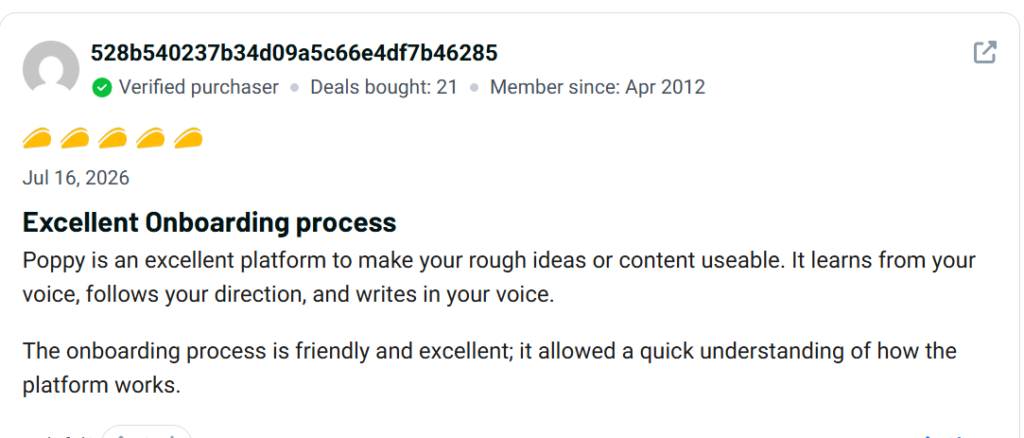
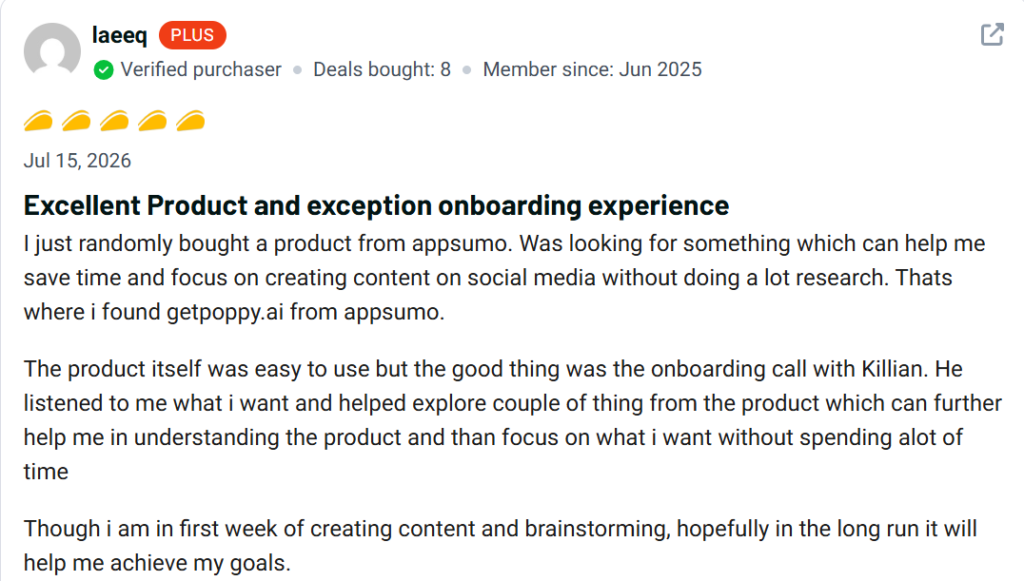
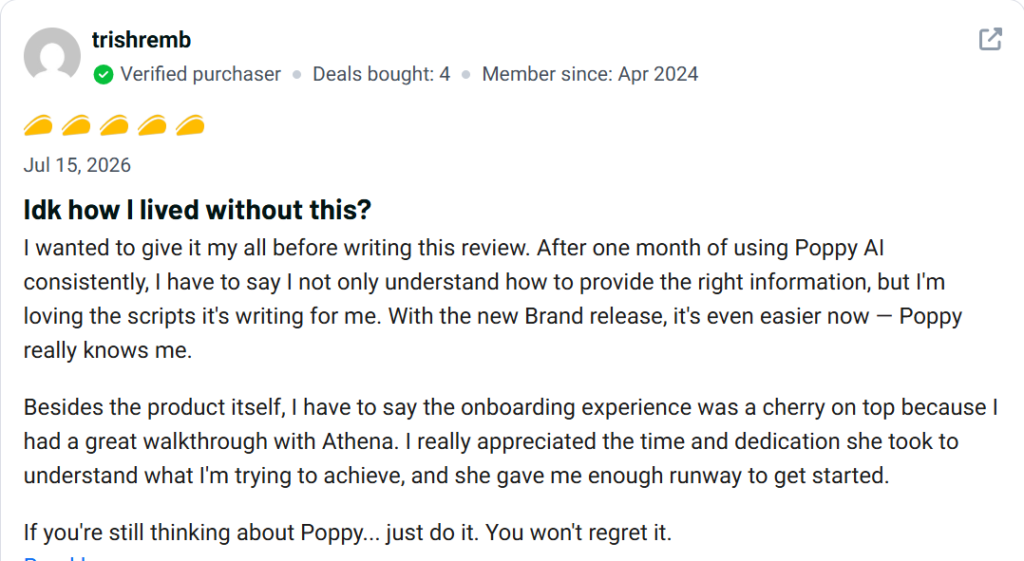
On AppSumo, the rating for Poppy AI is 4.88 out of 5 stars based on 142 reviews, with 96% of them giving the product a 5-star rating.
The personal onboarding call is frequently mentioned in the comments and is a point of praise. A few reviewers note they appreciated doing a live walkthrough of the canvas to be able to understand how to use it as opposed to figuring it out themselves.
The reviewer also noted that the tool facilitates the ability to access ideas from various platforms such as YouTube and Instagram, which is something they were unable to see in any one-purpose AI writing tools.
A handful of reviews comment that the tool was more expensive than they had anticipated for the application they made use of it for, and a few reviews said they needed to do a bit of exploring to discover all the features. There are a few ratings in the 1 and 2-star range, but these seem to be a relatively small proportion of all the ratings.
In general, the feedback on the public review is consistent with the product’s description: good induction support and more than adequate space to generate content, but the most common grievance is on the entry-level tiers, credit limits.
Is Poppy AI Legit?
Yes. Poppy AI is a legitimate and established company launched in San Francisco, USA in 2024. It is listed on AppSumo (which verifies sellers before listing lifetime deals) and the founders have a public identity verification through PandaDoc. The high number of reviews and the high average rating also indicate that it is not some new or untested product, as it is a real user base.
How easy is it to use Poppy AI?
Once past the initial setup, it’s fairly simple. The guided onboarding and free walkthrough call help to level the learning curve. However, the visual canvas concept differs from the traditional chat-based AI application, and you may need to get used to using a board-style workspace if you are not familiar with this type of application.
Who Should Buy Poppy AI
- Bloggers whose posts have a regular schedule and cite several sources of research.
- Marketers who need to convert video, ads, and customer feedback into new campaigns.
- Small agencies with more than one brand/content client.
- Whether you’re a YouTuber or a podcaster, there are many instances when you need to repurpose a long video into a script and post.
- Anyone who wants to use multiple tabs but loses track of the studies will love this! This is for anyone who ever gets lost with several tabs open!
Who Should NOT Buy Poppy AI
- Those who are writing their social post once in a while (which is probably your case if you’re reading this) are probably good to use a free tool, such as a social post.
- Companies that require extensive, custom API workflows that are beyond the capabilities of the top tier.
- Users who are primarily interested in the design of the graphics, rather than the text.
- Anyone who doesn’t want to put a bit of effort into learning a visual canvas, rather than a chat box.
Final Verdict
What is Poppy AI for? So what is Poppy AI for? It provides you with a single place to keep your sources and write from, rather than switching back and forth between tabs and a blank AI chat.
This is a one-off payment, which makes the Poppy AI lifetime deal more affordable. Tier 1 ($279) is a good starting point for solo creators, but the more credits you need, the more Tier 3 or 4 will be worth your consideration.
It’s not flawless. The actual credit limits and visual asset generation are constraints to be aware of prior to purchasing. However, for those looking for other sources that do not have the option of a 60-day money-back guarantee, it’s a decent investment. If this is what you want to do, this is worth checking out.
FAQ
Should Poppy AI be purchased using a lifetime deal?
Yes, if you are a regular content creator. The Poppy AI lifetime deal eliminates the monthly subscription fees, while the 60-day money-back guarantee reduces the risk of using it.
Is there a free trial of Poppy AI?
No free trial, but all buyers receive a free 1-on-1 onboarding call to try out the workflow and receive expert guidance.
What is the refund policy for Poppy AI?
AppSumo backs the purchase with a 60-day money-back guarantee, so you can request a refund if it isn’t a fit.
Poppy AI lifetime deal — who is it best for?
The poppy ai lifetime deal fits bloggers, marketers, and small agencies who create scripts, posts, or emails from multiple sources on a regular basis
What are the differences between Poppy AI and Jasper?
The template-based long-form copy is the strength of Jasper, whereas Poppy AI is based on the visual canvas that takes inspiration from videos, PDFs, and voice notes. The Poppy AI comes with a “lifetime deal”, whereas Jasper is a monthly subscription.
Should Poppy AI be used by new users?
It’s easy to use with its guided onboarding and live call, but might require some getting used to for those who have only used a basic chat system before.
Yes, you can use Poppy AI to write scripts for YouTube.
Yes. Drop in a reference video or notes, and then Poppy AI can help you draft a script that is written in your own voice.
What do real users say about the Poppy AI lifetime deal?
The average rating of public reviews is 4.88 out of 5, with the multi-source canvas and onboarding support getting the thumbs up, and a few comments on the lack of credits at lower tiers.
What is the most suitable Poppy AI plan for small teams?
Tier 4, which has a price of $1,379, is available for small teams (3,000 monthly credits, 2 seats).
What are the top alternatives to Poppy AI?
There are a few alternatives whose features are similar to Jasper, Miro, and Notion AI, but none do it exactly like they do.