
(Disclosure: This article may contain affiliate links. If you purchase through a qualifying link, we may earn a commission at no additional cost to you.)
Urban fantasy is a blast to write and a pain to keep straight. You need a city that feels real, factions with believable grudges, a threat that matters, and magic that follows its own rules. Somewhere around chapter twelve, the details start slipping.
Urban Fantasy Royalties Bot is built to help with exactly that. It’s an AI-assisted tool for planning, worldbuilding, chapter development, and publishing files. According to its sales page, it runs on the Royalties Bot 2.0 framework and works with several outside AI providers.
So is it a useful tool, or is a regular ChatGPT or Claude workflow enough? This Urban Fantasy Royalties Bot review looks at the advertised features, costs, limits, and publishing support. One honest note first: this review is based on the product information I have, not on hands-on testing. How good the output is, and how much time it saves you, will depend on your workflow.

Urban Fantasy Royalties Bot Review: Quick Verdict
Overall: A structured workflow that could suit authors who want help organizing an urban fantasy book. The advertised features are promising, but none are independently tested here.
Main strength: The Story Bible and chapter-based process aim at a real problem, which is keeping a complicated world consistent.
Main limitation: AI usage is billed separately through your own API key, and the later $27 charge isn’t clearly explained.
Best for: Independent authors, beginners who like guided steps, and writers who already use AI tools.
Worth considering? Yes, if you check output quality, export options, licensing, and total costs before you buy.
What Is Urban Fantasy Royalties Bot?
It’s publishing-focused software that helps you develop an urban fantasy book with AI assistance.
Urban fantasy usually puts supernatural elements inside a modern setting. Think hidden magical societies, detectives who deal with monsters, secret factions, or people who live between an ordinary life and a stranger one. Good stories in this genre need consistent characters and clear rules. A scene or two of cool ideas won’t carry a whole novel.
The sales page describes a step-by-step process: develop the concept, organize the world, plan chapters, draft a manuscript, and prepare publishing materials. The advertised workflow includes:
- A story premise and central conflict
- A main character, city, factions, and threat
- A world framework and Story Bible
- Chapter planning and drafting
- Manuscript organization
- Book covers in several styles
- Assets for Amazon KDP and Google Play Books
It’s presented as custom-built software, not a bundle of generic prompts. That’s a reasonable pitch. But structure doesn’t equal a strong novel. You still bring the judgment, the editing, and the creative direction. The real question is whether the organization is worth the price.
Who Created Urban Fantasy Royalties Bot?

The product information names Quintana Marketing as the company behind it. The sales page lists two people:
- Andreas Quintana: Lead Vendor and KDP Strategist
- Erika Quintana: Co-Vendor and Marketing Strategist
That tells you who’s attached to the offer. It doesn’t tell you how reliable the software is over time, what the vendors’ full track record looks like, or how good every generated manuscript will be.
Before buying, look up the current support information, documentation, terms, and refund policy. Writing software ends up inside your whole publishing process, so you want to know who to ask when something breaks. The sales page lists this support email: andreas@quintanamarketing.com. It’s a good place to ask about compatibility, exports, licensing, and purchase terms.
Who Is It For, and Who Should Skip It?
Who May Benefit
Beginning urban fantasy writers. A guided path from idea to outline can make a huge project feel less scary.
Independent authors. If you publish your own books, a tool that mixes story development with publishing assets might appeal to you.
Writers juggling complex worlds. Supernatural rules, rival factions, recurring characters, and many locations add up. A central Story Bible could keep them organized.
People who already use AI. If you know AI output needs editing, a specialized workflow may beat starting from scratch every time.
Writers who struggle with planning. Plenty of authors have ideas but no map. Chapter planning might get them moving.
Who Should Skip It
Writers who want a fully manual process. If you plan to invent every scene and decision yourself, this has little to offer.
Anyone expecting a bestseller on autopilot. No software can promise good reviews, platform approval, or sales.
Buyers who don’t want separate AI costs. The tool uses your own API key, so the purchase price may not cover everything you’ll spend.
Authors who need professional editing. AI drafting isn’t developmental editing, copyediting, or proofreading. If you want a publication-ready manuscript with minimal revision, confirm what the software really produces.
How Does Urban Fantasy Royalties Bot Work?
The workflow below comes from the sales information. I haven’t verified the interface or the output, so treat this as the advertised process, not a walkthrough.
Step 1: Develop the Story Concept
Every novel starts with a premise, a central character, and a problem big enough to carry a book. The tool is advertised as helping you shape these.
Say you begin with a detective who discovers supernatural factions quietly running parts of a modern city. You’d still have to decide what makes her different, why the conflict matters, and why readers should care. The tool can help organize those choices, but the originality is on you.
Step 2: Build the Fictional World
Next you set up the setting, factions, characters, threats, and rules. This matters because supernatural fiction falls apart when details drift. If magic costs something in chapter two, the story shouldn’t forget it in chapter ten without a good reason. The worldbuilding step is meant to pull those details together. If you want more background on this part, our post on worldbuilding tips for fantasy writers goes deeper.
Step 3: Create a Story Bible
A Story Bible is one reference document holding your characters, locations, world rules, relationships, and key plot events. Keeping everything in one place cuts down on contradictions and helps with sequels. How useful the feature is depends on how clearly it organizes information and how well later chapters follow it. Our guide on how to build a Story Bible shows the manual version.
Step 4: Plan and Draft Chapters
The product advertises chapter-by-chapter planning and drafting. That’s smarter than asking an AI to produce a whole novel in one go. Still, a plan only works if every scene earns its place by developing a character, raising the stakes, or deepening the atmosphere.
Step 5: Organize the Manuscript and Prepare Publishing Assets
The sales page also mentions manuscript organization, multiple manuscript formats, book covers, and assets for Amazon KDP and Google Play Books. These could save time if the files fit your needs. Before relying on them, confirm the file types, formatting quality, cover dimensions, and how much manual cleanup you’ll face.
Key Features and What They Include
These are the vendor’s advertised features. Having them listed isn’t proof that every output will meet professional standards.
1. Concept and Story Planning
A strong book needs a clear idea and a real conflict. Without a center, even a cool setting feels loose.
The tool is designed to help you set up your lead, city, factions, and main threat. Say you have a hidden magical society, a mysterious disappearance, and a detective with odd powers. A structured process can tie those into one conflict.
You still have to judge whether the premise is fresh, the characters feel different from each other, and the plot avoids predictable turns.
My take: This addresses a real writing problem. Whether it adds value beyond your current AI tools is the part I can’t answer yet.
2. Worldbuilding and Story Bible
The setting may look like our world, but supernatural elements add hidden rules and relationships. If those change without explanation, readers lose trust.
A useful bible might include:
- Character backgrounds and motivations
- Key locations and their histories
- Supernatural abilities and their limits
- Relationships between factions
- The rules of your fictional world
- Major events that shape later chapters
This is gold for series writers, since nobody remembers everything by book three. But it only helps if it’s accurate, easy to update, and actually reflected in later drafts. You’ll want to review the output and fix contradictions.
My take: This could be the most useful feature for writers with complicated worlds. I’d still want to see how well it holds up in practice.
3. Chapter-by-Chapter Planning and Drafting
Planning a whole novel can feel crushing. Chapters give you smaller targets and a clearer sense of progress. This structure can also reveal plot holes and chapters that don’t move the story.
But an outline isn’t storytelling skill. A chapter can hit every planned beat and still feel flat. AI drafts can repeat ideas, lean on familiar tropes, or produce stiff dialogue, and that takes careful editing. If you’re new to the genre, read up on how to write an urban fantasy novel so you can judge the drafts yourself.
My take: Chapter-based work is a sensible approach, particularly for big projects. I wouldn’t assume the drafts are publication-ready until I’d checked a sample and measured how much revision it needs.
4. Manuscript Formatting and Exports
The sales page advertises finished manuscripts in three formats. What it doesn’t say is which formats, or whether the files can go straight to publication. That matters. A manuscript that reads well on your computer may still need work for ebook publishing: headings, chapter breaks, front and back matter, and more.
Ask the vendor:
- Which three formats are supported?
- Can the files be edited in common word processors?
- Are chapter headings and page breaks preserved?
- Is more ebook formatting needed?
- Can you export and keep your manuscript if you stop using the software?
My take: Multiple formats sound convenient. Confirm the exact formats and final quality before paying.
5. Book Covers and Publishing Assets
The tool advertises covers in up to six styles. A cover should fit the story, look good at thumbnail size, and signal the right genre. But “six styles” says nothing about whether the covers will actually sell books. Typography, composition, and contrast may still need work. Our overview of book cover design basics explains what to look for.
Also check that the files meet your platform’s technical requirements, and read the license to see how you’re allowed to use generated covers commercially.
My take: Cover generation may be a decent starting point, but check the samples and the usage rights first.
6. Amazon KDP and Google Play Books Support
The sales page advertises publishing assets for Amazon Kindle Direct Publishing (KDP) and Google Play Books. That’s relevant for indie authors going digital. But support for a platform doesn’t mean the software publishes your book or guarantees approval. You’ll likely still upload files, enter details, choose categories, and finish the platform’s process. Our Amazon KDP publishing guide and our post on self-publishing on Google Play Books cover those steps.
Platform rules change, and you stay responsible for your listing, your rights to the content, and any required AI disclosures. Our explainer on AI disclosure rules for KDP authors is worth a read.
My take: The publishing focus could be handy for independent authors. How much of it is automated, and how much manual work remains, is still unverified.
AI Providers, API Requirements, and Running Costs
This is the most important detail in this Urban Fantasy Royalties Bot review.
The sales page lists support for four providers:
- OpenAI
- Anthropic
- Together AI
- OpenRouter
You use your own API key, and the sales page says API usage is charged separately. So the software price isn’t the total price of writing a book with it.
An API key lets software send requests to an AI service. Depending on the provider, model, and the amount of text you generate, those requests can cost money. A short outline uses far less than a full manuscript, and regenerating chapters over and over pushes the bill up. I won’t invent a monthly figure, since your cost depends on your provider, model, input size, output size, and editing habits.
Before buying, find out:
- Which providers and specific models are supported right now?
- How do you connect and manage your API key?
- Can you set a spending limit with your provider?
- Can you see usage or cost estimates before generating long text?
- What happens if a provider changes its prices or availability?
Keep your key private, too. Our guide on API key safety explains how.
My take: Multiple providers give you flexibility, but the separate API charges deserve a spot in your budget. Add up the software, the AI usage, and any upgrades before you decide.
What’s in the Bonus Project Kit?
The offer also includes a bonus kit meant for ChatGPT or Claude. According to the sales page, it contains:
- Project instructions
- A genre knowledge file
- Ready-to-paste setup material
- A step-by-step guide
The idea is to help you set up a structured writing project inside a supported AI service. Treat it as a separate extra. It doesn’t mean every function of the main software lives inside ChatGPT or Claude. The sales page also says Projects may require a paid plan depending on the provider, so check your account. If you’re torn between the two assistants, see our ChatGPT vs Claude for fiction writing comparison.
A kit like this can save setup time if the instructions are clear and the reference material is good. You’ll still need to adapt it to your own story and style.
My take: Handy for people who already use ChatGPT or Claude. Its value depends on the quality of the materials.
Urban Fantasy Royalties Bot Pricing and Upsells
Item | Listed price | Important detail |
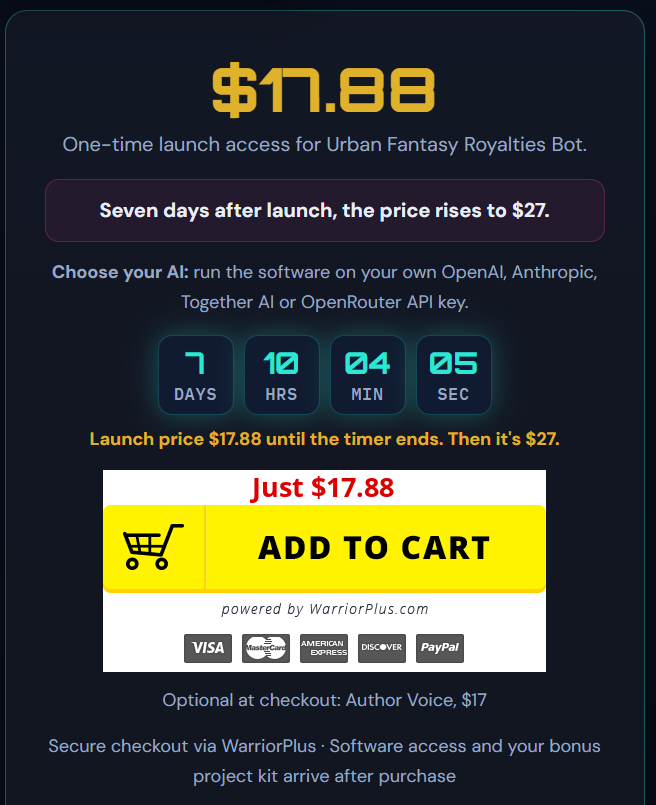
Launch access | $17.88 | Advertised starting price |
Later charge | $27 after 7 days | Confirm whether it's recurring or one-time |
Author Voice add-on | $17 | Optional extra listed on the offer |
AI API usage | Separate cost | Charged by your chosen AI provider |
Important: These prices come from the product information, not a live checkout page, and I haven’t confirmed them as of October 19, 2026. Offers change, so check the final checkout screen before paying.
The $17.88 price looks friendly. Don’t judge the deal on that number alone.
The $27 charge after seven days is the part that needs attention. The available details don’t say whether it’s recurring, what period it covers, or how to cancel. Get those answers before you click buy.
The Author Voice add-on costs $17. Find out what it adds, whether the main workflow needs it, and whether the base product already does what you want. And if you plan to generate a full-length book, your API costs could end up higher than the software itself.
When you tally things up, count:
- The initial payment
- Any later or recurring charges
- Optional upgrades
- AI provider fees
- Extra editing or formatting costs
My take: The entry price makes it accessible, but I can’t judge the real value until the later billing, the API costs, and the add-on details are clear.
Pros and Cons
Pros
1. A specialized workflow. It’s aimed at urban fantasy, not trying to be a do-everything writing assistant.
2. Planning and worldbuilding. The Story Bible could help you track characters, settings, factions, and supernatural rules.
3. Chapter-based development. Smaller stages make a big manuscript easier to manage.
4. Several AI provider options. Handy if you already have API access with one of them.
5. Publishing-related features. Exports and cover generation put several steps in one workflow.
6. A bonus project kit. Useful if you want a guided ChatGPT or Claude setup.
Cons
1. Output quality is unverified. Advertised features don’t prove engaging stories or consistent manuscripts.
2. API costs are separate. Your real spend will be higher than the software price.
3. The later billing is unclear. The $27 charge needs checking.
4. Export details are vague. The three formats and their readiness for publishing aren’t confirmed.
5. You’ll still edit. AI writing can bring repetition, weak dialogue, and plot slips.
6. No guaranteed success. The software can’t promise sales, reviews, rankings, or royalties.
7. License and refund terms need checking. Refund, commercial-use, and cancellation terms aren’t established in the information I have.
What I Could and Couldn’t Verify
A good review separates what a vendor says from what a buyer can confirm.
Advertised by the Sales Page
- A custom-built tool on the Royalties Bot 2.0 framework
- Concept development and worldbuilding
- A Story Bible and chapter-based workflow
- Manuscript organization and three output formats
- Book covers in up to six styles
- Publishing assets for Amazon KDP and Google Play Books
- Support for OpenAI, Anthropic, Together AI, and OpenRouter
- A separate bonus kit for ChatGPT or Claude
- Prices of $17.88, then $27 after seven days, plus a $17 optional add-on
These are descriptions of the offer, not performance tests.
Still Unverified
- How well it works in real use
- Whether drafts keep a consistent voice across a full book
- The exact manuscript export formats
- Whether the covers meet your preferred platform’s requirements
- The complete billing and cancellation terms
- The current refund policy and commercial license
- Whether every feature works with each supported AI provider
Since I haven’t tested it, I can’t honestly claim it saves a set number of hours or produces publication-ready books. If you can, ask for a demo, look at sample output, and read the full terms first.
I also found no verified independent user reviews, coupon codes, or official video demo in the information I had, so I’m not quoting any.
Urban Fantasy Royalties Bot vs. a DIY ChatGPT or Claude Workflow
The comparison most buyers face is the tool versus building their own process with a general AI assistant. You’d write prompts for concepts, characters, worldbuilding, outlines, drafting, and editing, and keep a Story Bible in a separate document. For other options, our roundup of AI writing tools for authors is a good next stop.
Consideration | Urban Fantasy Royalties Bot | DIY AI workflow |
Setup | Structured workflow is advertised | You build your own process |
Story planning | Built-in planning is advertised | Needs your own prompts and organization |
Story Bible | Advertised as part of the workflow | Kept in a document or AI project |
Chapter development | Planning and drafting are advertised | Depends on your prompts and tool |
Publishing assets | Manuscript and cover features are advertised | May need separate tools |
AI costs | Separate API charges | Depends on your service and plan |
Customization | Depends on the controls available | Highly flexible |
Learning curve | Depends on the real interface | You build and refine the process |
When the tool might be better: If you like a specialized system that pulls several stages together, it could save you time spent juggling prompts. That’s worth investigating if planning is your main struggle.
When DIY might be better: If you’re already good with AI and want full control over prompts, structure, and tools, DIY gives you more room to experiment and to switch providers. You do have to create and maintain the process yourself.
Neither route automatically gives you a better book. That comes from your creative direction, the AI output, your editing, and how consistent you are.
My take: If you already have a workflow that works, compare the tool’s actual output against it before paying. If organization is what trips you up, the specialized option may be worth a look.
Support, Refund Policy, and License Terms
Before buying publishing software, you should know what happens if something goes wrong or you change your mind.
The sales information lists a support email, andreas@quintanamarketing.com. I couldn’t verify the full refund policy, license terms, cancellation process, or support response times.
Questions to ask the vendor:
- What is the exact refund period, and what conditions apply?
- Is the $27 charge after seven days recurring or one-time?
- How do you cancel future billing?
- Can you use generated manuscripts and covers commercially?
- Are there restrictions on selling books made with the software?
- Do you keep access to exported files after canceling?
- What technical support is included?
- Are there other limits on using or distributing the software?
Save a copy of the terms that apply when you buy. A publishing feature on a sales page doesn’t automatically grant every commercial right you need. And check your chosen platform’s current policies on content, copyright, and AI disclosure.
Frequently Asked Questions
What is Urban Fantasy Royalties Bot?
It’s advertised as AI-assisted publishing software for developing urban fantasy books. Listed features include concept planning, worldbuilding, a Story Bible, chapter drafting, manuscript organization, covers, and publishing assets.
Who created Urban Fantasy Royalties Bot?
The sales page names Quintana Marketing as the company, with Andreas Quintana as Lead Vendor and Erika Quintana as Co-Vendor.
Does Urban Fantasy Royalties Bot require an API key?
Yes, according to the sales information. You use your own key, with OpenAI, Anthropic, Together AI, and OpenRouter listed as supported providers. API usage is charged separately.
Is Urban Fantasy Royalties Bot a one-time purchase?
The offer lists $17.88 at launch and a $27 charge after seven days. The full billing structure isn’t confirmed here, so check the checkout page and cancellation terms before you buy.
Does it include book cover creation?
The sales page advertises covers in up to six styles. Final quality, output specs, and commercial-use rights should be confirmed before you rely on them.
Can it publish books automatically?
It advertises publishing assets for Amazon KDP and Google Play Books. That doesn’t prove automatic publishing or guaranteed approval. Check what you’d still need to do yourself.
Is the Author Voice add-on necessary?
It’s listed as an optional $17 purchase. Nothing I have shows it’s required for the main product. Ask the vendor what it adds.
Does it guarantee book sales?
No. Nothing in the available information establishes guaranteed sales, rankings, royalties, or publishing success. Results depend on story quality, editing, cover design, positioning, reader demand, and marketing.
Can beginners use it?
The guided workflow may appeal to beginners, but it doesn’t remove the need to learn storytelling, revise AI text, and understand publishing requirements. Look at sample output and setup instructions first.
Is it worth it?
It could be, if you want a structured urban fantasy workflow and accept separate AI costs. Without independent testing, clear billing terms, and verified samples, its practical value is still uncertain.
Final Verdict: Is It Worth Considering?
Urban Fantasy Royalties Bot has an appealing idea at its center: story planning, worldbuilding, chapter work, manuscript organization, and publishing assets in one specialized workflow. The Story Bible and chapter-based approach could help authors who struggle with sprawling fictional worlds. Four supported AI providers add flexibility, and the bonus kit might help people who already use ChatGPT or Claude.
But some things need sorting out before you pay. API costs are separate. The later $27 charge needs an explanation. The export formats, refund policy, and commercial license aren’t confirmed. Most of all, a list of features doesn’t tell you how good the finished manuscript is.
My recommendation: Consider it if you want a guided workflow for urban fantasy books. Ask for a demo or sample output, confirm every billing term, and estimate your AI costs. If your current workflow already works well, compare it first.
The best writing tool isn’t the one with the longest feature list. It’s the one that helps you write a stronger story, work efficiently, and stay on budget.
Want to see the current details? Visit the official product page to check features, checkout terms, API requirements, and license details.